Issue Seventeen

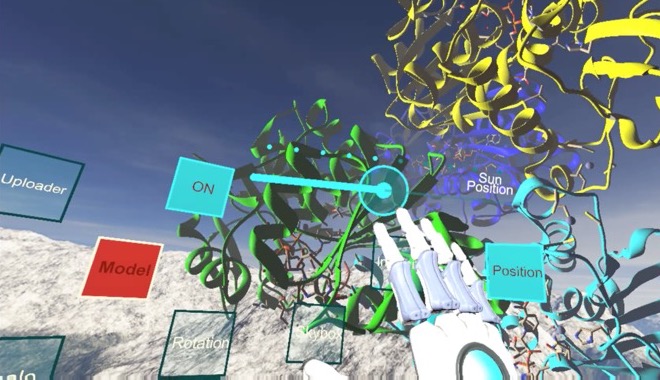
Screen capture from computer-generated virtual reality software showing the user's virtual hand reaching for controls in a simulated space. In the middle of the screen are multi-colored, three-dimensional models of spiraling biochemical proteins and floating controls with various labels "uploader, ON, Sun Position, Model, Position, Rotation, Skybox."
0

Barriers to Supporting Accessible VR in Academic Libraries

Abstract

Virtual reality (VR) shows great promise for enhancing the learning experience of students in higher education and academic libraries are at the forefront of efforts to bring VR into the curriculum as an innovative learning tool. This paper reviews some of the growing applications and benefits of VR technologies for supporting pedagogy in academic libraries and outlines the challenges of making VR accessible for disabled students. It defines existing regulations and guidelines for designing accessible digital technologies and offers two case studies drawn from each of the authors’ own academic libraries, at Temple University and at the University of Oklahoma, in order to provide insight into the challenges and benefits of making VR more accessible for students. The paper argues that to continue to serve their mission of equitable access to information for the entire student population, academic libraries that implement VR programs need to balance innovation with inclusion by allocating sufficient staff time and technical resources and bringing accessibility thinking into VR projects from the beginning. To accomplish this, libraries will need the assistance of software developers and accessibility experts, and librarians will need to act as strong advocates for better support from commercial software and hardware vendors and to promote change in their institutions.

Introduction

Virtual reality (VR) and other extended reality (XR) technologies show great promise for supporting pedagogy in higher education. VR gives students the chance to immerse themselves in virtual worlds and engage with rich three-dimensional (3D) models of learning content, ranging from biochemical models of complex protein structures to cultural heritage sites and artifacts. Research shows that VR can increase student engagement, support the development of spatial cognitive skills, and enhance the outcomes of design-based activities in fields such as architecture and engineering. With these benefits, however, come the risks that VR will exacerbate inequality and exclusions for disabled students.[1] Disability is typically defined as a combination of physical (e.g., not having use of one’s legs) and participation (e.g., not having a ramp so that a wheelchair user can access services) barriers. According to the Center for Disease Control, 26% of adults in the United States have a disability. These include cognitive, mobility, hearing, visual, and other types of disability.

As a class of technologies that engage multiple senses, VR has the capacity to engage users’ bodies and senses in a holistic, immersive experience. This suggests that VR holds great potential for supporting users with a diverse range of sensory, motor, or cognitive capabilities; however, there is no guarantee that the affordances of VR will be deployed in accessible ways. In fact, the cultural tendency to ignore disability coupled with the rapid pace of technological innovation have led to VR programs that exclude a variety of users. Within higher education, the exclusion of disabled students from the benefits of these new technologies being deployed risks leaving behind a significant portion of the student population. The U.S. Department of Education, National Center for Education Statistics (2019) has found that 19.4% of undergraduates and 11.9% of graduate students have some form of disability. Libraries have long been leaders in supporting accessibility (Jaeger 2018) and the rise of immersive technologies presents an opportunity for them to continue to be leaders in making information available to all users. Academic libraries, the focus of this paper, are particularly well positioned to address the challenges of VR accessibility given their leadership in innovative information services and existing close relationships with the research and pedagogy communities at their institutions.

In what follows, we present a brief outline of the recent emergence of VR technologies in academic libraries, introduce recent research on VR accessibility, and conclude with a discussion of two brief case studies drawn from the authors’ institutions that illustrate the benefits and barriers associated with implementing accessibility programs for VR in academic libraries.

VR in Higher Education

“Virtual reality” or “VR” refers to a class of technologies that enable interactive and immersive experiences of computer-generated worlds, produced through a mixture of visual, auditory, haptic, and/or olfactory stimuli that engage with the human sensory system and provide the user with an experience of being present in a virtual world. In most VR systems, visual and auditory senses are primarily engaged, with increasing research being done on integrating haptics and other stimuli. Different levels of immersion and interaction are possible depending on the specific configuration of devices, from relatively low immersion and low interaction provided by inexpensive 3D cardboard viewers for use with mobile devices (e.g., Google Cardboard) to expensive head-mounted displays (HMDs) such as the HTC Vive and Oculus Rift systems that use headsets and head and body tracking sensors to capture users’ movements along “six degrees of freedom” (three dimensions of translational movement along x, y, and z axes, plus three dimensions of rotational movement, roll, pitch, and yaw). At present, HMDs are more commonly used than CAVEs, or “Cave Automatic Virtual Environment,” room-sized VR environments that use 3D video projectors, head and body tracking, and 3D glasses to provide multi-user VR experiences (Cruz-Neira et al. 1992), which have been used in academic contexts since the 1990s. This interest in new information technologies that provide library users with access to computer-generated worlds is not new for librarians. The current interest in VR follows experimentation conducted in libraries beginning earlier in the 2000s on “virtual worlds,” 3D computer-generated social spaces, such as Second Life, that users interacted with through a typical configuration of 2D computer monitor, mouse, and keyboard. Libraries envisioned these technologies as potential tools for expanding library services and enhancing support for student learning and research evaluated the pedagogical efficacy of these new tools (e.g., Bronack et al. 2008; Carr, Oliver, and Burn 2010; Deutschmann, Panichi, and Molka-Danielsen 2009; Holmberg and Huvila 2008; Praslova, Sourin, and Sourina 2006).

Since the commercial release of affordable VR systems such as the HTC Vive and Oculus Rift in 2016 (and now cheaper, lower-resolution variants such as Oculus Go and Oculus Quest), academic libraries have started seriously exploring the possibility of VR to support research and pedagogy. They have begun to conceptualize VR as a platform for immersive user engagement with high-resolution 3D models that support existing curricular activities, such as the use of archaeological, architectural, or scientific models in classroom exercises. Cook and Lischer-Katz (2019) argue

the realistic nature of immersive virtual reality learning environments supports scholarship in new ways that are impossible with traditional two-dimensional displays (e.g., textbook illustrations, computer screens, etc.). … Virtual reality succeeds (or fails), then, insofar as it places the user in a learning environment within which the object of study can be analyzed as if that object were physically present and fully interactive in the user’s near visual field. (70)

VR has been used to support student learning in a variety of fields, such as anthropology and biochemistry (Lischer-Katz, Cook, and Boulden 2018), architecture (Milovanovic 2017; Pober and Cook, 2016; Schneider et al. 2013), and anatomy (Jang et al. 2017). Patterson et al. (2019) describe how the librarians at the University of Utah have been incorporating VR technologies into a wide variety of classes, supporting architecture students, geography students, dental students, fine arts students, and nursing students. From this perspective, VR is envisioned as a tool for accessing digital proxies of physical artifacts or locations that students would ordinarily engage with as physical models (for instance, casts of hominid skull specimens), artifacts, or locations, but which are often too expensive or difficult to access directly.

In addition to providing enhanced modes of access to learning materials, using VR can also enhance student engagement and self-efficacy if implemented in close consultation with faculty (Lischer-Katz, Cook, and Boulden 2018). The technical affordances of VR, when deployed with care, are able to support a range of pedagogical objectives. Dalgarno and Lee (2010) identified representational fidelity (i.e., realistic display of objects, realistic motion, etc.) and learner interaction (i.e., student interaction with educational content) as key affordances of VR technologies, which they suggest can support a range of learning benefits they identified, including spatial knowledge representation, experiential learning, engagement, contextual learning, and collaborative learning. Chavez and Bayona (2018) surveyed the research on literature on VR and identified interaction and immersion as the two aspects of VR that should be considered when designing VR learning applications. Similarly, Johnson-Glenberg (2018) identified a set of design principles for using VR in education based on related affordances of VR—“the sense of presence and the embodied affordances of gesture and manipulation in the third dimension” (1) and found that “active and embodied learning in mediated educational environments results in significantly higher learning gains” (9). Research also suggests that the special visual aspects of VR, such as depth perception and motion cues (Ware and Mitchell 2005), head tracking (Ragan et al. 2013), and immersive displays (Ni, Bowman and Chen 2006) are able to enhance the analytic capabilities of human perception. VR has been shown to enhance human abilities of visual pattern-recognition and decision-making, particularly when working with big data (Donalek et al. 2014), prototyping (Abhishek, Vance, and Oliver 2011), or understanding complex spatial relationships and structures in data sets (Prabhat et al. 2008; Kersten-Oertel, Chen and Collins 2014; Laha, Bowman and Socha 2014).

Immersion is often identified by researchers as a key characteristic of VR technologies that is applicable to enhancing the learning experiences of students. Fowler (2015) identified three types of VR immersion relevant to pedagogy: Conceptual immersion, which supports development of abstract knowledge through students’ self-directed exploration of learning materials, for instance, molecular models; task immersion, in which students begin to engage with and manipulate learning materials; and social immersion, in which students engage in dialogue with others to test and expand upon their understanding. One critique of the applications of VR-based pedagogy is that instructional designers and instructors rarely indicate their underlying learning models or theories (Johnston et al. 2018). For instance, Lund and Wang (2019) found that VR can improve student engagement in library instruction, but do not specify which pedagogical models are effective, instead comparing a particular classroom activity with traditional classroom methods versus the same activity using VR, measuring impact on academic performance and motivation. Radianti et al. (2020), in their review of 38 recent empirical studies on VR pedagogy, acknowledge that while immersion is a critical component of the pedagogical affordances of VR, different studies define the term differently. They also found that only 32% of the studies reviewed indicated which learning theories or models underpin research studies, which makes it difficult to generalize approaches and apply them to other contexts. Radianti et al. (2020) point out that “in some domains such as engineering and computer science, certain VR applications have been used on a regular basis to teach certain skills, especially those that require declarative knowledge and procedural–practical knowledge. However, in most domains, VR is still experimental and its usage is not systematic or based on best practices” (26).

What these trends suggest is that VR shows great potential for use in supporting classroom instruction in higher education institutions, even though pedagogical models and methods of evaluation are still being developed and most projects are in the experimental phase of development. Some fields have already been adopting VR into their departments, such as computer science, engineering, and health science programs, but academic libraries are leading the way in promoting VR for their wider campus communities (Cook and Lischer-Katz 2019). Since many libraries are emerging as leaders in supporting VR, it is essential for them to have policies and support services in place to ensure that these new technologies are usable by all potential users at their institution.

As librarians consider adopting these innovative technologies, discourses of innovation can sometimes lead to oversights that may exclude some users. VR technologies enter libraries alongside other emerging technologies and innovative library services. The current discourse of transformational change promoted by the corporate information technology sector are often at odds with critical approaches to librarianship that stress inclusion and social justice (Nicholson 2015). These conceptions of radical innovation and disruption construct institutions, their policies, and regulations as structures that only function to slow down and constrain innovation. The assumption is that innovative technology is inherently neutral in terms of its ethics and politics, and that it does not require institutional processes to constrain or limit its negative effects; however, by decoupling technological change from institutionalized processes that protect the rights of historically marginalized groups of library patrons, technological change inevitably reinscribes exclusion into the infrastructures of learning. As Mirza and Seale (2017) argue

technocratic visions of the future of libraries aspire to a world outside of politics and ideology, to the unmarked space of white masculinity, but such visions are embedded in multiple layers and axes of privilege. They elide the fact that technology is not benevolently impartial but is subject to the same inequities inherent to the social world. (187)

The idea that technologies embed biases and cultural assumptions is not a new idea—scholars in the field of Science and Technology Studies have argued for decades that technologies are never neutral (e.g., Winner 1986)—but librarians, library administrators, and library science researchers often forget to examine their own “tunnel vision and blind spots” (Wiegand, 1999), or more precisely, their unreflected implicit biases that shape decision making about which technologies to adapt and how to deploy them in libraries. On the other hand, this also means that it is possible to balance innovation with inclusivity by foregrounding library values at the start of the process of innovation, rather than by retrofitting designs, which can yield results that are less equitable and more costly (Wentz, Jaeger and Lazar 2011). Clearly, the learning affordances of VR (Dalgarno and Lee 2010), as they are currently designed, need to be reimagined for disabled users.

VR and Accessibility

Aside from these ethical considerations, as VR becomes increasingly common in education, business, and other disciplines, it becomes answerable to legal guidelines. Federal guidelines for more established information and communication technology can be found in Section 508 of the Rehab Act (see U.S. General Services Administration n.d.), which utilizes Web Content Accessibility Guidelines (WCAG) 2.0 as a standard for web technology (W3C Web Accessibility Initiative 2019). WCAG provide guidance on how to make web content accessible to disabled people and they are overseen by the Web Accessibility Initiative (WAI), part of the World Wide Web Consortium (W3C) (see W3C Web Accessibility Initiative 2019). While they provide a valuable framework, WCAG do not directly apply to immersive technologies and there are currently no accessibility guidelines that do so. Work has been done to develop individual accessibility extensions, hardware, and features, but measurable guidelines that would aid in accessible design are still needed. Only in the last few years have accessibility specialists started adapting existing guidelines by examining existing initiatives and mapping them to the success criteria in WCAG. This includes the XR Access Symposium that was held in the summer of 2019 (see Azenkot, Goldberg, Taft, and Soloway 2019), as well as W3C’s Inclusive Design for Immersive Web Standards Workshop held in the fall of 2019 (see W3C 2019). There are also more specific guidelines that can contribute to design considerations, such as the Game Accessibility Guidelines that are more focused on game design (see Ellis et al. n.d.). Increasing the urgency of this matter, as of December 31, 2018, any video game communication functionality released in 2019 or later must be accessible to disabled people under the 21st Century Communications and Video Accessibility Act (Enamorado 2019), which expands the group of industries mandated to meet accessibility guidelines to include the video game industry.

Those interested in learning more about the accessible design of VR and other immersive technologies should consider reading “Accessible by Design: An Opportunity for Virtual Reality” (Mott et al. 2019), which provides general guidelines for designing accessible VR. For an example of designing accessible tools for a specific user group, see Zhao et al. (2019), which details the developments of a VR toolkit for supporting low-vision users.

Before going any further, it is important to distinguish between VR in its current, popularized form vs. the affordances of VR as a medium. The initiatives, guidelines, and research projects referred to in this section are still largely focused on analyzing the design of the former. However, in order for the technology to become truly accessible, critical inquiry must continue to progress in its understanding of the broader capabilities, limitations, and levels of interaction that construct the latter. The design practices and recommendations that have been developed to support the accessibility of VR are largely individualized and prototypical, which means that each institution’s particular experiences tackling the challenges of accessible VR will vary based on a number of factors. These factors include their individual histories supporting VR, staffing levels and development support, resources, and institutional commitments to accessibility. As librarians at Temple University and University of Oklahoma, we are now in the process of developing guidelines and tools to meet these challenges.

VR at Temple University’s Loretta C. Duckworth Scholars Studio

Temple University’s Loretta C. Duckworth Scholars Studio (LCDSS) “serves as a space for student and faculty consultations, workshops, and collaborative research in digital humanities, digital arts, cultural analytics, and critical making” (Temple University Libraries n.d.). Before the main library’s relocation to its new building, the LCDSS, formerly known as the Digital Scholarship Center (DSC), was located in the basement of Paley Library. Upon its 2015 opening, the DSC had two Oculus Rift DK2 headsets available for interested users. Its space in the new Charles Library includes an Immersive Visualization Studio designed for up to 10 people to simultaneously participate in immersive experiences, and as of 2019 has twelve headsets from a variety of manufacturers, in addition to mobile based headsets with an eye towards continuous acquisition of newer technologies. There are six full-time staff members, one of whom is responsible for the upkeep and management of the Immersive Studio among their other duties.

In August of 2017, I (Jasmine Clark) began researching the accessibility of VR as part of a project I was developing during my library residency.[2] Upon reviewing existing literature, it was apparent that research on the usability of VR for disabled users was in its early stages. Most notable was a report, “VR Accessibility: Survey for People with Disabilities,” resulting from a survey of disabled VR users produced in partnership by ILMxLab and the Disability Visibility Project (see Wong, Gillis, and Peck 2018). However, the majority of research and resources exploring the applications of VR to disabled people were composed of one-off solutions and extensions. This included cases of VR being used as an assistive technology (e.g., spatial training for blind individuals), unique hardware solutions (e.g., the haptic cane), and known issues for specific types of users (e.g., assumed standing position in games being disorienting for wheelchair users). These developments, while valuable, were not design standards or solutions broadly adopted by the game industry. Another concern was the fact that, in the context of the DSC, VR was not just a technology, but also a service that included training and assistance in its use for library patrons. This added an additional layer of complexity because, while there have been discussions on disability in the context of making and makerspaces, there was no literature on accessible service policies, best practices, and documentation for digital scholarship as a whole. In response to these challenges, I began examining existing guidelines and assessing their applicability to emerging technologies. Because WCAG is the federal standard, I joined a working group that guided me through reading the supporting documents and success criteria of WCAG, as well as examining the major legislative changes that were happening around accessibility at that time. I also began working with Jordan Hample, the DSC’s (now LCDSS’s) main technical support staff member, to understand whether or not these guidelines were applicable to immersive technologies.

Because we also needed to address service practices and policies, I decided that user testing would be necessary. User testing would consist of three phases that would take place during a single visit: a pre-interview (to ensure safety and gain an understanding of a user’s disability and previous technical experience), a use test (where users would use VR headsets), and a post-interview (to solicit feedback). I coordinated with Temple’s Disability Resources and Services (DRS) and DSC staff to bring in disabled stakeholders (students, alumni, and other members of the Temple community) in an attempt to 1) determine whether or not they would be able to utilize the equipment, and 2) determine if there were barriers to providing them with the same level of service as other patrons. As Wong, Gillis, and Peck (2018) point out in their report, “people with disabilities are not a monolith—accessibility and inclusion is different for everyone” (1). In order to scope the research to a manageable scale, I decided we would begin with visually impaired, deaf/Hard-of-Hearing (HOH), and hearing impaired users (hearing impairment would include individuals with tinnitus, or other auditory conditions not included under the umbrella of deaf/HOH). Working with Jordan, as well as Alex Wermer-Colan, a Council on Library and Information Resources (CLIR) postdoctoral fellow, I proceeded to draft a research protocol that consisted of interview questions and an explanation for participants of what VR is and the purpose of the research being conducted. These were all sent out via DRS listservs to solicit participants. VR services in the DSC involved a lot of hands-on onboarding and orientation from staff. Often, patrons would drop in and simply want to get acquainted with the technology. As a result, the goal of the research project was for disabled participants in our user testing to be able to navigate to our space and successfully work with the staff members responsible for providing VR assistance to identify experiences that would be as usable as possible for them. There was also a need to better understand staff preparedness in providing assistance to disabled patrons. In the months leading up to the testing, I had preliminary discussions with staff, and also inquired into staff training on accessibility and disability more generally at the library and university level. I found that training was not formalized, so I gathered and shared resources with my colleagues to ensure the safety and dignity of participants. This included referring to the Gallaudet University’s guide on working with American Sign Language (ASL) interpreters (see Laurent Clerc National Deaf Education Center 2015) and various video tutorials on acting as a sighted guide for blind/low-vision people, and maintaining active discussions and explanations around ableism and disability. The discussions also allowed for better understanding of gaps in training and norms.

Once staff were sufficiently prepared, user testing commenced in the summer of 2018. Four participants were invited to the center, three of whom had various visual impairments and one of whom was deaf. On the days of their visits, I would go to the library entrance to greet and guide anyone who needed assistance. Upon arrival, they were brought into a meeting room for a pre-interview that would reintroduce the purpose of user testing, gauge any previous experience with the technology, and identify safety concerns by asking if they had other sensitivities that they felt would be a problem in VR (e.g., sensory sensitivities, sensitivity to flashing lights, etc.). We also asked about level of hearing/vision to get a better idea of which types of experiences worked for different types of hearing/vision. Some immediate questions brought up by participants were around accuracy of sound, depth perception, and similarity to real-world visual experience. Once the initial interview was completed, they were guided out to work with Jordan to identify potential experiences, similar to the way he typically worked with students. I took notes on the interactions, and Alex assisted as needed. Alex’s presence became particularly important when it came to the deaf user. It was brought to our attention that 1) due to variations in inner ear formation, those who were deaf/HOH were at higher risk for vertigo and, 2) a user reliant upon an ASL interpreter would not be able to see the interpreter while in the headset, complicating human assistance. In response, Alex took on the role of surrogate for this participant while they watched his activity on a monitor and gave instructions and feedback. Jordan took on the role of listening to the participants’ verbal feedback on each experience and, utilizing his knowledge of the DSC’s licenses for different VR programs, selected experiences that would be more accommodating to their specific hearing/visual needs.

Upon completion of this phase, participants were then brought back into the meeting room for a post interview. Responses to both interviews, as well as observations made during the interactions, were compiled and summarized into an internal report for our team. We had initially planned to have more users come in, but found that feedback on the limitations of the technology was consistent and addressable enough for us to make adjustments that would allow us to improve services and collect more nuanced data moving forward. For example, it was clear that the software varied so drastically that, in order to provide safe and effective services, it would be necessary to index the features and capabilities of various VR experiences.

The timing of this work was crucial, as we were a year away from the move to our new space, and the findings from the study helped us plan for it. The LCDSS is significantly larger than the DSC, and much more visible. However, while it has required that we re-envision our service policies and programming, it has also given us the opportunity to integrate accessibility into our work from the beginning. One way we are doing this is by developing an auditing workflow that would allow any staff member or student worker to examine newly-licensed VR experiences and produce an accessibility report, as there is a glaring lack of Voluntary Product Accessibility Templates (VPAT) for VR products. These reports would detail accessibility concerns and limitations at the beginning, allowing us to better serve disabled patrons. We are also working with the university’s central Information Technology Services to look at how this can be incorporated into broader LCDSS purchasing practices and documentation workflows.

Once this workflow is finalized, it will be used to support LCDSS staff in aiding faculty and researchers in the development of Equally Effective Alternative Access Plans (EEAAP) for their research and teaching. An EEAAP documents how a technology will be used in a class or program, its accessibility barriers, the plan to ensure equitable participation for disabled people, and the parties responsible for ensuring the plan is carried out. LCDSS staff frequently consult with faculty who wish to integrate LCDSS resources into their pedagogical practices. This can include feedback on assignment structure and design, recommended technologies, and other vital information required for pedagogical efficacy. By generating accessibility reports that identify technical limitations, LCDSS staff can aid faculty in developing multimodal approaches to integrating these technologies into their teaching. This means that, not only are we bringing accessibility to their attention early, but that we are also able to guide them and reduce intimidation, making buy-in more successful. Moving forward, Jordan Hample and I will be making all materials involved in this workflow publicly available, as well as continuing and expanding user testing to include other disabilities.

VR at the University of Oklahoma Libraries, Emerging Technologies Program

Accessibility initiatives for VR at the University of Oklahoma have followed a slightly different trajectory than the one outlined by Jasmine in the previous section. The VR program at OU Libraries was officially launched in 2016 in the Innovation @ the EDGE Makerspace, which began hosting classes and integrating VR content into the course curriculum, including initial integrations within biology, architecture, and fine arts courses (Cook and Lischer-Katz 2019). We use custom-built VR software that enables users “to manipulate their 3D content, modify environmental conditions (such as lighting), annotate 3D models, and take accurate measurements, side-by-side with other students or instructors” and support networked, multiuser VR sessions, which forms “a distributed virtual classroom in which faculty and students in different campus locations [are able to] teach and collaborate” (Cook and Lischer-Katz 2019, 73). Librarians provide VR learning opportunities in three main ways: 1) deployment in the library-managed makerspace; 2) facilitated course integrations; 3) special VR events. Each approach requires different levels of support and planning from librarians. In the case of deployment in our makerspaces, students are able to learn about the technology in a self-directed manner, with guidance from trained student workers who staff the space. Workshops and orientation sessions are available, and students, faculty, and community members typically drop in when they want and engage with technology in a self-directed manner. Since the focus of this space is on self-directed learning and experimentation, the training of student support staff is essential for ensuring that the space feels welcoming and inclusive to visitors and that staff are able to adjust the level of support they provide based on the needs of the visitors to the space.

In the case of course integrations, students are typically brought to our makerspace during regularly scheduled class time. We have portable VR kits that use high-powered gaming laptops and Oculus Rift headsets, which makes it possible to bring the learning experiences directly into the classroom if the faculty member prefers. Examples of VR-based classroom activities include interacting with 3D models that simulate learning objects, such as examining the morphology of different hominid skull casts in an anthropology class or analyzing complex protein structures and processes in a biochemistry class. VR is also used in other classes as a creative tool, such as in a sculpture course in which the students created sculptures in VR and then printed them using the 3D printers in the makerspace. In planning VR course integrations, librarians work directly with faculty members to design activities that will support their course learning objectives.

VR is also used frequently at OU Libraries for special events in which experts lead participants on guided tours through scholarly, high-resolution 3D models. Participants can join the VR tour on campus or from other institutions, since our custom-built VR software supports networked, multi-user sessions. Examples include inviting an archaeologist to lead a group through a 3D scan of a cave filled with ancient rock carvings that is located in the Southwestern United States (Schaffhauser 2017), as well as a tour led by a professor of Middle Eastern History through a 3D model of the Arches of Palmyra, located in Syria.

From the start of the emerging technologies initiative at OU Libraries, rapid innovation was a guiding principle, with the hope that the benefits of emerging technologies could be demonstrated to the broader campus community and that the library could become a hub for supporting emerging technologies across campus. It was important to quickly develop a base of VR technologies and librarian skills in order to promote the potential benefits of the technologies to faculty and students across campus. Starting in January 2016, students and faculty began using our VR spaces for research, learning, experimentation, and entertainment, and by 2018 we had faculty from over 15 different academic departments across campus using VR as a component in their classes (Cook and Lischer-Katz 2019), along with over 2000 individual uses of our VR workstations. By 2019, the emerging technology librarians (ETL) unit had grown to five full-time staff members who worked together to “rapidly prototype and deploy educational technology for the benefit of a range of University stakeholders” (Cook and Van der Veer Martens 2019, 614). At this time, concerns were raised by one of our ETLs about the accessibility of existing VR services and the ETL team brought in an accessibility specialist to advise them. One of the key challenges the team identified through the process of reviewing their existing VR capabilities was the fact that most commercially produced VR software lacks accessibility options, particularly in terms of compatibility with assistive devices. In reviewing users’ experiences in our makerspace, ETLs found that users with dexterity, coordination, or mobility disabilities often request passive VR experiences that provide immersive experiences without the need for use of the VR controller inputs. For programs such as the popular Google Earth VR program, it is not currently possible to provide users with passive experiences, rather the user needs to be able to actively control the two VR controllers themselves to engage with the VR experience. To the team’s surprise, some of the lower-resolution, untethered VR systems, such as the Oculus Go have shown more capabilities for providing passive experiences that rely only on head tracking and the use of target circles for movement through the VR space. Making narrated and guided tours for a VR experience available is essential for providing access to some groups of disabled users. Ensuring that VR controllers are accessible has also been a challenge and ETLs have begun experimenting with 3D printing add-on components to make the VR controllers more usable for users with limited hand function. In response to the lack of accessibility options for commercial software releases, modifications were made to OU’s custom-built VR software to provide accessibility capabilities, including: 1) controls for changing the sensitivity of VR interface controls; and 2) options for user interface text resizing. These modest modifications were made in consultation with VR users. Technical solutions alone are not sufficient, of course, and the ETL team has also found it very important to continue to improve training for student staff so that they are prepared to properly assist disabled users in a sensitive and respectful way. Communicating clearly to the wider university community about what accessible software and hardware capabilities are available is also a challenge that the team is tackling. These activities are still ad hoc in many ways, and we have found that additional work is needed to develop procedures for addressing VR accessibility in a more systematic way in the library and across campus.

The ETL team is taking several approaches to improving our support for accessible VR, looking outward to resources beyond the walls of OU Libraries and looking inward to resources at the university to support improvements to accessibility. ETLs are expanding their knowledge base through involvement in accessibility conferences and working groups and looking to our colleagues at other institutions, such as Temple University Libraries, for guidance on policies and procedures for evaluating and implementing VR software and hardware. The ETL team is planning on conducting future usability testing and focus groups with a range of disabled users from the OU community in order to further refine the feature set of our custom software, which we plan to package and distribute for other institutions to use and build upon.

The experiences of ETLs at OU Libraries point to the importance of working with accessibility experts and bringing disabled users into the design process to develop technologies and policies. Librarians should not be expected to take on accessible design by themselves, rather they should look to experts in this field for assistance. Working with our University’s disability coordinator has been essential for helping us to identify areas where we need to improve our accessibility capabilities, as well as providing us with a network of disabled users on campus who could provide us with user feedback on our technologies. The types of issues we are looking into include techniques for auditing VR software for accessibility issues, providing clearer signage and information on websites to provide students and faculty with a clear understanding of which emerging technology tools are accessible and what accommodations are possible, and ways in which we can continue to improve staff training so that the student workers who staff our makerspace can better support disabled users. The process of developing policies and establishing processes and documentation to support those policies does take time; however, this work has been essential for training staff and establishing best practices at our makerspace in order to address the challenges of VR accessibility. Additional work is necessary to codify this ongoing and still experimental work into institutional policy documents and continue to seek out adaptive tools to make VR accessible for a greater range of library patrons.

Conclusion

The current wave of immersive technologies was not initially designed for users with varying levels of visual, auditory, mobility, and neurological capabilities. Even for libraries and centers that do have development support there is no way to remediate the inaccessibility of every experience used and, even if there was, there would be no way to keep up with the regular updates of hardware and software. One-off, localized solutions cannot replace structural change. In order for VR to become an accessible medium, developers, hardware manufacturers, distribution platforms, and other stakeholders involved in its creation and distribution need to ensure accessibility within their respective roles. The current lack of support from these stakeholders makes it crucial that library staff and the educators that they support understand disability and accessibility, develop appropriate documentation, and advocate for software and hardware vendors to provide better accessibility support in their products. In the meantime, libraries supporting different tiers of VR use and investment will have to consider different approaches to accessibility.

The preceding examples drawn from our experiences at Temple University and the University of Oklahoma (OU) show the range of issues facing accessible VR, but also show the differences in approach for different service models and pedagogical objectives. Temple University includes VR in a very broad suite of technical offerings and its faculty are not currently at the phase of “buy-in” where regular VR development is a priority. As a result, Temple’s focus is on indexing experiences and integrating alternative access plans, with accessible development occurring on a smaller scale. In comparison, OU has much more of a demand for custom-developed software solutions. This demand is due to the fact that one of the main VR applications that OU promotes for course integrations is its own flexible, custom software, which supports a variety of disciplines, including courses in biochemistry, anthropology, architecture, and English. OU is beginning to investigate the accessibility challenges of working with commercial software and is looking to Temple for guidance on how to properly evaluate different software titles and provide adequate documentation. For libraries without developer support, we can expect that the focus will more likely follow Temple’s approach. For libraries with regular development efforts, supporting home-grown accessible design practices, such as those at OU, will be more of a central activity. Some libraries will be a mixture of the two, working to blend commercial and homegrown solutions. Regardless of a library’s approach, the major takeaways for other institutions to consider as they bring accessibility thinking into their VR programs include:

  • Plan for Accessibility from the Beginning: Libraries can save time and resources by thinking about accessibility issues at the start of a program or project.
  • Lack of Standards: As of 2020, there are no standards for accessible VR design, but there are related standards that could lay the groundwork for their development.
  • Developer Support is Essential: Libraries that intend to develop VR experiences need to have sufficient developer support with accessibility expertise.
  • Importance of Auditing and Reporting: Out-of-the-box VR experiences will pose different accessibility challenges from one person to the next and should be audited to better understand these barriers to access. If a library lacks a developer to modify software or create new software, at the very least, available software needs to be audited and have a corresponding accessibility report produced.
  • VR is Not the Pedagogy: VR should be another tool in an educator’s arsenal, not the sole focus of a class (unless VR is the course subject). As Fabris et al. (2019) suggest “Having VR for the sake of having VR won’t fly; the VR learning resources need to be built with learning outcomes in mind and the appropriate scaffolds in place to support the learning experience” (74).
  • Acknowledge the Limits of VR Accessibility: There are limits to making VR accessible. The reality is that there will be students who are unable to use VR for a variety of reasons. Therefore, there should always be an alternative access plan developed so that students have access to non-VR learning methods as well.

Considering these best practices will better enable libraries to approach the challenges of making VR accessible. Putting them into action will directly benefit disabled users, improve librarians’ abilities to make their innovative technology spaces more inclusive, and will help administrators to better plan and allocate resources for supporting the missions of their institutions. While these guidelines are focused on supporting academic libraries, they will likely benefit higher education applications outside of the library, too.

Additionally, while it is true that there is extensive work to be done, there are existing inclusive instructional approaches that can be integrated into VR based coursework by individuals. Multimodal course design and Universal Design for Learning (http://udloncampus.cast.org/page/udl_about) are frameworks that can be applied to VR coursework with approaches like collaborative assignments and activities. It is also worth reviewing a 2015 special issue of Journal of Interactive Technology and Pedagogy that considers the benefits of introducing perspectives from disability studies into the context of designing innovative pedagogies. One of the important takeaways from this collection is that embracing disability and the alternative perspectives that it can provide, presents the potential for new learning opportunities (Lucchesi 2015).

Regardless of whichever pedagogical approach educators adopt, it is imperative that, unless VR is the subject of the course, they remember it is not the pedagogy. Instead, faculty should keep a diverse array of tools in their pedagogical toolkit that will support an equally diverse set of learners. As librarians, faculty, and instructional designers become familiar with inclusive learning frameworks, they are better positioned for more targeted, meaningful advocacy within their institutions. Because, while it is true that there is a lot of work to be done, it is equally true that it can only be done together through active involvement in institutional committees and task forces and by ensuring that discussions about accessibility occur in strategic planning and budgeting meetings with administrators. Accessibility awareness needs to be raised throughout libraries and other academic institutions so that the accessibility challenges of emerging technologies are addressed at the design stage and built into pedagogical implementations from the beginning. This will help to ensure that pedagogies founded on emerging technologies will be “born accessible,” for the benefit of learners and educators throughout the academic world.
Notes

[1] The use of identity-first (“disabled person”) vs. person-first (“person with disabilities”) language is debated. Disability is a complex set of identities and the language used should take into account the preferences of disabled people and other contextual factors. Our choice to use identity-first language is a conscious one.

[2] A library residency is a term position during which residents may rotate through different functional areas of the library or focus on one subject area, and often contribute to projects and initiatives at their host library to gain professional (vs. paraprofessional) experience.

Bibliography

Abhishek, Seth, Judy M. Vance, and James H. Oliver. 2011. “Virtual Reality for Assembly Methods Prototyping: A Review.” Virtual Reality 15, no. 1: 5–20.

Azenkot, Shiri, Larry Goldberg, Jessie Taft, and Sam Soloway. 2019. XR Symposium Report. https://docs.google.com/document/d/131eLNGES3_2M5_roJacWlLhX-nHZqghNhwUgBF5lJaE/edit?usp=sharing.

Bronack, Stephen, Amy L. Cheney, Richard Reidl, and Johan Tashner. 2008. “Designing Virtual Worlds to Facilitate Meaningful Communication: Issues, Considerations, and Lessons Learned.” Technical Communication 55, no. 3: 261–69.

Carr, Diane, Martin Oliver, and Andrew Burn. 2010. “Learning, Teaching and Ambiguity in Virtual Worlds.” In Researching Learning in Virtual Worlds, edited by Anna Peachey, Julia Gillen, and Daniel Livingstone, 17–31. London: Springer.

Chavez, Bayron and Sussy Bayona. 2018. “Virtual Reality in the Learning Process.” In Trends and Advances in Information Systems and Technologies, edited by Álvaro Rocha, Hojjat Adeli, Luís Paulo Reis and Sandra Costanzo, 1345–56. Cham, Switzerland: Springer International Publishing, https://doi.org/10.1007/978-3-319-77712-2_129.

Cook, Matt and Betsy Van der Veer Martens. 2019. “Managing Exploratory Units in Academic Libraries.” Journal of Library Administration, 59, no. 6: 606–28. http://doi.org/10.1080/01930826.2019.1626647.

Cook, Matt and Zack Lischer-Katz. 2019. “Integrating 3D and VR into Research and Pedagogy in Higher Education.” In Beyond Reality: Augmented, Virtual, and Mixed Reality in the Library, edited by Kenneth Varnum, 69–85. Chicago: ALA Editions.

Cruz-Neira, Carolina, Daniel J. Sandin, Thomas A. DeFanti, Robert V. Kenyon, and John C. Hart. 1992. “The CAVE: Audio Visual Experience Automatic Virtual Environment.” Communications of the ACM 35, no. 6: 64–73.

Deutschmann, Mats, Luisa Panichi, and Judith Molka-Danielsen. 2009. “Designing Oral Participation in Second Life: A Comparative Study of Two Language Proficiency Courses.” ReCALL 21, no. 2 (May): 206–26.

Donalek, Ciro, George Djorgovski, A. Cioc, A. Wang, J. Zhang, E. Lawler, S. Yeh, et al. 2014. “Immersive and Collaborative Data Visualization Using Virtual Reality Platforms.” In Proceedings of 2014 IEEE International Conference on Big Data, Washington, DC, Oct. 27–30, 609–14.

Ellis, Barrie, Gareth Ford-Williams, Lynsey Graham, Dimitris Grammenos, Ian Hamilton, Headstrong Games, Ed Lee, Jake Manion, and Thomas Westin. n.d. “Game accessibility guidelines.” Game accessibility guidelines. Accessed Dec. 13, 2019. http://gameaccessibilityguidelines.com/.

Enamorado, Sofia. 2019. “The CVAA & Video Game Accessibility.” 3Play Media. https://www.3playmedia.com/2019/03/18/the-cvaa-video-game-accessibility/.

Fabris, Christian, Joseph Rathner, Angelina Fong, and Charles Sevigny. 2019. “Virtual Reality in Higher Education.” International Journal of Innovation in Science and Mathematics Education 27: 69–80.

Holmberg, Kim and Isto Huvila. 2008. “Learning Together Apart: Distance Education in a Virtual World.” First Monday 13, no. 10 (October). https://firstmonday.org/article/view/2178/2033.

Jaeger, Paul T. 2018. “Designing for Diversity and Designing for Disability: New Opportunities for Libraries to Expand Their Support and Advocacy for People with Disabilities.” The International Journal of Information, Diversity, & Inclusion 2, no. 1–2: 52–66.

Jang, Susan, Jonathan M. Vitale, Robert W. Jyung, and John B. Black. 2017. “Direct Manipulation is Better than Passive Viewing for Learning Anatomy in a Three-dimensional Virtual Reality Environment.” Computers & Education 106: 150–65.

Johnson-Glenberg, Mina C. 2018. “Immersive VR and Education: Embodied Design Principles that Include Gesture and Hand Controls.” Frontiers in Robotics and AI 5, art. 81 (July): 1–19, http://doi.org/10.3389/frobt.2018.00081.

Johnston, Elizabeth, Gerald Olivas, Patricia Steele, Cassandra Smith and Liston Bailey. 2018. “Exploring Pedagogical Foundations of Existing Virtual Reality Educational Applications: A Content Analysis Study.” Journal of Educational Technology Systems 46, no. 4: 414–39. https://doi.org/10.1177/0047239517745560.

Kersten-Oertel, Marta, Sean Jy-Shyang Chen, and D. Louis Collins. 2014. “An Evaluation of Depth Enhancing Perceptual Cues for Vascular Volume Visualization in Neurosurgery.” IEEE Transactions on Visualization and Computer Graphics 20, no. 3: 391–403.

Laha, Bireswar, Doug A. Bowman, and John J. Socha. 2014. “Effects of VR System Fidelity on Analyzing Isosurface Visualization of Volume Datasets.” IEEE Transactions on Visualization & Computer Graphics 4: 513–22.

Laurent Clerc National Deaf Education Center. 2015. “Working with Interpreters.” Gallaudet University. https://www3.gallaudet.edu/clerc-center/info-to-go/interpreting/working-with-interpreters.html.

Lischer-Katz, Zack, Matt Cook, and Kristal Boulden. 2018. “Evaluating the Impact of a Virtual Reality Workstation in an Academic Library: Methodology and Preliminary Findings.” In Proceedings of the Association for Information Science and Technology Annual Conference, Vancouver, Canada, Nov. 9–14, 300–8. https://hdl.handle.net/11244/317112.

Lucchesi, Andres. 2015. “Introduction to Special Issue: Disability Studies Approaches to Pedagogy, Research, and Design.” Journal of Interactive Technology & Pedagogy 8. https://jitp.commons.gc.cuny.edu/category/issues/issue-eight/.

Lund, Brady D. and Ting Wang. 2019. “Effect of Virtual Reality on Learning Motivation and Academic Performance: What Value May VR Have for Library Instruction?” Kansas Library Association College and University Libraries Section Proceedings 9, no. 1: 1–7. https://doi.org/10.4148/2160-942X.1073.

Milovanovic, J. 2017. “Virtual and Augmented Reality in Architectural Design and Education.” In Proceedings of the 17th International Conference, CAAD Futures, Istanbul, Turkey, July. https://www.researchgate.net/publication/319665970_Virtual_and_Augmented_Reality_in_Architectural_Design_and_Education_An_Immersive_Multimodal_Platform_to_Support_Architectural_Pedagogy.

Mirza, Rafia and Maura Seale. 2017. “Who Killed the World? White Masculinity and the Technocratic Library of the Future.” In Topographies of Whiteness: Mapping Whiteness in Library and Information Science, edited by Gina Schlesselman-Tarango, 171–97. Sacramento, CA: Library Juice Press. http://mauraseale.org/wp-content/uploads/2016/03/Mirza-Seale-Technocratic-Library.pdf

Mott, Martez, Ed Cutrell, Mar Gonzalez Franco, Christian Holz, Eyal Ofek, Richard Stoakley, and Meredith Ringel Morris. 2019. “Accessible by Design: An Opportunity for Virtual Reality.” ISMAR 2019 Workshop on Mixed Reality and Accessibility. https://www.microsoft.com/en-us/research/publication/accessible-by-design-an-opportunity-for-virtual-reality/.

Ni, Tao, Doug A. Bowman, and Jian Chen. 2006. “Increased Display Size and Resolution Improve Task Performance in Information-rich Virtual Environments.” In Proceedings of Graphics Interface, Quebec City, Canada, June 7–9 139–46.

Nicholson, Karen P. 2015. “The McDonaldization of Academic Libraries and the Values of Transformational Change.” College & Research Libraries 76, no. 3: 328–338. http://doi.org/10.5860/crl.76.3.328.

Patterson, Brandon, Tallie Casucci, Thomas Ferrill and Greg Hatch. 2019. “Play, Education, and Research: Exploring Virtual Reality through Libraries.” In Beyond Reality: Augmented, Virtual, and Mixed Reality in the Library, edited by Kenneth J. Varnum, 47–56. Chicago: ALA Editions.

Pober, Elizabeth E. and Matt Cook. 2016. “The Design and Development of an Immersive Learning System for Spatial Analysis and Visual Cognition.” In Proceedings of 2016 Conference of the Design Communication Association, Bozeman, MT, https://static1.squarespace.com/static/532b70b6e4b0dca092974dbe/t/5755e2df20c647f04c95598a/1465246433366/pobercook_text+%281%29.pdf.

Prabhat, Andrew Forsberg, Michael Katzourin, Kristi Wharton, and Mel Slater. 2008. “A Comparative Study of Desktop, Fishtank, and CAVE Systems for the Exploration of Volume Rendered Confocal Data Sets.” In IEEE Transactions on Visualization and Computer Graphics 14, no. 3 (May-June): 551–63.

Praslova–Førland, Ekaterina, Alexei Sourin, and Olga Sourina. 2006. “Cybercampuses: Design Issues and Future Directions.” Visual Computer 22, no. 12: 1015–28.

Radianti, Jaziar, Tim A. Majchrzak, Jennifer Fromm, and Isabell Wohlgenannt. 2020. “A Systematic Review of Immersive Virtual Reality Applications for Higher Education: Design Elements, Lessons Learned, and Research Agenda.” Computers & Education 147: 1–29. https://doi.org/10.1016/j.compedu.2019.103778.

Ragan, Eric D., Regis Kopper, Philip Schuchardt, and Doug A. Bowman. 2013. “Studying the Effects of Stereo, Head Tracking, and Field of Regard on a Small-scale Spatial Judgment Task.” IEEE Transactions on Visualization and Computer Graphics 19, no. 5: 886–96.

Schaffhauser, Dian. 2017. “Multi-campus VR Session Tours Remote Cave Art.” Campus Technology, (October 9). https://campustechnology.com/articles/2017/10/09/multi-campus-vr-session-tours-remote-cave-art.aspx

Schneider, Sven, Saskia Kuliga, Christoph Hölscher, Ruth Conroy-Dalton, André Kunert, Alexander Kulik, and Dirk Donath. 2013. “Educating Architecture Students to Design Buildings from the Inside Out.” In Proceedings of the 9th International Space Syntax Symposium, edited by Y.O. Kim, H.T. Park and K.W. Seo, Seoul, Korea. https://www.researchgate.net/profile/Saskia_Kuliga/publication/281839210_Educating_Architecture_Students_to_Design_Buildings_from_the_Inside_Out_Experiences_from_a_Research-based_Design_Studio/links/55faa73c08aeba1d9f36bb64/Educating-Architecture-Students-to-Design-Buildings-from-the-Inside-Out-Experiences-from-a-Research-based-Design-Studio.pdf.

Temple University Libraries. n.d. “Loretta C. Duckworth Scholars Studio.” Temple University Libraries. Accessed Dec. 13, 2019. https://library.temple.edu/lcdss.

U.S. Department of Education, National Center for Education Statistics. 2019. Digest of Education Statistics, 2017 (2018–070), https://nces.ed.gov/fastfacts/display.asp?id=60.

U.S. General Services Administration. n.d. “About Us.” Section508.gov, GSA Government-wide IT Accessibility Program. Accessed Dec. 13, 2019. https://www.section508.gov/about-us.

Ware, Colin and Peter Mitchell. 2005. “Reevaluating Stereo and Motion Cues for Visualizing Graphs in Three Dimensions.” In Proceedings of the 2nd Symposium on Applied Perception in Graphics and Visualization, 51–8. http://doi.org/10.1145/1080402.1080411.

W3C. 2019. “Inclusive Design for Immersive Web standards.” W3C. https://www.w3.org/2019/08/inclusive-xr-workshop/.

W3C Web Accessibility Initiative. 2019. “Making the Web Accessible.” Web Accessibility Initiative. https://www.w3.org/WAI/.

W3C Web Accessibility Initiative. 2019. “Web Content Accessibility Guidelines (WCAG) Overview.” Web Accessibility Initiative. https://www.w3.org/WAI/standards-guidelines/wcag/.

Wentz, Brian, Paul T. Jaeger, and Jonathan Lazar. 2011. “Retrofitting Accessibility: The Legal Inequality of After–the–fact Online Access for Persons with Disabilities in the United States.” First Monday 16, no. 11 (November). https://firstmonday.org/ojs/index.php/fm/article/view/3666/3077.

Wiegand, Wayne A. 1999. “Tunnel Vision and Blind Spots: What the Past Tells Us about the Present; Reflections on the Twentieth-Century History of American Librarianship.” The Library Quarterly 69, no. 1: 1–32.

Winner, Langdon. 1986. The Whale and the Reactor: A Search for Limits in an Age of Technology. Chicago: University of Chicago Press.

Wong, Alice, Hannah Gillis, and Ben Peck. 2018. “VR Accessibility: Survey for People with Disabilities.” Disability Visibility Project & ILMxLAB. https://drive.google.com/file/d/0B0VwTVwReMqLMFIzdzVVaVdaTFk/view.

Zhao, Yuhang, Edward Cutrell, Christian Holz, Meredith Ringel Morris, Eyal Ofek, and Andrew D. Wilson. 2019. “SeeingVR: A Set of Tools to Make Virtual Reality More Accessible to People with Low Vision.” In Proceedings of CHI 2019, Glasgow, Scotland, May 4–9. http://doi.org/10.1145/3290605.3300341.

About the Authors

Jasmine Clark is the Digital Scholarship Librarian at Temple University. Her primary areas of research are accessibility and metadata in emerging technology and emerging technology centers. Currently, she is co-leading The Virtual Blockson, a project to recreate the Charles L. Blockson Afro-American Collection in virtual reality, while also doing research on 3D metadata and the development of Section 508 compliant guidelines for virtual reality experiences. Jasmine has experience in a variety of functional areas and departments, including metadata, archives, digital scholarship, and communications and development. She is interested in the ways information organizations can integrate accessible, inclusive practices into their services, hiring, and management practices.

Zack Lischer-Katz is a postdoctoral research fellow at University of Oklahoma Libraries. From 2016 to 2018 he was a Council on Library and Information Resources (CLIR) Postdoctoral Fellow. He employs qualitative-interpretive methodologies to examine visual information preservation and curation in information institutions, with a focus on complex data types, such as virtual reality, 3D, and audiovisual formats. His research has appeared in Library Trends, International Journal of Digital Curation, Information Technology and Libraries, and First Monday. He received his PhD in Communication, Information, & Library Studies from Rutgers University and his MA in Cinema Studies from New York University.

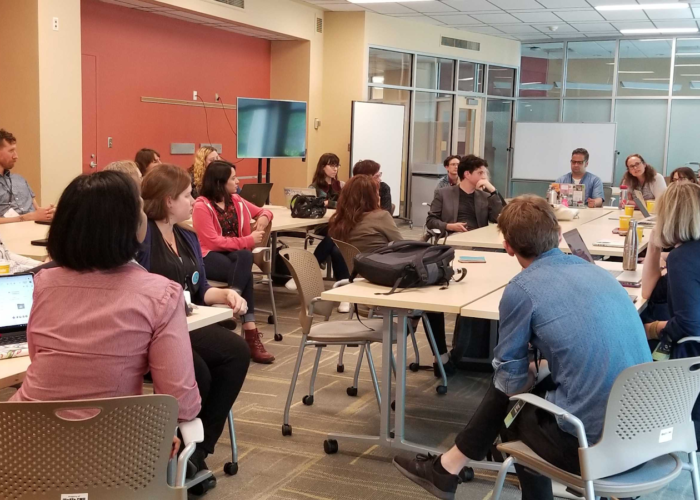
Group of twenty-one symposium attendees sitting in a circle actively engaged in a workshop discussion session.
0

Mission US TimeSnap: Developing Historical Thinking Skills through Virtual Reality

Abstract

Mission US: TimeSnap is a blended learning experience, marrying the capacity of a virtual reality mission with consolidation, support, and deeper exploration in the classroom. This article investigates the affordances of virtual reality as a teaching tool and the challenges of designing for today’s classroom. The game developers of Electric Funstuff were drawn to virtual reality by research that suggests it has great potential to support the kind of inquiry-based learning that many high school history classrooms struggle to provide. The result is Mission 1: King Street, 1770, the first in a series of history-based virtual reality missions that model and scaffold the use of critical historical thinking skills. After several rounds of testing and iteration, Mission 1 is poised for a final classroom evaluation, and this paper shares the developers’ insights and best practices for other classroom-VR creators.

Introduction

There’s an argument brewing in the Royal Exchange Tavern on King Street. Two men cluster at the end of a sturdy wooden table, deep in conversation and visibly agitated. The tavern keeper ignores their quarrel, distracted by an advertisement in the Gazette. Across the room, a man slouches over his tankard and re-reads, astonished, a letter the author never meant to share with the people of Boston. Hundreds of miles away, hundreds of years into the future, yet, impossibly, also present in this moment, in Boston, in April, in 1770, a high school student considers her options: “Hm, do I really want to do that? No, don’t go there…”

This student is playing Mission US: TimeSnap, a game-based virtual reality experience designed to critically engage high school learners in US History. Before her mission is through, this student will explore three richly detailed and interactive locations in 1770 Boston, on the way gathering evidence that will help her explain why, only weeks earlier, five civilians were gunned down in the middle of the street by British soldiers. And, because TimeSnap is a blended learning experience, the journey won’t end when she removes her headset. Outside of the virtual world, this student will collaborate with her classmates and receive support from her teacher in order to understand and articulate not only the causes of the Boston Massacre but also the different ways this event was interpreted and why this matters to America’s Revolutionary history. In short, she will be “doing history” by grappling with contextualization, causation, and other essential historical thinking skills.

This paper describes the design and implementation of TimeSnap from the perspective of both its developers and researchers and offers lessons learned for would-be practitioners.[1] These lessons include (a) how to allow for the time and technological constraints of today’s classroom, (b) how to manage cognitive load in virtual learning environments, and (c) how to use design to support active learning.

Educational Affordances of Virtual Reality

Since the computer arrived in the classroom, history educators have sought to harness digital technologies to innovate instruction. Advocates saw exciting opportunities to digitize primary sources, scaffold learning with hypermedia, and build two- and three-dimensional virtual spaces for exploration and engagement (Dede 1992; Evans and Brown 1998; Cornell and Dagefoerde 1996). The use of technology in the classroom arose side-by-side with a shift in pedagogical practice in the social sciences. Over the past few decades, professional organizations like the Stanford History Education Group, National Center for History in Schools, American Social History Project, and Roy Rosenzweig Center for History News and Media have developed strategies and resources to help each learner to “read like a historian,” or practice disciplinary literacy, by grappling with historical evidence. Inquiry-based learning, where teachers guide students through the process of evidence-gathering, source evaluation, and argumentation, has emerged as the most promising instructional mode for building these historical thinking skills (Voet and De Wever 2017). Assessment tools have also evolved: the document-based question (DBQ)––in which students analyze primary and secondary sources to explain past events and make arguments––has been widely adopted as the most reliable measure of student learning. Technology, particularly digital media, has been singled out for its significant potential for scaffolding learning (Dede 1992; Saye and Brush 2006). Hypermedia and other digital supports foster inquiry into the “ill-structured” problems of history by providing hard scaffolds and promoting independent exploration and problem-solving (Saye and Brush 2006). However, despite calls for an inquiry-based classroom and even after the wide adoption of digital tools in many classrooms, according to one survey, half of high school history teachers still regularly lecture for three-quarters of the class period––and some for the entire period (Wiggins 2015). Implementing these methods poses a challenge for teachers trained in conventional practices as well as for students who struggle to analyze complex texts.

Reflecting on the need for both effectively modeled historical thinking skills and more compelling practice environments, we saw an opportunity for innovation. After ten years’ experience using the affordances of games and interactives to deepen middle school social studies through Mission US, our game developers wanted to harness the unique capacities of virtual reality (VR) to build historical literacy. We drew on the insights of the Stanford History Education Group (SHEG) and the National Center for History in the Schools (NCHS), selecting essential historical thinking skills like contextualization, causation, and sourcing to model and develop in high school history classrooms through a blended VR experience.

Virtual reality has strong potential for teaching history. Like living history museums, VR assembles a three-dimensional historical world to explore––putting students “inside” the past and, through embodied learning, making historical investigations more memorable and motivational. Theorists of embodied learning assert that learning is a product of sensorimotor interaction with the world rather than the result solely of mental activities that occur within the brain’s physical confines (Lakoff and Johnson 1999; Osgood-Campbell 2015). Proponents of experiential learning argue that the most powerful learning experiences are those that allow people to experiment (or “take action”) physically as well as mentally through hands-on activities, reflect on the outcomes, and make changes as required to advance toward goals (Kolb 2014; Kontra, Goldin-Meadow, and Beilock 2012). In this frame, learning activities should be designed to allow students to interact in meaningful ways with their environments to facilitate deeper encoding of knowledge.

Researchers speculate that VR can promote embodied and experiential learning by facilitating presence, or the illusory perception of physically “being there” in a non-physical space (Schubert, Friedmann, and Regenbrecht 2001). Accordingly, students can interact with content in ways not possible with books, video, or even games. They can, for example, pick up and rotate objects, and, in in-room VR, move toward and away from sounds, giving them an intimate sense for the distinctive material culture of a historical era. Students may also be more likely to practice the skills of historical thinking after having them modeled by characters in the VR space and then trying themselves. Similarly, VR may promote embodied learning by enhancing episodic memory (memory of autobiographical events) and visuospatial processing (the ability to identify objects and the spatial relationships among them) (Parsons et al. 2013; Repetto, Serino, Macedonia, and Riva 2016). Some researchers have proposed that the formation of memories is closely tied to the ability to take action on the information being encoded by the brain. According to Glenberg (1997), “conceptualization is the encoding of patterns of possible physical interaction with a three-dimensional world. These patterns are constrained by the structure of the environment, the structure of our bodies, and memory” (see Osgood-Campbell 2015). If this is the case, a learner in a VR setting, who must perform actions (albeit limited gestures, not fine motor movement) to navigate their virtual environment and unlock knowledge, would form more meaningful memories than a student reading the same information.

VR has educational potential beyond the affordances of embodied learning. Research suggests, for example, that the novelty and interactive possibility of VR improves student motivation and increases student recall (Chiang, Yang, and Hwang 2014; Ijaz, Bogdonovych, and Trescak 2017). Furthermore, learning in a realistic virtual space aligns with the methodologies of anchored instruction. Anchored instruction theory posits that more meaningful learning takes place when students are placed in a realistic context, for example by solving a problem presented in a case study (Yilmaz 2011). Often, anchored instruction is supported by technology like video or VR, which supplies the realism of an otherwise unfamiliar situation. In a virtual scenario, students activate “inert” knowledge when they encounter situations to which that knowledge can be applied (Love 2005).

TimeSnap is designed to bring these advantages to the US History classroom. With its immersive and interactive historical spaces, TimeSnap aims to model the work of history as it builds knowledge of historical people, places, events, and ideas. Working under the assumption that inquiry-based learning experiences are the most powerful, our theory of change posits that a brief (fifteen-to-thirty minute) VR experience that models historical thinking skills, followed by a lesson plan that helps students to apply their new knowledge and skills, will be demonstrably more effective at helping students retain and apply historical knowledge and skills than a traditional, paper-based lesson.

Virtual Tour of TimeSnap Mission 1: King Street, 1770

Mission US: TimeSnap is a blended learning experience that marries the capacity of the virtual reality mission with consolidation, support, and deeper exploration in the classroom. It was developed in Unity and optimized for the Oculus Go. The production and research process has been funded by a Small Business Innovation Research grant through the US Department of Education. In each TimeSnap mission, students “travel” back in time to investigate a pivotal period in American history. The core of each lesson is a VR mission in which students explore historical locations, encounter local people, collect and analyze artifacts, and bring back evidence to construct an interpretation of what happened and why. The following case study is focused on the development and testing of Mission 1: King Street, 1770, an investigation of the Boston Massacre. Later missions will build upon this research to explore the Fugitive Slave Law, westward expansion, and turn-of-the-century immigrant communities.

To encourage the critical inquiry and problem-solving skills at the heart of inquiry-based learning, TimeSnap is animated by “missions,” questions that form the basis for the VR task and the lesson to follow. A simplified in-game mission (Find the causes of the Boston Massacre) keeps students focused on a single task during their time in the VR. The classroom lesson poses a more complex question (How did the Patriots and the British each explain the causes of the Boston Massacre?), to be answered using evidence collected in the VR in collaboration with classmates and with teacher support and guidance. For more advanced students, an optional DBQ challenges them to apply what they have learned to a new set of documents and interpret the larger significance of the Boston Massacre in American history.

Entering a three-dimensional virtual space allows players to feel physically immersed in a new world, but TimeSnap extends this opportunity for immersion by including worldbuilding. Students do not simply put on the VR headset and immediately see 1770: they enter a future society with its own fractured history before embarking on their mission. Students are deputized as agents of the Chronological Advanced Research Projects Agency (C.A.R.P.A.), a future government department. C.A.R.P.A. was founded to rebuild the world’s archives using the agency’s signature technology, a virtual form of time travel that replicates historic environments, artifacts, and organisms. C.A.R.P.A. created this technology to repopulate their digital collections and expand their understanding of the past. Agents search for objects and information to fill gaps in the historical record that have puzzled the agency’s scholars. In the King Street Mission, for example, C.A.R.P.A. is aware of the Boston Massacre but does not have the evidence necessary to explain why five civilians were shot by soldiers of their own government. Room by room, students uncover the clues necessary to explain the many factors contributing to the Massacre.

Overview of User Experience

In a three-minute tutorial, agents meet C.A.R.P.A.’s Director Wells, who will be their guide and model for historical thinking. Director Wells outfits agents with a TimeSnap device (the handheld VR controller) that enables time travel and other helpful powers. Wells gives agents a mission: to go back in time and verify or collect historical accounts in order to respond to the mission question (e.g., What caused the Boston Massacre?). Their mission begins with a key piece of evidence––a challenging text or visual primary source. Wells poses focus questions about the evidence and prompts the players to learn all they can by investigating historical figures, locations, and other documents and artifacts. In King Street, 1770, Wells leads agents through three rooms, which are carefully researched recreations of colonial historical settings. Players explore rooms to gather sources and contextual information and to collect and study additional primary documents.

VR Features

Teleport

Players use the Oculus pointer (or an equivalent) to navigate to, and through, rooms in the VR environment.

Audio Guide

Voiceover (VO) support, in the form of C.A.R.P.A.’s Director Wells, guides players through the space, assigns tasks connected to the lesson question, and models historical thinking skills, including sourcing and contextualization.

Scan, Mind Meld, and Analyze

Players use the pointer to click on people and objects in the VR environment, view hot spots providing background information, “hear” thoughts (Mind Melds), and zoom in for a closer look. This feature is the primary way that players interact with the VR rooms and items.

Close-up of Paul Revere’s “Landing of the Troops” print. In the center of the frame is a transcription of the cursive letters from a corner of the print. Text supports are highlighted in aqua. At the bottom of the frame, the text supports explain that His Majesty’s Secretary of State for America was “the official responsible for overseeing the American colonies.”
Figure 1. Transcription and text supports for Paul Revere’s “Landing of the Troops.”
In the center of the frame, a textbox contains the transcription of a Mind Meld with the tavern keeper. Below the text are two prompts labeled with an ear, inviting the student to listen further to one of the options.
Figure 2. Transcription of the tavern keeper’s branching Mind Meld.

Tableaux

Each room is divided into discrete scenes, known as tableaux. Each is a collection of objects and Mind Melds, typically providing interrelated information. Players must complete a minimum number of interactions with the items in a single tableau before they move on.

Field Notes

Players automatically collect field notes during their interactions with certain objects and people. Notes are sorted into pre-set categories as they are found. Players can track their progress unlocking categories and collecting notes when they return to the C.A.R.P.A. Lab. At the end of their mission, players are emailed copies of their notes.

In the left half of the frame, a text box indicates how many Field Notes the player has collected. The Field Notes are grouped by category (ex. “The Aftermath”, “Taxation”, etc).
Figure 3. Collected field notes displayed in the C.A.R.P.A. Lab.

Evidence Locker, Room, and Exit Questions

After they complete each room, players are asked to select one of three objects to return with them to the C.A.R.P.A. Lab. These objects are held in the Lab’s evidence locker for the duration of the mission. When they return to the C.A.R.P.A. Lab, players answer questions about the items they have selected from each room and about the conclusions they are drawing about the mission question.

In figure 4, holograms of three objects are projected on top of the final Revere Workshop tableau. The closed caption prompts players to choose the object that “best helps you understand the causes of the massacre.”
Figure 4. A room question in Revere’s Workshop.
In figure 5, a follow-up question about the Revere Workshop artifact is projected over the C.A.R.P.A. Lab scene.
Figure 5. The follow-up question from Revere’s Workshop in the C.A.R.P.A. Lab.

Virtual rooms

C.A.R.P.A. Lab

A large space with irregular grey and white walls. In the center of the field of view, a fragment of Paul Revere’s “Bloody Massacre” spins on a small holographic pedestal. The closed caption reads, “It’s a primary source from 1770 that another agent retrieved.”
Figure 6. A fragmentary source is analyzed in the C.A.R.P.A. Lab.

Players begin and end their mission in the C.A.R.P.A. Lab, a cavernous industrial space with an evidence locker for the artifacts students collect from the historic spaces.

  • Room Objective: Acclimate players to the VR environment, introduce them to the mission and Director Wells, and help students reflect on and consolidate information between VR rooms.
  • Number of Objects: 1
  • Number of Mind Melds: 0

Paul Revere’s Workshop

A workshop filled with the tools of a silversmith. In the left half of the frame, a man in colonial attire sits with his back to the viewer. In the center-right of the frame, the player’s pointer rests on a colorful print and declares “Landing Print.”
Figure 7. Paul Revere in his Workshop.
  • Room Objective: Discover the complete “Bloody Massacre” print and explore Paul Revere’s perspective on the Boston Massacre.
  • Tableaux: Revere’s Workbench, Revere in 1770, Revere in 1768
  • Number of Objects: 5
  • Number of Mind Melds: 2

Royal Exchange Tavern

A dim tavern interior with wooden tables and a large fireplace. Two men stand in the center-right foreground. A third sits in the left background. There is a wooden stick on the table behind one of the standing men.
Figure 8. Customers at the Royal Exchange Tavern.
  • Room Objective: Encounter conflicting perspectives and evidence on the Boston Massacre.
  • Tableaux: An Argument, The Tavernkeeper, An Editorial
  • Number of Objects: 4
  • Number of Mind Melds: 4

Boston Gaol

A narrow jail cell. In the center of the frame, a man sits in his shirtsleeves with his back to the viewer. To his left, the iconic red coat of a British soldier lies on a cramped metal bed. To his right, a player’s pointer lands on a piece of paper with the question “What is he writing?”
Figure 9. Captain Preston in Boston Gaol.
  • Room Objective: Hear Captain Preston’s account of the Massacre.
  • Tableaux: Preston Asleep, Preston Awake
  • Number of Objects: 4
  • Number of Mind Melds: 1

TimeSnap Lesson

The King Street, 1770 VR mission is followed by a classroom lesson that helps students apply the knowledge and skills presented in the VR mission. Teachers are asked to lead their students in a mission debrief discussion that helps students review and consolidate the information they were exposed to in the VR. Students are provided a copy of their field notes, pre-sorted into relevant categories to support their inquiry into the causes of the Boston Massacre. Classroom activities and teacher-led discussions lead students to expand their inquiry into the Massacre, from naming and explaining the causes of the Boston Massacre to a critical evaluation of the sources of their evidence. Ultimately, students are expected to use the historical thinking skills modeled by Wells and practiced in the lesson to analyze a new set of documents pertaining to the Boston Massacre and the American Revolution.

Testing and Evaluation

Over the course of its ongoing development, the usability, feasibility, and promise of efficacy of TimeSnap have been evaluated in numerous settings. The final version of TimeSnap, described above, has been substantially revised based on recommendations from two pilot studies (conducted in December 2017 and January 2019), but final testing is still in progress. The results of this summative study, including the extent to which learning was positively impacted by the VR experience, will be shared via the project website.

Initial Phase I pilot study

In December of 2017, a pilot study of the initial Mission 1 VR and lesson activities was conducted with two US history teachers and fifty-nine students in two public high school classrooms (a ninth grade class in Queens, New York, and an eleventh grade class in suburban New Jersey) to determine the project’s feasibility. Students in each class were randomly assigned to a treatment group or control group by their teachers. Prior to the beginning of the pilot, participating teachers and students in the treatment group were asked to complete a Student Immersive Tendencies Questionnaire. During the two-day classroom pilot, all students had the opportunity to engage in the TimeSnap VR experience and were also asked to read, annotate, and respond to questions about four primary source documents related to the Boston Massacre, though students in the control group were asked to complete their analysis of documents before engaging in the VR experience. Many students in the treatment group reported that the immersive nature of the VR experience heightened their engagement and focus during the lesson in addition to aiding their ability to visualize and recall important information about the historical context. Students also reported that they enjoyed having a personal, distraction-free learning space in which to explore and progress at their own pace. Both teachers were able to successfully incorporate TimeSnap into their regular instructional approaches and noted an interest in using VR with their students in the future. To ensure that this novel instructional experience was not going to adversely affect learning, the pilot study also included preliminary measures for efficacy. The treatment group actually showed slight, but not statistically significant, improvements in retention of historical facts. More importantly for the goals of the study, students and educators affirmed the potential for the game to impact students’ sourcing and contextualization skills.

Phase II formative research

In January 2019, a newer iteration of the TimeSnap: Mission 1 VR prototype and accompanying curriculum materials were tested with a group of five eleventh-grade students and one facilitating teacher at a public high school in lower Manhattan in New York City. The instructional session took place in an after school setting over ninety minutes (designed to simulate a condensed version of two individual instructional periods) and was immediately followed by a thirty-minute group interview with all participating students and a forty-minute interview with the facilitating teacher later that week (see Appendix for additional information.) The small sample of student participants (n=5) allowed for in-depth analysis of students’ written responses to open-ended questions, which provided some insight into the nuances of their misconceptions and gaps in understanding.

Key Findings and Implications

All participating students exhibited a high degree of engagement in the VR and subsequent class discussions and collaborative writing activities. The two features of the VR experience students found most compelling were picking up and manipulating objects and Mind Melding with different historical figures. Ironically, though students were able to vividly recall objects they had “touched” in VR, they ultimately struggled to articulate how these interactions informed their understanding of the relevant 2D primary source documents. This suggested that future iterations of the prototype might benefit from attaching deeper, more meaningful content to these popular mechanics, in an effort to better engage and support students in making sense of difficult language and more relevant contextual details. At the same time, it remained important to consider what could get lost through such enhancements to the Mind Meld mechanic, insofar as this feature was intended to function as a support—not a replacement—for the heavy lifting work of document analysis.

All students demonstrated an appropriate degree of intuition about how to interact with key VR features, though most expressed a desire for more opportunities to “click around to figure it out yourself.” Nevertheless, and in spite of the degree to which they chose to engage with in-game scaffolds, all students exhibited difficulty recalling and articulating specific mission goals 
following the experience and there were only minor differences in their performance on a six-question multiple choice pre-/post- VR assessment. When asked to recall important information associated within each VR room, student responses primarily focused on people and objects, with a tendency to describe these elements broadly rather than explicitly referencing their significance to the mission question or historical context (e.g. “three men,” “tools,” “a bowl with writing on it,” etc.). Though students were able to work together to answer sourcing and contextualization questions about “The Case of Capt. Preston of the 29th Regiment,” they were less successful in building and supporting independent arguments related to the “Bloody Massacre” print, where they either interpreted the print as a photographic representation of historical events or failed to acknowledge the broader historical events which informed the creation of the document. Students’ failure to fully meet the lesson’s learning objective, coupled with their professed desire for additional agency and freedom to choose their own level of scaffolding, suggested a need for the incorporation of additional prompts and moments aimed at inspiring students to pause, reflect, and revise their initial impressions as the VR experience unfolds, rather than postponing such activities until students’ return to the “real world.”

Phase II Full Study

TimeSnap is currently undergoing final testing. In December and January 2019–20, the revised build of Mission 1 and accompanying instructional material were piloted in three “treatment” classrooms, while three “business-as-usual” classrooms completed a paper-based lesson on the same content and skills. The first build of Mission 2 will be tested at the same three sites at a date to be determined. Our research partners are evaluating TimeSnap on the following criteria:

  • Usability: Are students able to navigate the VR setting successfully and accomplish the goals of the lesson?
  • Feasibility: Is the teacher able to integrate the students’ experiences in VR with the associated classroom activities to achieve the learning objectives?
  • Fidelity of Implementation: What modifications does the teacher make to the lesson activities or curriculum materials and why?
  • Student Impact: As compared to peers in business-as-usual classes, do high school students who participate in TimeSnap lessons demonstrate greater gains in history content knowledge about topics in American history and in historical thinking skills? How do students relate to and experience history content in a VR-supplemented lesson?

Lessons, Revisions, and Conclusions

Testing has repeatedly shown that students find TimeSnap to be appealing and immersive, a welcome change in the way they approach course material. However, measurable change in students’ approach to historical thinking remains elusive. Since January 2019, our team has drawn on research findings and other insights from our partners at the Education Development Center, the American Social History Project, and other expert advisors in history pedagogy to revise and strengthen TimeSnap: Mission 1. We have taken steps to clarify the mission goal, expand the role of the in-game audio guide, and create space for reflection and synthesis. The Virtual Tour of Mission 1 included earlier in this article reflects those revisions to the design of the game. We believe that the simplified mission, enhanced support from Wells, and deliberately reflective room questions will produce meaningful learning opportunities. We launched Phase II testing in December 2019 in three New Jersey high schools. As of the submission of this article, those tests were ongoing. While we wait for the data and results, we have reflected on our process and identified three critical best practices for would-be developers. As you embark on your own VR production process, here are lessons to keep in mind.

Lesson #1: Plan for Classroom Realities

Bringing interactive technology into the classroom means designing for conditions of scarcity. Even in school districts that value technology in the classroom or experimental instructional design, there are limits on the amount of time and money departments can dedicate to VR. We knew it was essential to design a teaching tool that teachers would actually have the resources to implement. To keep TimeSnap teacher friendly, we have adhered to three core principles:

  • Short: Here, VR best practices align with classroom needs. Industry guidelines suggest that users should not exceed 30 minutes of continuous play, as they then become more likely to report symptoms of simulator sickness, such as nausea, disorientation, and eyestrain (Smith and Burd 2019). In our experience, most students reported little to no discomfort when adhering to these limits. Classroom time available for novel learning experiences is also limited, making the time constraints on VR a compatible limitation. The VR portion of the TimeSnap mission takes twenty to thirty minutes to complete, less than a standard class period.
  • Mobile: Mobile headsets, like the Oculus Go, are less expensive than room-scale VR systems and require far less set up. While mobile VR headsets do not offer the ability to walk or grasp objects in virtual space, they still provide an immersive experience without breaking a district’s technology budget. While new mobile headsets like the Oculus Quest provide six-degrees of freedom, consider that it is not very practical to have twenty-five students trying to walk around the actual classroom!
  • Flexible: Some teachers may have a week to explore the nuances of a single historical event, but most must move speedily through their curriculum. We have created lesson materials that teachers may select from or adapt to their own purposes, from a simple worksheet to guide students through field note analysis to a full DBQ. We also believe that our focus on teaching historical thinking skills (beyond the specific historical context) helps justify additional time spent.

Lesson #2: Less is Still More

Educators have looked to digital technologies to support student learning, including to help shoulder a student’s cognitive load while they wrestle with new or complex information. However, in a VR experience like TimeSnap, there is a risk that the very supports meant to be helpful will inundate students with new information and without any time or mechanism to process that information. Earlier iterations of TimeSnap provided more detail and allowed students more freedom to explore each room at the cost of their comprehension. This is why, despite the fact that some players have requested more interactions and greater freedom of movement, we embarked on a program of simplification ahead of our Phase II testing.

  • Clear Mission: It is critical for students to understand their primary purpose while in VR. We found that having a secondary mission sapped students’ cognitive load without adding to their interest or learning. We pared down the in-game mission question, saving the subtleties of sourcing for the classroom exercise.
  • Audio Guidance: Use a narrator or guide to support students as they navigate virtual space. A guide can do more than just give orders or answer basic questions: she can shape the way students think about the information they encounter. We expanded the role of our in-game audio guide, Director Wells; in addition to her existing function answering hotspot questions, Wells will prime students for a focus task within a room (“I wonder if these people would agree with Revere’s version of events…”) and act as an external memory (“This must be the same print we saw…”).
  • Structured Discovery: Be wary of calls for free exploration of the VR landscape. Some creators understandably believe that more unstructured experiences that allow students to move and explore at will must generate high user engagement. More freedom, however, often creates instructional and logistical problems. Students who are free to explore are also free to miss essential information, and the ability to transition back and forth between rooms makes the VR experience longer and increasingly uncomfortable. We introduced the tableaux system, curtailing player ability to move between sections of a room and complete in their preferred order. This allows us to control the flow of information to students; we feed them information in an order that makes sense. This has the added benefit of reducing the need to script complex conditional answers based on what a student has or has not encountered yet.
  • Repetition: The primary affordance of VR—immersion in a new and exciting virtual space—can be distracting. With so much to look at and absorb, students can easily miss key details unless they are exposed to them multiple times. We threw off our fear of repetition and began recycling key phrases and ideas. The language of the mission question and the various potential causes resurface again and again in the script. Repeated exposure to these ideas, some of them quite unfamiliar, gives students a chance to recognize that this information might be worth hanging on to.

Lesson #3: Cultivating Curiosity

Historical VR experiences are often framed as time travel, where learners can visit the past in the same way they might visit Paris. But what kind of tourists will they be? Sometimes, exploring a nominally “interactive” virtual environment is downright passive. To ensure that students are pursuing and synthesizing information, not just hitting “next,” our production team deliberately constructed a mission that students could get excited to complete. Our developer team designed game mechanics that motivate students to explore widely and make meaningful choices, even within the constraints set by cognitive load. These Phase II revisions reflect recommendations from Phase I and interim testing to encourage more student reflection and synthesis within the VR.

  • Tools for Problem-Solving: Make gameplay captivating by presenting a problem and equipping students with the tools to solve it. By setting a mission goal and creating opportunities for interaction and meaningful choice, TimeSnap presents a compelling problem space for students to navigate. In the C.A.R.P.A. Lab, Director Wells assigns the student a task and models the “hotspot” method they will use to extract information from the objects they encounter on their mission.
  • Meaningful Choice: Prevent students from passively clicking through interactives by prompting them to make decisions. Mind Melds and Room Questions provide TimeSnap’s primary opportunity for meaningful choice. Unlike documents, Mind Melds offer branching choices. When a student selects a follow up option in a Mind Meld, they cannot return to listen to the other option later. This encourages students to select the most interesting or relevant information and can lead to variation in student experience and field note collection. At the end of each room, students are prompted to select a significant artifact to return to C.A.R.P.A. While this ultimately does not affect the outcome of the mission or the information in their field notes, students must use their judgment in choosing what artifact they believe is most relevant to the mission.
  • Rewards: Use in-game reward systems to encourage learning behaviors and help students monitor their improvement or progress. We developed specific game mechanics meant to motivate users to actively explore their environment. For example, students can see how many field notes they have collected on return to the C.A.R.P.A. Lab. This in-game feedback informs students that they are making progress towards their goal. However, equally as motivating is the thrill and wonder of “hands”-on discovery. Phase I research and interim testing indicated that students were most excited to “touch” virtual objects (rather than to read virtual documents) and enjoy discovering “hidden” items. These encounters drive them to keep interacting with the virtual environment in search of new secrets to uncover.

Mission 1: King Street, 1770 received a final round of classroom testing in December and January 2019–2020; Mission 2 is currently in production and will begin testing, conditions permitting, in Fall 2020. We are eager to see how this current iteration of Mission 1 can produce measurable improvements in student knowledge-acquisition[2] and historical thinking, and we will carry forward any new insights we glean from these tests into Mission 2 and beyond. Grappling with the technical and cognitive challenges of VR in the classroom has been a productive process; each frustration forced us to adapt and innovate and ultimately create a better product.

Though it is hardly still “early days” for VR, this technology remains underutilized in education because of significant logistical impediments, and our work to mitigate these obstacles is one part in a long process to make VR a practical and effective pedagogical tool. Including educator voices is an essential component of that long-term mission and one that developers would do well to prioritize. Our developer team is perhaps uniquely well-positioned to partner with educators: after a decade of interdisciplinary collaboration on the Mission US game series, Electric Funstuff has built a robust network of educational researchers, curriculum specialists, and classroom instructors. Even with our considerable experience designing and developing educational games, we actively solicited insight and guidance from these partners. Developers best understand the technical possibilities afforded by new and evolving technologies, but only educators can point us to the areas of greatest need in their classrooms. Seeking balance between freedom and structure, depth of content and cognitive load limits, we will continue to iterate a compelling educational instrument where even the laws of physics are no barrier to historical learning.

Notes

[1] Mission US: Timesnap was developed by Electric Funstuff in partnership with the Educational Development Center and the American Social History Project/Center for Media and Learning at the CUNY Graduate Center. The authors would like to further acknowledge Dr. William Tally, who kindly reviewed drafts of this article and provided invaluable feedback, along with Dr. James Diamond, James Hung, Valentine Burr, Pennee Bender, Donna Thompson, Joshua Brown, Michelle Chen, Jill Peters, Dale Gordon, Benjamin Galynker, Robert Duncan, Caitlin Burns and Peter Wood, each of whom has contributed their talents and expertise to this project.

[2] While pandemic control measures have indefinitely delayed our test of the second TimeSnap mission, we are excited to share preliminary data from the Mission 1 tests from December through January. Independent sample t-tests were conducted to compare treatment and comparison students’ change from pre- to post-assessment on a historical thinking subscale (possible range 1 to 6) and a historical knowledge subscale (possible range 0 to 1). Treatment students showed statistically significant greater pre-post change (M=.19) on the Historical Knowledge sub-scale than the comparison students (M=.04) (t=-2.7, p=.007, Cohen’s d=.54 indicating a medium effect size). Further analysis is ongoing. A full report will be made available on the project website when it is complete.

Bibliography

American Social History Project. 2019. “Home.” Accessed December 12, 2019.
https://ashp.cuny.edu/

Chiang, Tosti., Stephen J. H. Yang, and Gwo-Jen Hwang. 2014. “An Augmented Reality-based Mobile Learning System to Improve Students’ Learning Achievements and Motivations in Natural Science Inquiry Activities.” Educational Technology & Society 17, no. 4: 352–365.

Cornell, Saul, and Diane Dagefoerde. 1996. “Multimedia Presentations: Lecturing in the Age of MTV.” Perspectives on History (January). https://www.historians.org/publications-and-directories/perspectives-on-history/january-1996/multimedia-presentations-lecturing-in-the-age-of-mtv

Dede, Christopher J. 1992. “The Future of Multimedia: Bridging to Virtual Worlds.” Educational Technology 32, no. 5: 54–60. www.jstor.org/stable/44425648.

Evans, Charles T., and Robert Brown. 1998. “Teaching the History Survey Course Using Multimedia Techniques.” Perspectives on History (February). https://www.historians.org/publications-and-directories/perspectives-on-history/february-1998/teaching-the-history-survey-course-using-multimedia-techniques

Glenberg, Arthur M. 1997. “What Memory Is For.” Behavioral and Brain Sciences 20, no. 1 (March): 1–19.

Ijaz, Kiran, Anton Bogdanovych, and Tomas Trescak. 2017. “Virtual worlds vs Books and Videos in History Education.” Interactive Learning Environments 25, no. 7: 904–929.

Kolb, David A. 2014. Experiential Learning: Experience as the Source of Learning and Development, 2nd ed. Upper Saddle River, New Jersey: Pearson Education, Inc.

Kontra, Carly, Susan Goldin-Meadow, and Sian L. Beilock. 2012. “Embodied Learning Across the Life Span.” Topics in Cognitive Science 4, no. 4, 731–739.

Lakoff, George, and Mark Johnson 1999. Philosophy in the Flesh: the Embodied Mind and Its Challenge to Western Thought. New York: Basic Books.

Love, Mary Susan. 2004. “Multimodality of Learning Through Anchored Instruction.” Journal of Adolescent & Adult Literacy 48, no. 4: 300–10. www.jstor.org/stable/40016917.

National Center for History in the Schools. 2019. “Introduction to Standards in Historical Thinking.” Accessed December 12, 2019. https://phi.history.ucla.edu/nchs/historical-thinking-standards/

Osgood-Campbell, E. 2015. “Investigating the Educational Implications of Embodied Cognition: A Model Interdisciplinary Inquiry in Mind, Brain, and Education Curricula.” Mind, Brain, and Education 9, no. 1: 3–9. https://doi.org/10.1111/mbe.12063

Parsons, Thomas D., Christopher G. Courtney, Michael E. Dawson, Albert A. Rizzo, and Brian J. Arizmendi. 2013. “Visuospatial processing and learning effects in virtual reality based mental rotation and navigational tasks.” International Conference on Engineering Psychology and Cognitive Ergonomics: Understanding Human Cognition. EPCE 2013. Lecture Notes in Computer Science, vol. 8019. https://doi.org/10.1007/978-3-642-39360-0_9

Repetto, Claudia, Silvia Serino, Manuela Macedonia, and Giuseppe Riva. 2016. “Virtual Reality as an Embodied Tool to Enhance Episodic Memory in Elderly.” Frontiers in Psychology 7, 1839.

Roy Rosenzweig Center for History News and Media. n.d. “Mission.” Accessed December 12, 2019. https://rrchnm.org/our-story/

Smith, Shamus P. and Elizabeth L. Burd. 2019. “Response Activation and Inhibition After Exposure to Virtual Reality.” Vol. 3–4. https://doi.org/10.1016/j.array.2019.100010. http://www.sciencedirect.com/science/article/pii/S2590005619300104.

Saye, John W. and Thomas Brush. 2006. “Comparing Teachers’ Strategies for Supporting Student Inquiry in a Problem-Based Multimedia-Enhanced History Unit.” Theory and Research in Social Education 34, no. 2 (Spring): 183–212.

Schubert, Thomas, Frank Friedmann, and Hoiger Regenbrecht. 2001. “The Experience of Presence: Factor Analytic Insights.” Presence: Teleoperators and Virtual Environments 10, no. 3 (June): 266–81.

Stanford History Education Group. n.d. “History Assessments.” Accessed December 12, 2019. https://sheg.stanford.edu/history-assessments

Voet, Michiel, and Bram De Wever. 2017. “Preparing Pre-service History Teachers for Organizing Inquiry-Based Learning: The Effects of an Introductory Training Program.” Teaching and Teacher Education 63: 206–17.

Wiggins, Grant. 2015. “Why Do So Many HS History Teachers Lecture So Much?” Granted, and… (blog). April 24, 2015. https://grantwiggins.wordpress.com/2015/04/24/why-do-so-many-hs-history-teachers-lecture-so-much/

Yilmaz, Kaya. 2011. “The Cognitive Perspective on Learning: Its Theoretical Underpinnings and Implications for Classroom Practices.” The Clearing House: A Journal of Educational Strategies, Issues and Ideas 84, no. 5: 204–12.

Appendix: January 2019 Testing Session Overview

Approximate Duration Research Activities
2 min. The research team shared a brief introduction to study activities and objectives.
5 min. Students completed an online 10-question pre-assessment, which included six multiple choice and four open-ended questions.
5 min. The teacher introduced the lesson with a provided script and by sharing a player onboarding video.
15–22 min. Students engaged with the VR experience.
10 min. Students completed an online Simulator Sickness Questionnaire, Self-Assessment Manikin survey, and a post-assessment that was identical to the pre-assessment taken earlier.
3 min. Students filled in a “memory map” graphic organizer in which they were asked to record all the relevant information they remembered from each VR room visited.
5–10 min. The teacher then facilitated a class discussion in response to the following three prompts:

  • Whose account of the massacre was more believable to you?
  • Did witnesses agree that Preston gave the order to fire? Can this fact be corroborated? Or is it contested?
  • Do you think Preston should have been found guilty?
15 min. Students were grouped according to whether or not they thought Preston was guilty, with two students in the “guilty” group, and three students in the “not guilty” group. In these groups they:

  • Discussed and responded to two sourcing questions in reference to Captain Preston.
  • Read and discussed an excerpt from “The Case of Capt. Preston of the 29th Regiment.”
  • Discussed and responded to two contextualization questions and
    two close reading questions.
5 min. Individually, students assessed the trustworthiness of Paul Revere’s Bloody Massacre print by circling details in the document and briefly describing their significance.
5 min. The teacher led a discussion by sharing John Adams’ role in the trial and connecting the case to the concept of “presumption of innocence.”
25 min. An Education Development Center (EDC) researcher led a debrief interview with students with support from other members of the project team.
40 min. An EDC researcher and the EFS PI interviewed the facilitating teacher at a later date.

About the Authors

Alison Burke is an instructional designer and writer at Electric Funstuff. She leads the research and writing for Mission US: TimeSnap. An educator and public historian, she creates meaningful and accessible encounters with the past for audiences of all ages. She holds an MA in Public History from New York University.

Elana Blinder is the curriculum director at The League of Young Inventors, an interdisciplinary STEAM + Social Studies program for students in grades K–5. In her previous role as a design researcher at The Center for Children and Technology | EDC, she conducted formative and summative research to support the ongoing development of Mission US: TimeSnap and a variety of other educational media products.

Leah Potter is a senior instructional designer and writer at Electric Funstuff. She is also co-founder and president of Hats & Ladders Inc., a social impact organization dedicated to helping all youth become more confident and better-informed career thinkers.

David Langendoen is the President and lead game designer of Electric Funstuff, an NYC educational game studio, makers of Mission US––the critically acclaimed history learning games, produced by WNET, with over 2 million users.

Images are for demo purposes only and are properties of their respective owners. ROMA by ThunderThemes.net

Skip to toolbar
