Daily Archives: May 2, 2019

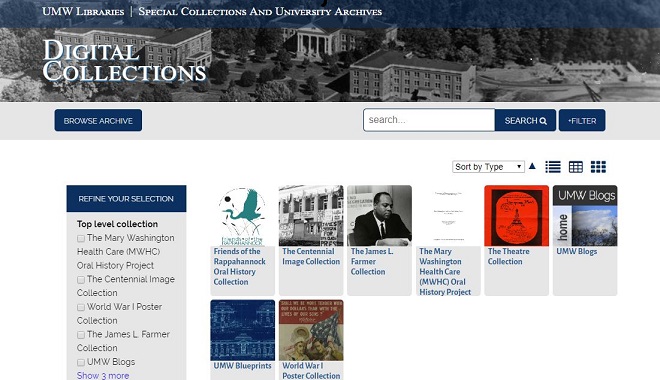
UMW Digital Collection Website
0

What Do You Do with 11,000 Blogs? Preserving, Archiving, and Maintaining UMW Blogs—A Case Study

Abstract

What do you do with 11,000 blogs on a platform that is over a decade old? That is the question that the Division of Teaching and Learning Technologies (DTLT) and the UMW Libraries are trying to answer. This essay outlines the challenges of maintaining a large WordPress multisite installation and offers potential solutions for preserving institutional digital history. Using a combination of data mining, personal outreach, and available web archiving tools, we show the importance of a systematic, collaborative approach to the challenges we didn’t expect to face in 2007 when UMW Blogs launched. Complicating matters is the increased awareness of digital privacy and the importance of maintaining ownership and control over one’s data online; the collaborative nature of a multisite and the life cycle of a student or even faculty member within an institution blurs the lines of who owns or controls the data found on one of these sites. The answers may seem obvious, but as each test case emerges, the situation becomes more and more complex. As an increasing number of institutions are dealing with legacy digital platforms that are housing intellectual property and scholarship, we believe that this essay will outline one potential path forward for the long-term sustainability and preservation.

As a leader in what is called the Digital Liberal Arts, we at the University of Mary Washington are facing the unique challenge of archiving our early digital output, namely, UMW Blogs. Started in 2007, UMW Blogs contains 11 years of digital history, learning, and archives. Although we are best known today as the birthplace of Domain of One’s Own, UMW Blogs was a testcase for showing the viability of such a widely available online platform for faculty, staff, and students.

After three years in which Division of Teaching and Learning Technologies (DTLT) staff and a few UMW faculty experimented with blogs in and out of the classroom (Campbell 2009, 20), UMW Blogs launched in 2007. It provided the campus with a WordPress installation that allowed any student, faculty, or staff member to get their own subdomain (e.g. mygreatblog.umwblogs.org) and WordPress site, administered by DTLT. Since then, the 600 blogs of 2007 has grown to over 11,000 blogs and 13,000 users as of 2018! Each site has any number of themes, plugins, and widgets installed and running, creating a database that is exponentially larger and more cumbersome than the user numbers suggest at first glance.

The viability and popularity of a digital platform available to the UMW community convinced the administration that we should be providing faculty, students, and staff not only with a space on the web, but with their own web address, hosting capabilities, and “back-end” access to build on the web beyond a WordPress multisite installation. Domain of One’s Own was born, where anyone with a UMW NetID could claim their own domain name and server space on the web, and where they could install not just WordPress, but also platforms like Omeka, docuwiki, or even just a hand-coded HTML website.

As a result, we now have two “competing” platforms—one legacy, one current—to administer and maintain.

Maintaining UMW Blogs today can be quite a challenge, and as the administrators we frequently alternated between idyllic bliss and mass panic. It’s not very heavily used (most users have moved to Domain of One’s Own instead), but when something does go wrong, it goes really wrong, bringing down every site on the system. And with a number of sites that haven’t been updated since the twenty-aughts, there are many that are poised to cause such problems: too many sites using too many outdated themes and plugins, leaving too many security vulnerabilities, and impacting the overall performance of the platform.

And while there was the initial expectation that the sites would be left up on UMW Blogs forever, the changing nature of the web and our understanding of digital privacy and data ownership has evolved as well. We have an open, online platform featuring works by former faculty and students that are over a decade old, many of which are inaccessible to the original creator of the content to delete. Content they may no longer want on the web. How do we balance preservation and privacy?

Of course, we can’t just pull the plug—well, okay, we could, but for many faculty, this would be unacceptable. Some of our faculty and students are still using UMW Blogs, and many of the sites no longer being maintained are important to our institution and its history—whether it’s an innovative (for its time) course website, an example of awesome student collaboration, or an important piece of institutional history. Former students, as well, may still be using content they have created on UMW Blogs in their job search. We want to ensure the UMW Blogs system works and that those important pieces of our institutional history and students’ intellectual property don’t become digital flotsam.

With that in mind, DTLT in collaboration with UMW Libraries have embarked on a major project to ensure the stability of our legacy system and the long-term preservation of UMW’s digital history. We are going to chronicle some of those efforts, both for the benefit of the UMW community and for those at other institutions who find themselves in a similar situation, or soon will.

Outline of the Problem

UMW Blogs contains some stellar content. A group of students (some of whom are now UMW staff) catalogued historical markers and other landmarks throughout the Fredericksburg/Spotsylvania area, mostly from the Civil War, providing important historical context. A student wrote love letters to his girlfriend at another university regularly for several months, leaving her coded messages and invitations to dinner dates (“don’t forget the coupon!”). Two colleges on campus hosted their Faculty Senate sites there. Student government leaders (and campaigns) hosted sites on UMW Blogs. And there are historical sites from many student clubs, activists, and research groups. And who can forget Ermahgerd Sperts, or possibly the most creatively unimaginative username: umwblogs.umwblogs.org.

While most faculty, students, and staff have migrated to Domain of One’s Own (DoOO), there are always those who remain on the the platform they are most familiar with. As a public liberal arts, teaching-intensive institution, many upper-division courses are only taught on a three-year rotation, meaning that course sites built in UMW Blogs remain inactive for two or three years until the course itself is once again offered. While the course sites could (and often eventually are) migrated into DoOO, the way that faculty and students then interact with those sites inevitably shifts, causing some degree of anxiety from faculty members, who thus delay the migration process.

In other words, in the faculty’s mind, if it isn’t broke, don’t fix it. Except, of course, it does break. Often. Leaving their course sites down.

In addition to valuable contributions to UMW history, scholarship, and archives, UMW Blogs also contains about 700 sites that were last updated on the same date they were created. (“Hello, World!”… and nothing since.) A number of sites have “broken” since they were last maintained, mostly as a result of using themes and plugins that have not been updated by their developers to retain compatibility with upgrades to the WordPress core platform. And then there are sites that, while valuable to some at the time, have been neither updated nor visited in a long time. This leaves broken and vulnerable sites, compromising those who are currently using the platform.

One of the challenges we are facing in the process of archiving the sites is the ethos under which the project was created, of openness and experimentation. The original Terms of Service for UMW Blogs reads:

UMW Blogs is an intellectual and creative environment, owned and maintained by the University of Mary Washington’s Division of Teaching and Learning Technologies. Users of the system are expected to abide by all relevant copyright and intellectual property laws as well as by the University’s Network and Computer Use Policy.

Users are encouraged to use UMW Blogs to explore the boundaries of Web publication in support of teaching and learning at the University, with the understanding that UMW may decide to remove at any time content that is found to be in violation of community standards, University policy, or applicable federal or state laws.

As participants in a public Web space, users must also understand that the work they publish on UMW Blogs generally may be browsed or viewed by anyone on the Web. Some features are available to users who wish to protect content or their own identity. Information about protecting content and/or your identity within the system can be found at the following address:[1]

While the TOS capture the ethos and spirit of UMW Blogs and prompt users to think about privacy, they don’t prompt users to address their own IP and copyright. This oversight is partially a reflection of the approach to the Web as open. Nevertheless, it leaves us, now, wondering what we can actually do with student work, former faculty and staff work, group blogs, long-term collaborative projects between faculty, staff, and students.

The intention was always that copyright would remain with the creator of the content (which was made explicit in the Domain of One’s Own Terms of Service). But as we archive sites, we have encountered a number of issues regarding whose permission we need to move these sites into the (public) archive, to which the original creators will no longer have access. This is particularly difficult for collaboratively created sites, where contributors to the site are not owners of the site.

There’s another related issue that has been weighing on our minds. Past members of DTLT (none of whom are still administering the platform) told users that their UMW Blogs sites would be hosted in perpetuity, but that presents a major data ownership and privacy issue. The internet is a different place than it was in 2007. According to Paul Mason, the entire internet in 2007 was smaller than Facebook is today (Mason 2015, 7)! And that’s to say nothing of the changing ways in which we view our personal data, even our public creative work, since GamerGate, Ferguson, and Cambridge Analytica. And as the birthplace of Domain of One’s Own, UMW (and DTLT in particular) has focused increasingly over the past decade on the ownership aspect of writing and working on the web—empowering students to make critical decisions about what they put on the web, what they don’t put on the web, and what they delete from the web.

We’ve also received a number of requests from alumni asking us to remove their blog from UMW Blogs, to remove a specific post they created on a faculty course site, or even to remove specific comments they left on a classmate’s blog as part of an assignment. We are well aware of the vulnerabilities that working in public can create, as well as the ways in which we as people change and grow, leaving behind aspects of the (digital) identity that we once shared with the world.

And so, beyond the need to streamline the platform, we think it’s important that we take the initiative to remove old content from our public platform, and to pass it along to former students and faculty so they can decide what should be public and where it should be hosted.

After everything is archived locally and before anything is deleted from the platform, DTLT will be reaching out to those former students, faculty, and staff, letting them know our plans, and providing them the opportunity (and documentation) to export their data and preserve it publicly or privately, in a place of their choosing. This not only helps those currently on the platform have a better experience, but it helps our former community members once again reflect critically on their public digital identity and take a bit more ownership over their data and what’s done with it.

As proponents of “digital minimalism,” we often tell our students and colleagues that what we delete is as important a part of curating our digital identity as what we publish. We want to encourage students (and faculty and staff) to think about how large a digital footprint they are leaving, and help devise strategies everyone can use to minimize traces of themselves online. And our freedom to delete increases our freedom to experiment. As the attention economy and algorithmically driven content discovery have radically changed the internet since the early days of UMW Blogs, it’s worth rethinking both what we as an institution hold onto, and what we as individuals decide to keep in public venues.

Another challenge was that at the start of this project, we at UMW did not currently have any policies governing data storage, collection, and deletion. Alumni could keep their email addresses, the only time we ever deleted a course in the LMS was when we moved from one to another, and we do not have a enterprise-solution cloud-based shared digital storage space. We were starting from scratch.

The Process, DTLT

We identified over 5000 blogs on the platform that have not been updated since 2015 or earlier, are not administered by any current UMW community members, and have either not been visited at all in the last two years or have been visited less than 100 times in the entire time period for which we have analytics. That means essentially half the platform is inactive and no longer providing benefit to users, but is also open to vulnerabilities or “bit rot,” which can cause problems for the active sites.

However, some of the inactive sites we identified are also important pieces of institutional history. After analyzing the metadata for all 11,333 sites in the UMW Blogs database, we identified a list of over 5000 blogs that meet all of the following criteria:

  • The blog has not been updated since Jan 1, 2016.
  • None of the blog administrators are current members of the UMW community.
  • The site has either not been visited at all in the last two years, or has logged fewer than 100 visits all-time.

We then went through the entire list to identify sites important to our institutional history, as well as course websites that are less than five years old. (Some courses are offered every three or four years, and having relatively recent course websites live can be useful for faculty and students.) These are sites that we either think should be kept on the platform, or—more likely—that we think would be good candidates for UMW Libraries’ new Digital Archive. The latter will create a flat-file archive (a website with no databases or dynamic content, only HTML and CSS code) that will be far more future-proof and less likely to just break one day.

Now, we didn’t visit all 5000+ blogs manually! Rather, we looked carefully at the metadata—site titles, the person(s) attached to the sites as administrators, the administrator’s email address, and the dates the sites were created and last updated. This told us if the site was created by a student or faculty member, and if the site was a course website, collaborative student project, personal blog, etc. We identified almost 300 sites from this collection which we did check manually, often consulting with each other about them, before deciding on the 62 of these 5000+ sites that were important to keep public or submit to the UMW Digital Archive (more on that process below).

In the end, we determined that of the 11,333 blogs on the UMW Blogs platform, 6012 of them were important to keep actively published on the web (including about 50 which would best serve the UMW Community by being frozen in time and preserved publicly before “bit rot” and broken plugins bring them down). The other 5321 blogs, many of which were important in their time, are ready to be removed from the platform.

To be clear, we’re not talking about just deleting them! We are working with our hosting company, Reclaim Hosting, to create a flat-file archive and a WordPress XML export of each of those blogs, which DTLT will retain for 2 years before permanently deleting them. We are also preparing to email the administrators of those sites to let them know our plans so they can download their content before we remove anything from the platform (or, worst-case scenario, ask us to email them the backup archive after we purge the platform). But ultimately, it is important for the health of the platform to streamline the database and focus on supporting the more recent and active sites.

Through this process, we also identified a number of faculty and staff “power users” of UMW Blogs—those people who had more than 10 sites on UMW Blogs or had created a course site on the blog within the last two semesters. Once that handful of faculty were identified, we reached out to them to schedule one-on-one meetings with a member of DTLT to discuss the options for their UMW Blog site: deletion, personal archive, library archive, or migration to personal subdomain.

This was, admittedly, a fraught process for some of the faculty; these sites had become important and significant resources, examples, and case-studies of the viability and ultimate success of working openly on the web. They were sometimes years in the making, informed by countless hours of student and faculty work. To come in and say, “These sites aren’t viable in this space anymore” is intimidating.

One advantage of targeting the “power users” first is that we interacted frequently with these faculty members on a number of other projects, and thus had already developed a relationship with them, not to mention an understanding of their values, their work, and their pedagogy. We decided collectively which DTLT team member would work with each individual faculty member based on past relationships and interactions. We weren’t cold-calling these faculty; we were approaching colleagues with whom we had previously collaborated. Thus, we knew better how to discuss the issues with each individual faculty. While time consuming, we built on our relationships to tailor each interaction to the specific needs of the faculty member, allowing us to better explain and recommend options for their UMW Blog sites.

Explaining that our goal is, in fact, to preserve these websites in a more sustainable format, in order to celebrate and highlight their importance and significance to faculty, is key. We also want faculty to take more control over their data and their sites, understanding better how WordPress works and how the archival process will be of benefit to them. No technology, no matter how advanced, can survive this long without a lot of help, a lot of work, and some hard decisions about how we are going to invest our time, energy, and monetary resources.

We worked with faculty, then, to create a list of sites on UMW Blogs and categorized them based on how they wanted them to be preserved. Once that list was created and finalized, we passed the information along to the relevant people, including DTLT and UMW Archives staff, to make sure that all sites ended up in working order where they were supposed to be. When moving sites to Domain of One’s Own, we often had to replace themes and plugins, so that while the site might not look the way it did when initially created, we tried to ensure it would still retain its original functionality. The static library archive preserved the original link and function of the site in a static file.

The Process, UMW Libraries

UMW Libraries has been archiving the University’s web presence for several years now, primarily with established, automated web crawls and the occasional manual crawl to capture historical context during a special event, such as a university presidential inauguration. Our focus has been on archiving institutional sites, such as the main website, social media, UMW Athletics, or UMW News. Despite this effort, we were often missing the individual stories of the campus community.

We have a fantastic scrapbook collection in the University Archives. Stories from UMW (or MWC) students across the decades. Though students are still creating and donating scrapbooks, many are recording their college experience online, through Domain of One’s Own or UMW Blogs, rather than on paper. We also have detailed records of university business, such as meeting minutes, correspondence, and publications. The vast majority of this information is online today, with blogs or other platforms used to keep notes on committee work or to provide transparency on important campus issues, such as faculty governance or strategic planning. We must be proactive in not only preserving but providing access to these records for future students and researchers.

The UMW Archives appraisal process is an important step in beginning to archive this material. We not only need to make sure that the websites and digital projects we collect fit within our collection development policies, but we must also be confident in our abilities, through both technology and staff power, to preserve and provide access to the material we agree to accept. To help us with this process, we developed a set of criteria for appraisal:

  1. Scholarship that is new and impactful in its field.
  2. Highly innovative technical and/or creative aspects.
  3. Content that complements existing archival collections and subject areas of emphasis.
  4. Content that documents the history, administration, and/or culture of the University.
  5. Unique content that supports the research and curriculum needs of faculty.
  6. Content created, owned, or used by university departments, faculty, or students in carrying out university-related business, functions, or activities.
  7. Compatibility with SCUA’s preservation software.
  8. A faculty member’s statement of support for student-created websites.

This set of criteria will help us work through lists of current websites to determine what would be best suited for the UMW Archives. It is also published on the library website so that faculty, staff, and students can read through the list and determine if their website will be a good fit for the library’s collections. However, even if a UMW community member is unsure of where their website belongs, our hope is that the broad guidelines will encourage them to contact us and start a conversation. Even if a suggested website is not acquired by the archives, DTLT and UMW Archives staff will work with the creator to find other alternatives for migrating or archiving their content.

The lists of current websites that we are combing through and appraising do not contain the thousands of websites that DTLT started with on this project. For example, we removed from consideration sites that were created but never built out, don’t have any content, haven’t been accessed, etc. Other websites were also included because they were listed in previous university publications or suggested by a colleague. Our initial list of potential websites to archive is not all-inclusive, and it will be a continuous process as more URLs are recommended or discovered.

After websites are selected for archiving, the very important step of requesting permission follows. While the University Archives actively archives institutional websites, such as UMW Athletics or UMW Social Media, we feel strongly that we must receive permission before archiving individual blogs, websites, and other digital projects. DTLT and UMW Archives work together to reach out to the community to request permission from all creators and contributors of items that we want to archive. For those submitting archive requests, the copyright permission statement is published on the library’s website so that anyone can read and understand the terms before submission. Even if a faculty member recommends a website for archiving, the student still must provide permission before archiving takes place.

If permission is received to archive a website, the crawling can begin! UMW uses three tools for archiving websites: Preservica, Archive-It, and Webrecorder. Each web crawl is manually initiated by staff and student aides, as well as checked over for quality control after the crawl is complete. The crawl creates a WARC file, which is uploaded in the library’s digital preservation system. A metadata record in the form of Dublin Core is created for each WARC file, which includes creator(s), contributor(s), and two to three subject headings. Library staff used “Descriptive Metadata for Web Archiving: Recommendations of the OCLC Research Library Partnership Web Archiving Metadata Working Group” to help determine metadata guidelines, in addition to local, unique needs (Dooley and Bowers 2018).

The final component to the archiving process is making the archived websites accessible. Once a WARC file is created and metadata is applied, the archival item is published in Digital Collections, the library’s digital preservation and access platform. Users of the platform are able to locate archived websites through search functions that use both metadata and full-text. The websites render within the browser itself, so users can navigate the website as it existed at the time of capture.

Conclusion: Further Challenges, looking forward, plan for it

This is only the beginning of a long process of preserving and protecting our legacy platform, UMW Blogs. The platform was a launch pad for Domain of One’s Own and put UMW on the map for innovative digital learning. At the time, there was no precedent, no best practices, no road map, no rules. Now, we hope the lessons shared in this essay help schools trying to maintain their own legacy, open, digital learning platforms.

Moving forward, we will likely confront similar issues with Domain of One’s Own, particularly concerning what we should preserve in our library archives. We are developing a process for students, faculty, and staff to submit a site for preservation consideration. But given the ethos of DoOO—that the work done on users’ website is theirs to do with as they like—we know there have already been some potentially important sites deleted, as is the prerogative of the user.

How, then do you balance the imperative to save, preserve, and keep digital artifacts of (potential) historical significance with the need for agency, privacy, and freedom of the student, staff, or faculty member to delete, let die, or decay? These are the questions we are now collectively grappling with, and will continue to moving forward.
Notes

[1] Much like this project itself is trying to illustrate in the preserving of historic or significant materials that lived online, the original links to these policies and information are broken and the original information is all but inaccessible.

Bibliography

Campbell, Gardner. 2009. “UMWeb 2.0: University of Mary Washington Webifies Its World.” University of Mary Washington Magazine, Fall/Winter 2017. https://archive.org/details/universityofmary33fwuniv.

Dooley, Jackie, and Kate Bowers. 2018. Descriptive Metadata for Web Archiving: Recommendations of the OCLC Research Library Partnership Web Archiving Metadata Working Group. Dublin, OH: OCLC Research. https://doi.org/10.25333/C3005C.

Mason, Paul. 2015. Postcapitalism: A Guide to Our Future. New York: Farrar, Straus, and Giroux.

About the Authors

Angie Kemp is the Digital Resources Librarian at the University of Mary Washington. She works in Special Collections and University Archives, focusing on maintaining and expanding the university’s digital archives. She also oversees the Digital Archiving Lab, where campus and community members go to collaborate on digital collection projects and preservation. Her research interests include ethics and privacy in digital archives, as well as the long-term sustainability of digital projects.

Lee Skallerup Bessette is a Learning Design Specialist at the Center for New Designs in Learning and Scholarship (CNDLS) at Georgetown University. Previously, she was a Instructional Technology Specialist at DTLT at UMW working digital literacy and Domain of One’s Own. Her research interests include the intersections of technology and pedagogy, affect, and staff labor issues. Her writing has appeared in Hybrid Pedagogy, Inside Higher Ed, ProfHacker, Women in Higher Education, and Popula. You can find her talking about everything on Twitter as @readywriting.

Kris Shaffer is a data scientist and Senior Computational Disinformation Analyst for New Knowledge. His book, Data versus Democracy: How Big Data Algorithms Shape Opinions and Alter the Course of History, will be published Spring 2019 by Apress. Kris also coauthored “The Tactics and Tropes of the Internet Research Agency,” a report prepared for the United States Senate Select Committee on Intelligence about Russian interference in the 2016 U.S. presidential election on social media. A former academic, Kris has worked as an instructional technologist at the University of Mary Washington and has taught courses in music theory and cognition, computer science, and digital studies at Yale University, the University of Colorado–Boulder, the University of Mary Washington, and Charleston Southern University. He holds a PhD from Yale University.

a closeup of a circuit board with several visible chips
0

Teaching with Objects: Individuating Media Archaeology in Digital Studies

Abstract

Media archaeology presents a framework for understanding the foundations of digital culture in the social histories of technological media. This essay argues that a pedagogy focused on individual, physical artifacts of technological media involves students in constructing a constellation of insights around technology’s mineral, global, and human history as well as its ecological future. By describing and reflecting on a series of assignments and exercises developed for my “Introduction to Digital Studies” class, I show how the intimacy of specific devices can connect to the exigencies of technological media through the lens of media archaeology. The core of this experience is a group project where students take apart an artifact like an old smartphone or game console, attempt to locate the origins of each component in that artifact, and present those origins in a map and timeline. The risks and rewards of this assignment sequence actively engage students in designing their own learning and encourage them to think critically and ethically about the media they consume, the devices that provide the foundation for that consumption, and the global economy of human labor that makes it all possible. In a step-by-step consideration, I consider how the practical and logistical challenges of this assignment sequence support the learning goals I identify as crucial to Digital Studies.

The study of digital culture includes many approaches to understanding the ways that technology has impacted and shaped human society. While a material turn within digital studies has—through subfields and discourses like software studies, platform studies, and media archaeology—effectively moved beyond or “behind” the screens of digital objects as the primary site for inquiry, the hidden, human costs of the labor required to produce these machines has remained relatively invisible. As Lisa Nakamura has explored in her analysis of Fairchild Semiconductor’s plant in Shiprock, NM, that invisibility has intersectional origins and consequences. Nakamura writes that “looking inside digital culture means both looking back in time to the roots of the computing industry and the specific material production practices that positioned race and gender as commodities in electronics factories” (Nakamura 2014, 936).

Within the field of media archaeology, many scholars have demonstrated the value of analyzing the underlying physical artifacts of technological media as culturally situated objects of inquiry in their own right. In introducing his book What is Media Archaeology, Jussi Parikka offers the practical explanation for the term “media archaeology” as “a way to investigate the new media cultures through insights from past new media, often with an emphasis on the quirky, the non-obvious apparatuses, practices and inventions” (Parikka 2012, 2). These insights can be seen as archaeological in Foucault’s sense of “digging into the background reasons why a … media apparatus or use habit is able to be born and be picked up and sustain itself in a cultural situation” (Parikka 2012, 6), where “background reasons” here are situational, cultural, and may extend from the pressures exerted by privilege, class, and capital that organize society.

But despite its significance to these “background reasons,” the individual, personal, human labor that forms a part of that background remains particularly well hidden. In arguing for circuit-bending as a method of applied media studies, Nina Belojevic observes that the selective documentation of digital history creates wide blind spots, but that we can begin to fill those in through considered individuation of technological media. As Belojevic writes, “a close, material study with an awareness of singularity recognizes the significance of physical differences and how they affect our understanding of technologies” (2014), and understanding those differences allows the haecceity of specific objects to orient an inquiry toward those specific, hidden origins. Even when the economics of manufacturing mean that, “in the case of (video game) console production, material parts indicate that while users may be able to trace the circuit board back to the manufacturer, it becomes nearly impossible to find out where every element on a particular circuit board comes from” (Belojevic 2014), understanding and making contact with the fact that those parts came from somewhere is a meaningful reorientation of inquiry, especially for students.

In this article, I discuss how I have approached this reorientation of inquiry into digital culture through an assignment where I direct students to investigate and, therefore, individuate specific artifacts of technological media. What follows is a step-by-step guide to this assignment and its related activities, but it is also my argument that there is pedagogical, historical, and cultural value in shifting the object of inquiry from, for example, “the Game Boy” as designed by Gunpei Yokoi that dominated 90s youth culture to, instead, “this Game Boy” as given to me as a Christmas present in 1990. Focusing on the individuality of the way a digital object is used and received helps highlight the human dimensions and circumstances of a digital object’s manufacture and assembly. In developing this assignment over multiple semesters, I continue to find that the specificity of this approach, which the hands-on methodology necessitates, helps drive home ideas about the contexts and consequences of digital materiality in a way that a series of readings never quite have.

At the University of Mary Washington, I teach a class called “DGST 101: Introduction to Digital Studies” where the goal is to engage students in using digital tools creatively, in understanding digital culture, and in employing digital methods to solve problems and answer questions. Teaching from the framework of media archaeology with an individuated exploration of technological media allows me to trace a thread through each of those three major, overarching outcomes of the class. The following sequence focuses students on a specific physical artifact of technological media as a way of helping them think about the materiality of digital technology in ways that hopefully illuminate the social challenges involved in the labor and mineral-extraction practices that make our devices possible, as well as the environmental legacy of technological obsolescence.

I call this unit of the class “Digital Archaeology,” as opposed to media archaeology, because while I do ask students to think about technology as cultural artifacts, as Parikka suggests, I also direct them to use the web to discover the origins of specific artifacts, which requires them to use investigative skills and reflect on the structure of the internet as a primary source and repository for cultural knowledge. In doing this work, especially when students reach an inevitable dead end, their investigations may encourage them to consider the web as yet another socially constructed, multi-layered repository of narratives about technological media, fraught with contingencies and gaps—as opposed to simply the supplier of answers. The failure of a Google search to yield a straightforward answer can be a powerful teachable moment.

The logistics of the assignment sequence are deceptively simple: I ask students to work in groups to 1) take apart (“sacrifice”) some technological artifact; 2) research the origins of the various components inside that artifact; and 3) use Omeka with Neatline to tell the story of their artifact via a map of its components’ origins. Despite this apparently simple outline, the nuances of this process pose several challenges to students and to me as the instructor. Mainly, since I’m asking students to investigate devices that they provide, I do not have a preconceived sense of what they should be able to learn about a particular device, which puts a significant amount of responsibility on the students in evaluating the knowledge that they are creating. This open-endedness underscores the networked nature of the digital field of inquiry I am asking them to enter into through this assignment.

By offering this assignment to the readers of the Journal of Interactive Technology and Pedagogy, I don’t mean to suggest that what follows is the best or most obvious approach to implicating individual technological media in a digital studies pedagogy, nor do I want to presuppose that the solutions I present to some of the challenges I have faced in the years developing this assignment are necessarily the best solutions. Instead, I hope to offer a useful starting point for other instructors who may be interested in incorporating media-archaeological projects into their classes, and I look forward to hearing what other approaches and problems others have come across.

The narrative and sequence of steps that follows is a “best-case scenario” account of this assignment sequence, avoiding the real-life complications of scheduling and organizing student groups. Most of the examples below are generic or hypothetical, or in specific cases, I include them here with the permission of the students I am citing or describing.

Learning Goals

By completing the assignments and activities in this unit, students will encounter several significant concepts and develop important, transferable skills. Morally, students may find themselves thinking about the economics of globalization and the way their position as consumers of technology is constructed through the labor and often exploitation of workers in other parts of the world. Epistemologically, students will learn to think about the web beyond the first page of Google as they find they must use critical and careful reasoning in the course of their investigation. As they think about these concepts and develop these skills, the secondary texts we’ll use to access these conversations will engage different modalities, encouraging students to think about how one makes an argument in different media. Finally, students will gain some experience working with bibliographic and spatial metadata to tell the story of what they found in their research.

Step 1: Four Phases

The organizing narrative template that this assignment is interested in are the four phases of an electronic device’s life cycle as demonstrated in Molleindustria’s persuasive game, “Phone Story” (2011):

  1. Resource extraction
  2. Manufacturing
  3. Consumption
  4. Recycling

For each of these phases, “Phone Story” presents a short, relatively easy arcade-style game that highlights a key problem within each of these areas. For “production,” players must act as soldiers threatening enslaved children in a “whac-a-mole”–style game mechanic. The factory stage adopts a mechanic similar to the classic Activision game, Kaboom! (1981), where in this case players must operate nets to catch suicidal factory workers. The consumption phase lets players slingshot new “iThings” at consumers, and in the final “recycling” phases, players must sort components by color into the appropriate recycling mechanism.

Four images side by side depicting four levels of the game Phone Story: a top down view of slaves mining in the dirt, a face on view of a factory where workers are tumbling from a building, a retail storefront where workers fling smartphones at consumers, and a conveyor belt where workers separate color coded material into appropriate piles.
Figure 1. Screenshots of the four levels of “Phone Story”

Like other works by Molleindustria, Phone Story gets its point across with a jarring blend of cheerful imagery and sound with disturbing contexts and implications. In this case, the game mechanics require players to occupy the position of the oppressor, or at least the one benefiting directly and measurably from the exploitation and abuse of fellow humans.

As Parikka describes it, “Molleindustria’s painfully simple game creates [a] map of this darker side of media materiality. This map is about nonorganic and organic materialities: mining, suicides, electronic waste, and planned or meticulously scheduled obsolescence form the perverted side of the attractive, entertaining end device” (Parikka 2015, 89).

Because of the game’s polemical stance and its cartoony tone, student responses to this game vary. Some will be offended by the way it treats violence so casually and trivially, and still others have found the opening level so disturbing that they refused to play the rest of the game.[1]

The debriefing discussion of this game is always interesting. In addition to setting up the basic topic of this unit, it also invites students to think about how the game makes its argument with the procedural rhetoric of each level’s design. We can and often do debate the efficacy of the specific arguments presented here, but acknowledging and being able to describe the way that this game makes arguments differently than a text-based work is one of the core digital studies outcomes for this class.

In the suicides level, for example, a rhetoric of failure makes a particularly chilling point. As Ian Bogost describes it, “if procedural rhetorics function by operationalizing claims about how things work, then videogames [that employ a rhetoric of failure] can also make claims about how things don’t work” (Bogost 2007, 85). As players rush to save falling workers with a trampoline-style net, they may notice that it is nearly impossible to save everyone who jumps, and yet, the threshold for success required to pass the level does not actually require that players save everyone. Success in this level means that the procedural claim here—that safety nets are a reasonable means to prevent suicide—is belied by the operational reality simulated within the game whereby there is some acceptable number of worker suicides that will not harm the company’s outcomes. This can be an uncanny realization, as players are invited to reflect on their assumptions about worker suicide and how the game’s latent encoding of a specific response to that question, “How many suicides are acceptable?” may or may not align with a player’s intuitive sense of morality or justice.

Ultimately, this game is valuable because it delineates a technological object’s four-stage life cycle by illustrating the human side of each. The connection with materiality is indelible, as Parikka concludes: “like labor, [information technology] is material. This materiality is made of components—mineral and chemical—and will some day end up somewhere. It won’t just disappear; both ends of this simple chain include labor and organic bodies, each of which are the registering surfaces for effects and affects of media” (Parikka 2015, 93).

Step 2: “Your Phone Was Made By Slaves”

After this initial introduction, we move into considering the four specific phases of a technological artifact’s life cycle, starting with the original phase where minerals are extracted from the earth, often under brutal and exploitative conditions. For this conversation, we read an excerpt from Kevin Bales’ Blood and Earth: Modern Slavery, Ecocide, and the Secret to Saving the World posted at LongReads.com under the provocative title, “Your Phone was Made By Slaves” (Bales 2016).

In this essay, Bales describes the cycles of abuse and corruption that make cheap minerals possible, and as with the Phone Story game, it is useful in class discussion to analyze the rhetorical moves in this essay. Why, for example, does the essay start with a story about tombstones? What is the link between tombstones and smartphones? How does the author create the sense of place for the Democratic Republic of the Congo, where his story takes place? Why is the author ultimately optimistic by the end of the essay, and is the solution he proposes to these problems actually plausible?

The specific mineral this essay focuses on is coltan, which we learn is used in all kinds of electronics. In class, students can do some initial web research to try and figure out how much Coltan is used in their model of smartphones, and share those results. The inevitable conclusion of this conversation and exercise—so what do we do about it?—is a compelling moment to consider what responsibilities and power we do and do not have as consumers.

Step 3: The Apple Factory

The “production” level of “Phone Story” is based on the widely circulated now well-known story (Merchant 2017) about factory dormitories installing suicide prevention nets. This is a vivid image, but the truth, as usual, is more complicated.

To learn more about the truth of this phase of a product’s life cycle, we listen to two episodes of the podcast This American Life. The first, “Mr. Daisey and the Apple Factory” (Glass 2012) can only be read as a transcript because, as the later episode, “Retraction” (Glass 2012), explains, the original story was retracted after editors at This American Life found problems in Mike Daisey’s original story. Daisey, a monologist, tells a compelling story about visiting Foxconn factories in Guangzhou, but as a narrative artist, Daisey fails to take appropriate journalist care in making several key claims about that trip, including the claim that he met with underage workers at a Foxconn plant, that he met with a secret union of blacklisted workers, and that he encountered armed guards at one factory. The narrative is dramatic and compelling, but as host Ira Glass explains in the “Retraction” episode, many of those specific claims could not be verified.

In that follow-up episode, as we hear Glass and his producers confront Daisey about the claims in his story, they invite an important conversation about the ethics of representation in drama and journalism. Many students feel conflicted: it is easy to be angry with Daisey, but his point that his story, while not factually true in some cases, still has a truth to it that needs to be told. Indeed, the alleged labor abuses of workers at Foxconn have been reported elsewhere, and Apple’s increasing efforts to document via their “Transparency Report” indicates that the public awareness of situations like Daisey’s story is leading to some positive change.

There’s also a striking moment in the “Retraction” episode, at about 29:05, when Ira Glass asks Mike Daisey, “So why not just tell us what really happened?” The excruciating 13 seconds of silence which follow this question perfectly demonstrate the specific modality of audio narrative, and parallel to the discussion of procedural rhetoric in Phone Story, this audio piece invites a conversation about how different media can use different affordances to connect with an audience.

Figure 2. Clip of Ira Glass confronting Mike Daisey in This American Life episode 460, “Retraction”Ultimately, this is a frustrating story, and I’ve wrestled with the decision to include it at this point in the assignment, because there’s a risk of students “overcorrecting” to the inaccuracies presented by Daisey. “If,” they might say, “all this is made up, then I can probably just dismiss any reporting about inhumane conditions at Chinese factories.”

Nakamura points out that, despite the flaws in Daisey’s approach, his story did lead to subsequent investigations by the New York Times which revealed other abuses like excessive, mandatory overtime (Nakamura 2014, 941).

As such, one of the lessons of Mike Daisey’s story is that this is difficult work. “Digital labor is usually hidden from users in closed factories in Asia, visible to us only as illegally recorded cell phone video on YouTube or through the efforts of investigative reporters who overcome significant barriers to access—again, nothing to see” (Nakamura 2014, 938). Furthermore, it is always important to document one’s sources; when it comes to making claims of this magnitude— show your work. Hopefully, students bear this in mind as they prepare to conduct their own fact-finding in subsequent steps.

Step 4: Disassembly

This is my favorite part of this project: the day where we bring in the sacrificial devices and take them apart. To prepare for this, students have looked in their closets and trunks for discarded technology, or made trips to the local Goodwill to decide on an object to sacrifice. The advantage of taking apart their own devices is that they already know some parts of that object’s life story, which will be useful later on when they tell the object’s story. Generally, these are old smartphones, iPods, iPads, and other e-readers. The disadvantage of working on this type of device is that their parts tend to be rather smaller, and getting them apart can be somewhat trickier. It may require using a heat gun to detach the screen, the screws are likely going to be very, very small, and the component parts are likely all connected to very thin and fragile printed circuit boards (PCBs). Goodwill-sourced items on the other hand have tended to be old radios, VCRs, and printers, and they are somewhat easier to work with. I simply insist that students choose some sort of technological media device and let them evaluate the pros and cons within their group.

closeup of an open Super Nintendo case, including the main circuit board. A student is using a tool to pry it apart.
Figure 3. Students disassembling a Super Nintendo on deconstruction day.

Setup

The room I teach this class in is the “active learning classroom” at UMW’s Convergence Center. This is a large room with six tables spread out along the walls. Each of these tables includes a PC and a monitor, and seat up to six people comfortably, with a large working area where objects can be arrayed. This arrangement of tables has actually influenced the design of the assignment, since I teach up to 30 students in this class, dividing them into six groups of five each seems to be about right for the amount of work and division of labor I’m requesting.

Supplies

To prepare for disassembly day, I make sure I have on hand a few basic supplies:

  • First-aid kit: This usually isn’t necessary (see the “Safety” section below), but I think having it on hand helps convey to students that they need to be careful as they work.
  • Nitrile gloves: Some devices have sharp edges and messy components as they come apart (printers and VCRs are usually well-lubricated) so it’s useful to have these as an option.
  • Paper towels and cleaning wipes: It’s hard to predict what sort of mess you’ll make, and you always want to leave the classroom cleaner than we found it.
  • Sealable plastic bags: Students will be taking components with them to study, so it’s helpful to have a convenient way to keep their parts organized.
  • Tools. Small-tipped Phillips-head screwdrivers are especially convenient, but some Nintendo devices may have proprietary bits and tri-wing screwdrivers. A kit of these specialty screws is relatively cheap. A set of small hex wrenches and torx bits will also frequently be useful, along with a set of needle-nose pliers and wire-cutters. A plastic bicycle tire remover can be a good way to gently pry things open.

These supplies have normally been plenty, but for a few specialized cases requiring more robust efforts, UMW’s maker space, the “ThinkLab,” is equipped with rotary tools, heat guns, and soldering irons.

Safety

Because students are working with sharp tools to destroy complicated objects, it’s important to take some practical steps ensuring everyone’s safety. Some devices that students may wish to take apart are simply too dangerous to work on, while others will need to be treated with particular care lest they also become dangerous. For one categorical rule, I insist on no objects with CRT screens. Old TVs and PC monitors may be interesting from an artifactual or historical standpoint, but the cathode-ray tube poses a risk of implosion when damaged. And since these devices generally draw a large amount of power, there’s a risk of electric shock from the power supply or flyback transformer, which can hold a charge even if the device has been powered off for many weeks.

A similar hazard with newer devices is that they likely employ a lithium battery, which supposedly can ignite if it is punctured. As students energetically probe their sacrificial technology with screwdrivers and pliers, this is a real risk. For this reason, I simply insist that their first step in taking apart their device—and I supervise this—is to isolate and remove the battery.

In the several years I’ve done this assignment, no one has been injured other than the occasional bloody knuckle.[2]

Process

The disassembly begins with an explanation of the available tools, a sternly-worded reminder about safety, and a general pep-talk about what they’re about to do. One member of each group is designated as a photographer, and it is their job to capture the original, un-disassembled device and each stage in its dissection. Documenting these layers is useful if students ever want to put the device back together again (they rarely do), but since they will eventually be researching individual components, it is important to document the original context where those components resided in their device.

Photographs are also important because some components—a ROM chip, for example—may be interesting in their own terms as discrete parts, but are simply too hard to extract from a PCB without using a soldering iron. The manufacturer’s logo and other information printed on the face of it may provide all the information a researcher needs to discover its origin.

Components

Ideally, each student leaves disassembly day with two or three components to learn about. The specific number of components will vary depending on the device, and herein lies the first of many ontological discussions about what constitutes a “component.” Is the molded plastic case a component, or a support for components? Is the PCB one component, or many? Is the design of the PCB specific enough to count as a component of its own? If there are two memory chips, are they individual components, or collectively a single component? Is each key on a keyboard a component, or is the keyboard itself a single component?

I simply define a component as something that can be individuated by tracing it to a specific material origin, but in some cases, when a device is relatively simple on the inside, I’ve had to help student groups think creatively about their objects. Whether or not students will succeed in tracing that origin remains to be seen in the next step.

Step 5: Research

This is the most valuable step in this assignment, and to students, often the most frustrating. Their task is to take their components and determine as specifically as possible when and where they were made. The amount of reasonable specificity will vary, but the objective is an exact date and street address. Our goal here is to understand the device, but more importantly, we want to have some way of thinking about the human labor behind our devices. By locating a factory with Google Street View, students find that the lives of these workers become much visible. This is only effective once we refuse to accept “some time in the late 90s in China” as an acceptable account of a component’s origin.

The other thing I love about this moment in the project is that it reveals to students something about how their knowledge is constructed from search engines and how much they take that for granted. Presented with a black rectangle with some numbers and symbols printed on it, the next steps to finding out more about it aren’t exactly clear. When simply Googling those numbers doesn’t give them the answer, several students have commented on how jarring this moment can be: the sudden awareness that the answer to a question is not immediately forthcoming can be an important epiphany.

Example: Sharp LH5264N4

What students find they must do is take what they know for sure about their device and use that knowledge to help make educated guesses about things they know less well. This is a process with several steps, which I will illustrate with an example taken from my early-90s Game Boy.

a closeup of a chip on a circuit board.
Figure 4. Sharp chip LH5264N4, from the author’s Game Boy’s circuit board.

When

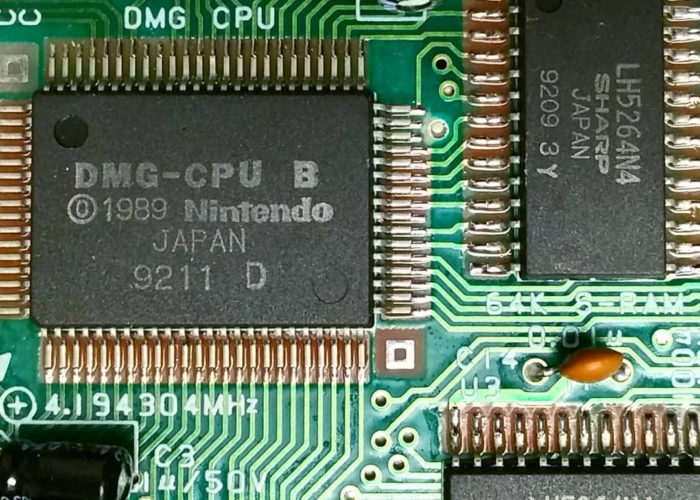
I know the chip in Figure 4 is from a Game Boy, which were made in this body style from 1989 through the mid-1990s. This Sharp chip includes a four-digit code, “9209”, which by itself may not mean much, and searching for it doesn’t yield anything relevant. However, in context (see Figure 5) on two adjacent chips I see “9211” and another “9209.” The CPU chip includes a copyright date of 1989, but that isn’t as helpful since it only refers to the product’s design, not its manufacture. The “92” is the salient pattern here, and it turns out this is part of an industry-standard manufacturing date code (Woerner 2001) that here identifies the 9th and 11th weeks of 1992. I now have a pretty high degree of confidence about these three chips’ dates of origin.

a closeup of a circuit board with several visible chips
Figure 5. Game Boy DMG-1 PCB.

Who

Finding the location it was manufactured is a bit more challenging, but again, I can expand what I know via logical inference. I have an explicit country of origin, Japan, but I need to do better than that, which starts by identifying the manufacturer. Conveniently, these chips are large enough to include the full name of their manufacturer, “Sharp,” but in many other cases, chips will include a small logo. In the example shown in Figure 6—a 3-pin positive voltage-output regulator from a Super Nintendo console—the stylized “M” inside a rounded square identifies the manufacturer.

A black, rectangular chip with three leads.
Figure 6. 3-pin positive voltage-output regulator from a Super Nintendo, manufactured by Matsushita Panasonic.

There are a number of websites that list and identify these logos, so after skimming the reference page at SiliconInvestigations.com, I can confirm that this particular voltage regulator was made by Matsushita Panasonic.

What

Returning to my Sharp chip, the part number LH5264N4 is another clue, and because the Game Boy is such a popular item for collectors and hobbyists, this is a rare case where a web search actually yields useful information about this component. A database hosted by Joonas Javanainen lists these LH5264 chips as either VWRAM or WRAM, and the list includes several Game Boys (also known as “DMG” for “Dot-Matrix Game”) with similar chip date codes.

For chips with a less famous application, part numbers can still lead to useful information about what a particular chip actually does, particularly if one finds datasheet references available at websites like AllDatasheet.com. There is quite a lot of technical data in these documents that goes far beyond what we need for this inquiry, but in this case, the data sheet for the related LH51264 chip series, which appears in some slightly earlier Game Boys, turns out to be 64K of static RAM.

Where

The Sharp Corporation is a huge company with a long history, and as part of its public relations to investors, the Sharp Global website proudly tells the story of that history. Using the information on the “Sharp Journey” chronology page, I can identify the plants that would have been operational in 1992 when these chips were manufactured: Tanabe, Hirano, Yamato Koriyama (now Nara), Hiroshima, Tochigi, Shinjo (now Katsuragi), and Fukuyama.

Since Tanabe, Hirano, Hiroshima, and Tochigi all seem to be created to produce consumer electronics, that leaves just three plants to choose from. A site-search for information about each of these three yields some more detailed history, including the fact that the Shinjo plant was created to manufacture solar technology. A bit later, in 1985, the Fukuyama plant began production on integrated circuit and semiconductor chips of the sort I’m researching. Based on this information, I can infer with some confidence that this is the plant that produced my chip, located at 1 Asahi, Daimon-cho, Fukuyama-shi, Hiroshima Prefecture 721-8522, Japan, which I can find in a satellite view on Google Maps (see Figure 7).

A screenshot of an aerial or satellite view of a factory in Japan. Nearby there is a river and a residential area.
Figure 7. Screenshot of Google Maps’ satellite view of Sharp’s Fukuyama plant, the probable origin of the RAM chips in my Game Boy.

This example is the best-case scenario for this research: I’ve learned what this chip is and when and where it was manufactured; I can explore the area on Google Street View to learn more about the neighborhood and get a sense of the community; and I can use this location data later on to tell the archival story of my Game Boy.

Students often are not always this lucky, since some manufacturers will be harder to track down than others, and some countries (China, mainly) are far less accessible via Google Satellite. For the purposes of the assignment, however, it’s the process that’s most important, so I demonstrate this process with my chips and make sure that students document each step in their research so that when they inevitably hit a dead end, they can at least describe the steps that they took to get there.

Step 6: Recycling and e-Waste

After we’ve disassembled the sacrificial devices and students have begun their individual research, we turn to a consideration of e-Waste or electronics recycling. This is an appropriate point in the assignment because the acts of deconstruction we’ve just committed are very similar to the first stages of processing e-Waste for recycling. To learn more about this process, we look at two videos which document some of the challenges that come with e-Waste. The first, a PBS NewsHour segment featuring an investigation by Jim Puckett who tracks electronics submitted for recycling to a final destination in China where they are being processed in unsafe, illegal conditions (PBS 2016).

The narrative of the piece is dramatic, but it ends on an optimistic tone as it describes safer processes being developed and an encouraging response from Goodwill Industries about the findings of the piece. This association with Goodwill has some extra weight as, often, students will have “rescued” their items from Goodwill, thus preventing them from entering this problematic supply chain to China.

A man (Jim Puckett) looks at a pile of electronic waste.
Figure 8. Jim Puckett of the Basel Action Network investigates an illegal recycling facility in China in a 2016 NewsHour segment.

A second documentary film, E-Wasteland (2012), directed by David Fedele takes a different approach. With intertitles instead of voice-over narration or commentary, the filmmakers choose to simply present footage of workers processing electronic waste for recycling in Agbogbloshie, Accra, Ghana. Young men burn bundles of wire to extract the copper, a man rests in a shelter made from old refrigerators, and children smash apart a CRT TV with hammers and rocks. The tone is stark and almost eerie, and like the discussions of Phone Story’s procedural rhetoric and “Retraction”s audial specificity, the comparison of these two films’ styles helps draw students’ attention to the modality of the visual medium and the different ways in which these two films’ different genres fulfill different expectations for their audiences.

Two children in a junk yard pry the screen off of a television or computer monitor.
Figure 9. Children smash apart a CRT TV in E-Wasteland (2012).

The PBS segment is critical but informative and optimistic, while the documentary’s flat presentation and general quietness makes it more emotionally compelling to many students. It also raises the question of what we will do with our devices at the conclusion of this project.[3]

Step 7: Working with Omeka and Neatline

Finally, after gathering data, comparing notes via their group’s Slack channel, and getting as close as possible to chronological and geographic specificity regarding the origins of their components, it is time to share that data via a website, which we create using Omeka. In recent years, I have directed students in using the Neatline plugin, but most recently, I found Omeka S‘s Mapping Module to be sufficient.

Working with Omeka can be a challenge, but after trying more accessible but incomplete alternatives like StoryMap, TimeMapper, and Timeline JS, I’m convinced that Omeka S is the best choice for this project for several reasons. Though it currently lacks a timeline presentation, the map function is essential to the key learning outcomes of the assignment, the page editor and site builder encourages groups to think of their projects in a sequential, narrative form, and most importantly, using Omeka directly for data entry (as opposed to importing a spreadsheet) encourages student groups to normalize their metadata. Working in a single platform also makes it easier for me to find my students’ work and to let them access each other’s.

While the basic task of entering data in Omeka is relatively simple, the challenge for many students comes in thinking through the metadata of their artifacts should be. The terminology in Dublin Core can be vague and contradictory, and we have to do extra work to understand what a field like “Creator” means for an artifact of digital technology: Is that the designer? The distributor? The factory where it was made?

I’ve found it difficult to push students through that kind of thinking at the same time as they’re learning a new platform, so recently, I’ve given each group a Google Spreadsheet with headings for each kind of metadata we’re interested in as well as a sample row of data and comments to explain what kind of information each field is capturing. Letting groups work in a shared Google Spreadsheet also helps them see each other’s work, and compare notes as they work simultaneously.

At this point in the semester, students have been working with WordPress consistently, and most find Omeka relatively easy to use, even if it’s not quite as intuitive. Ultimately, while it is our goal to create a public-facing resource that is useful to interested audiences, the learning in this assignment comes more from the process than in the value of the final product. Therefore, in terms of evaluating students’ work, I have realistic expectations for the quality of their maps. That said, many have been excellent. The projects from the most recent semester (Spring 2019) are available for browsing at devices.dgst101.net.

Student Responses and Outcomes

As I noted earlier, students’ most frequent comment about this assignment sequence acknowledges its difficulty, some of which comes from the usual headaches endemic to requiring group work. The more germane frustration students describe is with the difficulty of the task I have set before them in this assignment: I’ve asked them to discover things that I don’t know, so they have an unusual responsibility to evaluate their own work. As they go down the rabbit hole of their research, they have to decide when the answers they think they’ve found are accurate, credible, and good enough to bring back to their group’s project.

For this reason, I find that the difficulty-level for this assignment sequence is the kind of challenge that students feel proud to have completed. Not only do students learn about the material history and legacy of their devices, they gain a transferable skill in conducting research with the web that is more like investigative reporting than the research papers they’re accustomed to. In a comment that exemplifies this perspective, Stephanie writes,

After many long nights spent with countless tabs open, and even more pinned tabs, I feel that this project is finally coming to an end. While the work my group and I conducted wasn’t easy and challenged my faith in universal search engines, I feel as though I’ve learned a lot from this process.

Not only do I now have way more information about the processor inside of a Nintendo Game Boy Advance than I ever thought I would, but the concept that some of this information was so hard to find, or turned up absolutely nothing really left me wondering. Why? Why is it so hard to find this information?

Several students have emailed or even called companies to track down the information they needed. One student, Nikolas, found himself following the trail of Congo-originating Coltan into a rabbit-hole that ended up in an encrypted chat with someone claiming to be an accountant at a firm that managed supplies for the chip manufacturer Nikolas was researching.

After successfully connecting, this mysterious man behind the curtain told me that he was an accountant for Holtek in Taiwan named John. … I asked him if he worked at the HsinChu City location, but he wasn’t comfortable giving out that specific of information. After talking about the political climate in China, and how much censorship affects web usage in all of Asia, I got back on topic to coltan. I wanted to know if all the materials that Holtek used came without slave labor… John informed me that, for that product and the year it came out, the coltain [sic] most likely came from Australia.

It’s impossible to verify the authenticity of this informant, but the fact that Nikolas went so far into the data that he found himself in conversation with a potential primary source is an excellent example of the way networked digital tools enable the kind of inquiry necessary to investigate, understand, and act on the many issues and problems that converge on the material histories of digital artifacts.

Lisa Nakamura has articulated a need within digital cultural studies and media archaeology to look within the histories of our platforms to understand the configuration of labor as it exists today. In a study of the way Fairchild Semiconductors employed Navajo women at their plant in Shiprock, New Mexico, Nakamura writes, “immigrant women of color were hailed as the ideal workforce because they were mobile, cheap, and above all, flexible; they could be laid off at any time and could not move to look for alternative forms of work. … The notion that Indians were ‘inherently flexible’ both racializes and precedes the idea of flexible labor that informs much of the research on globalization in the information age” (Nakamura 2014, 926). Looking at the ways race, gender, geopolitics, and income inequality impact the economic model we are all implicated in as consumers of cheap electronics is one way to begin a conversation toward more equitable and humane solutions.

The deceptively simple task set forth in this sequence of conversations, assignments, and projects for my students in Introduction to Digital Studies—to take something apart and find out where its parts were made—leads students toward that critical evaluation of technological artifacts as archives of social meaning. In doing so, students gain experience in conducting web-based research, in analyzing different modalities of digital rhetoric, and in communicating complex information within a spatiotemporal content management system.

Notes

[1] Regrettably, some have taken that trivialization to heart and assume that these problems must not really be that bad if it’s OK to make a game about it. A refusal to play for moral reasons is always a justifiable excuse, in my view, but it is worth noting that some students will also find that they cannot play this game for technical reasons. It uses Flash, so most browsers now require additional configuration that some students may not realize they need to do. Because of the way the game mechanics seek to persuade by implicating the player in violence, I insist that students make their best effort to play it themselves, rather than watching someone else play and talk about it in a YouTube video.
[2] In a recent example, a student cut himself when he insisted on using a pocket knife he’d brought with him to cut some wires, instead of just using the wire cutters I provided. He just needed a small band-aid, fortunately.
[3] I volunteer to collect materials that students don’t plan to or know how to recycle. Some of this material has found secondary afterlives in students’ art projects.

Bibliography

Bales, Kevin. 2016. “Your Phone Was Made By Slaves: A Primer on the Secret Economy.” Longreads (blog). March 8, 2016. https://longreads.com/2016/03/08/your-phone-was-made-by-slaves-a-primer-on-the-secret-economy/.

Belovic, Nina. 2014. “Circuit Bending Videogame Consoles as a Form of Applied Media Studies.” NANO: New American Notes Online, no. 5. Accessed March 27, 2019. https://nanocrit.com/issues/issue5/circuit-bending-videogame-consoles-form-applied-media-studies.

Bogost, Ian. 2007. Persuasive Games: Videogames and Procedural Rhetoric. Cambridge, MA: The MIT Press.
cbgames. 2009. Kaboom Commercial [Activision] for Atari 2600. https://www.youtube.com/watch?v=FkNztWEVxD4.

Cook, Stephanie. “Digital Archaeology [Reflection] – Stephanie’s Space.” 2017. Accessed June 11, 2018. http://blog.stephaniemc.com/digital-studies/digital-archaeology-reflection/.

Duhigg, Charles, and David Barboza. 2012. “Apple’s IPad and the Human Costs for Workers in China.” The New York Times, January 25, 2012, sec. Business Day. https://www.nytimes.com/2012/01/26/business/ieconomy-apples-ipad-and-the-human-costs-for-workers-in-china.html.

Fedele, David. 2012. E-Wasteland. Documentary, Short, News. http://www.imdb.com/title/tt2414034/.

Foucault, Michel. 1972. The Archaeology of Knowledge. Translated by A. M. Sheridan Smith. New York: Pantheon.

Glass, Ira. 2012. “Mr. Daisey and the Apple Factory.” This American Life. Accessed June 4, 2018a. https://www.thisamericanlife.org/454/mr-daisey-and-the-apple-factory.

———. 2012. “Retraction.” This American Life. Accessed June 4, 2018b. https://www.thisamericanlife.org/460/retraction.

Javanainen, Joonas. 2018. “Game Boy (DMG).” Game Boy Hardware Database. June 3, 2018. https://gbhwdb.gekkio.fi/consoles/dmg/.

Kaplan, Larry and David Crane. 1981. Kaboom! Activision, Inc.

Kottke, Jason. 2012. “The Silence of Mike Daisey.” Kottke.Org (blog). Accessed June 4, 2018. https://kottke.org/12/03/the-silence-of-mike-daisey.

“LH5164A Datasheet(PDF) – Sharp Electrionic Components.” n.d. AllDatasheet.Com. Accessed June 11, 2018. http://www.alldatasheet.com/datasheet-pdf/pdf/42972/SHARP/LH5164A.html.

Merchant, Brian. 2017. “Life and Death in Apple’s Forbidden City.” The Observer, June 18, 2017, sec. Technology. http://www.theguardian.com/technology/2017/jun/18/foxconn-life-death-forbidden-city-longhua-suicide-apple-iphone-brian-merchant-one-device-extract.

Nakamura, Lisa. 2014. “Indigenous Circuits: Navajo Women and the Racialization of Early Electronic Manufacture.” American Quarterly 66 (4): 919–41.

Parikka, Jussi. 2012. What Is Media Archaeology. 1st ed. Polity.

———. 2015. Geology of Media. Minneapolis: University of Minnesota Press. http://ebookcentral.proquest.com/lib/umw/detail.action?docID=1983521.

PBS NewsHour. 2016. “Watchdog Group Tracks What Really Happens to Your ‘Recycled’ e-Waste.” https://www.youtube.com/watch?v=3sUT1u4WMP4.

Phone Story. 2011. Android / iOS / Flash. En. Molleindustria.

Sharp Corporation. “1980-1984 : Becomes Comprehensive OA Manufacturer.” n.d. Sharp Corporation. Accessed June 11, 2018. http://www.sharp-world.com/corporate/info/his/h_company/1980_1984/index.html.

———. “1985 : Making Products That Match Individual Lifestyles.” n.d. Sharp Corporation. Accessed June 11, 2018. http://www.sharp-world.com/corporate/info/his/h_company/1985/index.html.

———. “A Sharp Journey: Chronology.” n.d. Sharp Corporation. Accessed June 11, 2018. http://www.sharp-world.com/corporate/info/history/chronology/.

Silicon Investigations, Ltd. 2018. “Silicon Investigations Integrated Circuit Manufacturer Logo Identification Page.” Silicon Investigations. May 16, 2018. http://www.siliconinvestigations.com/Logos/logos.htm.

Woerner, Jeorg. 2001. “Date Codes.” Datamath Calculator Museum. January 13, 2001. http://www.datamath.org/Datecodes.htm.

About the Author

Zach Whalen is an Associate Professor at the University of Mary Washington where he teaches courses in Digital Studies at the intersections and overlaps between digital creativity, digital culture, and digital methodologies. His courses span topics such as electronic literature, videogames, graphic novels, writing for digital media, and creative coding. He has published journal articles and book chapters in many of these areas coedited Disability in Comic Books and Graphic Narratives (2016) with Chris Foss and Jonathan W. Gray and Playing the Past: History and Nostalgia in Video Games (2008) with Laurie N. Taylor.


Images are for demo purposes only and are properties of their respective owners. ROMA by ThunderThemes.net

Skip to toolbar
