Issue Ten

Anderson and Shepherd – "I Lit: An E-Poetry, E-Portfolio Exhibit"
0

I Lit: An E-Poetry, E-Portfolio Exhibit

Editors’ Note

Daniel Anderson and Emily Shepherd have created an ePortfolio to curate student examples within a framework of theory and context. This submission provides an example of the kind of scholarship we hope to see more of at JITP, i.e. scholarship that leverages the affordances of technology to present its theses, analyses and evidences more effectively. After exploring options, we found the iframe to be the best way to render this work on our site. We recognize that an iframe may not render the contents of the piece correctly on all devices and apologize for any inconvenience; for a full-screen experience, please see http://ilit.altscholarship.com/.

About the Authors

Daniel Anderson is Professor of English, Director of the Carolina Digital Humanities Initiative, and Director of the Studio for Instructional Technology and English Studies at The University of North Carolina at Chapel Hill. He studies digital rhetoric, teaching with technology, and alternative approaches to scholarship. His books on teaching include Connections: A Guide to Online Writing, Writing About Literature in the Media Age, and Beyond Words: Reading and Writing in a Digital Age. He also creates new media performance art and scholarship using the computer screen as a composing space. A full biography and more information can be found at http://iamdananderson.net/.

Emily Shepherd is an undergraduate student at The University of North Carolina at Chapel Hill. She studies History, English, and Education. She wants to become a middle school teacher and is interested in literacy and working with English Language Learners. She is particularly interested in incorporating multimedia composition in the classroom, which can be an effective method of engaging ELL students.

Figure 9. Treemap of All ePortfolio Pages
0

RePort_Bot: A Computational Approach to ePortfolios and Reflection

Abstract

This article is an experimental effort to add a new dimension to the priority of reflection, which characterizes the crafting of both print and ePortfolios (see Yancey 2009; Bourelle, et al. 2015: the concept of rhetorical velocity. Rhetorical velocity (Ridolfo and DeVoss 2009; Ridolfo and Rife 2011) refers to how reusable texts are in acts of circulation and recomposition. In this article, I outline a computational approach to measuring rhetorical velocity of ePortfolio textual content, visualizing findings, and using these findings to assist reflection and refinement of ePortfolio composing. This computational approach revolves around a Python “bot” script with the portmanteau RePort_Bot (Report + ePortfolio + Bot). The RePort_Bot crawls web pages, scrapes textual content and metadata such as page titles, analyzes the ePortfolio, and returns results to users in the form of descriptive statistics and visualizations.

Introduction

This article is an experimental effort to add a new dimension to the priority of reflection, which characterizes the crafting of both print and ePortfolios (see Yancey 2009; Bourelle, et al. 2015: the concept of rhetorical velocity). Rhetorical velocity (Ridolfo and DeVoss 2009; Ridolfo and Rife 2011) refers to how reusable texts are in acts of circulation and recomposition. Media boilerplate texts represent an exemplar genre of texts predicated on maximizing rhetorical velocity because these texts are designed to populate multiple contexts and to be easily resituated. The application of a heuristic based on rhetorical velocity acts of reflection can take the form of close-readings of ePortfolios by students or instructors. However, in this article, I will outline a computational approach to measuring rhetorical velocity of ePortfolio textual content, visualizing findings, and using these findings to assist reflection and refinement of ePortfolios. This computational approach revolves around a Python “bot” script with the portmanteau RePort_Bot (Report + ePortfolio + Bot). The RePort_Bot crawls web pages, scrapes textual content and metadata such as page titles, analyzes the ePortfolio, and returns results to users in the form of descriptive statistics and visualizations.

Robot Rationale

The RePort_Bot (and its emphasis on rhetorical velocity) is galvanized by two related theoretical questions: how does the digital nature of ePortfolios affect composing and reflection practices and how can we leverage the digital affordances of ePortfolios in the service of better writing and design?

One obvious difference that the digital nature of ePortfolios makes manifest is the ability to incorporate diverse content as a showcase of skills, experiences, and knowledge-bases. This includes hyperlinking to resources or hosting a range of media such as PowerPoint presentations, YouTube videos, audio tracks (Yancey 2013, 26–27; Rice 2013, 42), and social media content (Klein 2013). Reynolds and Davis (2014) also observe that ePortfolios represent dynamic means of storing and displaying work (Kilbane & Milman 2003, 8–9). With the expanded technical avenues that ePortfolios bring to writers comes the corresponding obligations to manage ePortfolio content and plan for its live deployment (Barrett 2000, 1111).

While not solely targeting ePortfolios (although ePortfolio assignments do factor heavily into her theorizing), Silver (2016) offers a handy gloss of what the digital (hyperlinking, video and audio sharing, social networking) means for the act of reflection in the writing classroom. To paraphrase Silver (2016, 167), reflection with and through digital media platforms becomes easier and more enjoyable as an activity, fosters collaboration and dialogue among peers, becomes more visible and measurable (167), and enables students to enter into more robust self-dialogues, thereby increasing their awareness of their own rhetorical actions and their ability to self-correct (Silver 2016, 169). Silver cites Meloni’s (2009) on the use of GoogleDocs revision history to provide automatic feedback to students on the trajectory of their writing, which then led to more detailed and data-supported reflections at the end of the assignment sequence.

While I would concur with all the points made by Silver (2016) above, it is the last two claims that scaffold the development of the RePort_Bot’s scope and goals. First, concommitant with the ability to house multimedia content such as video and audio is the fact that the presentation of many ePortfolios in HTML or XML makes these ePortfolios available to automated content extraction and indexing and computational analysis. Thus, reflections as products of ePortfolios and reflections as driven by the digital material of ePortfolios can be subject to or mediated by computational entities such as crawlers, bots, or text mining programs.

Of course, the fact that ePorfolios can be plumbed by bots or computer algorithms does not necessarily mean that it would be productive to do so. I argue that the contributions a bot like the RePort_Bot could make to the crafting of ePortfolios aligns with Silver’s (2016) valuation of self-dialogue in the course of reflection and Meloni’s (2009) practical use of GoogleDocs revision history for portfolio creation. At the same time, I would pose a different interpretation of Silver’s reading of Meloni’s article. Rather than view student utilization of GoogleDocs revision history as a case of a student using  a tool to promote recall and reflection, we might also characterize the GoogleDocs platform as a semi-autonomous agent that provided students feedback that aided reflection. While not a bot in the conventional sense of the term, the GoogleDocs revision history feature does work automatically to record each version of user-generated content in a way that is denatured from the original act of writing. The GoogleDocs revision history feature re-presents the arcs of student composing—arcs which only exist in retrospect after drafting and revision has occured. The RePort_Bot seeks a similar relationship with writers of ePortfolios. The RePort_Bot returns individualized and cumulative measures of rhetorical velocity of ePortfolio content to writers in a way that humans would have difficulties replicating. These measures, generated, in a sense, behind a screen of automated number-crunching, would then provide an anterior perspective on that ePortfolio content.

The advantages of such anterior perspectives have been argued for most saliently in the field of digital humanities. Jockers (2013) offers “macroanalysis” as a complement to traditional “close reading” methodologies employed in literary analysis. Jockers (2013) takes pains to explain that macroanalysis and microanalysis have a shared goal to gather data and derive insights. They key principle of macroanalysis is that it inquires into details that are generally inaccessible to human readers (Jockers 2013, 27). Ramsay (2003) extends this point in his paragonic comparison between close reading exegesis and algorithmic criticism, musing that machines can open new pathways to analysis by allowing scholars to reformulate texts and uncover new patterns of information and organization (171). Drawing on Samuels and McGann (1999), Ramsay (2011) has elsewhere referred to the process of reformulating a text for alternative interpretations as “deformance” (33). Samuels and McGann (1999) describe deformance as a critical operation that “disorders” a text, upsetting conventional readings and placing the reader in a new relationship with the text. Embodying deformative criticism is a proposal by Emily Dickinson to read her poetry backwards as a means to unfurl aspects of language that may be obscured by conventional approaches. Ramsay (2011) extends this to the work of digital humanists, arguing that the subjection of alphabetic texts to word frequency counts or semantic text encoding is similarly deforming (35). The creation of a text concordance removes grammar and syntax from analysis, providing scholars a view of a text in which the meaning or significance of a word depends less on its contextual deployment and more on the number of times it occurs in a text. The RePort_Bot hews to this notion of deformance by providing users an unfamiliar reading of a text based on word frequency counts, text normalization, and the application of the concept of rhetorical velocity.

Rhetorical Velocity

Rhetorical velocity (see Ridolfo and DeVoss 2009; Ridolfo and Rife 2011) is generally applied to those texts that have been designed for re-use, easy repurposing, and mass circulation. Consequently, rhetorical velocity has often been associated with boilerplate writing such as press releases or media images and video. One example is Amazon’s business summary. This summary conveys basic information about the who, what, and where of Amazon and appears with little deviation across multiple financial websites such as Bloomberg, Reuters, and Yahoo Finance. By boilerplating its public profile, Amazon is able to present a unified brand image to its multiple audience and facilitates the distribution of its brand identity by giving media outlets a plug-and-play textual patch for other artifacts such as news stories or blog posts.

A rhetorical concept that governs boilerplate writing seems far removed from the type of particularity of language and topic selection that ePortfolios demand. However, there are good reasons why rhetorical velocity is specifically applicable to ePortfolios. The first reason is inflected by the question of genre. Designers may be crafting a professional ePortfolio to reflect their career fields or, for undergraduates, their prospective career fields. In this case, designers must be attentive to the disciplinary codes of their chosen professions so that their ePortfolio can be recognized by practitioners of that field. In this case, ePortfolio content will likely concentrate a few key and readily discernible thematic foci. Thus, each page of the ePortfolio is likely to have replicated language to signal the focus or theme of the ePortfolio. Indeed, certain fields such as content strategy recommend this “templatey” approach (see Kissane 2011). Tracking the rhetorical velocity of ePortfolios reflective of this case can reveal if such a focus has been linguistically achieved. Theme words would appear more regularly as structuring rhetorical elements of each page, and would be considered to possess higher rhetorical velocity because they are being reused more frequently. Conversely, the antinomy of boilerplate writing can also be tracked because rhetorical velocity is a relative measure. For certain terms to be considered “fast,” other terms would need to be considered “slow.” These “slow” terms could serve as an index of an ePortfolio’s variety in a way that is much more informative than measuring word frequency. Sheer counts may provide people with a sense of content and topicality; however, the application of rhetorical velocity to this issue allows people to measure diversity of words and style against prevailing words (i.e., words that lessen the variability of the text).

Another reason that rhetorical velocity is an appropriate analytic for ePortfolios involves sustainability. While certain ePortfolio assignments may ask people to add content as if from scratch, others, maximizing the affordances of the media, may seek to re-use content or rhetorical modes across pages/content areas. Assessing the rhetorical velocity of an ePortfolio can help writers self-audit existing content from a fresh perspective and cue people to the best approaches to extending their ePortfolios.

No definitive means of calculating or rendering rhetorical velocity has been established. The RePort_Bot offers a computational approach to foregrounding textual features cognate with the idea of rhetorical velocity based on the calculation of a text’s word frequency h point. Formulated by Jorge Hirsch (2005; 2007;  see also Ball 2005; Bornman & Hans-Deiter 2007), the h point or h index attempts to weigh the impact of an author has in his/her discipline in a single value. This single value or h point is the point at which a publication’s rank in terms of citation count is equal to or less than the number of citations for that particular publication:

h point = (rank of citations, number of citations)

Let us say that Author A has publications 5 publications. The ordering of these publications isare given by rank-frequency of their respective citations. The number of citations for each paper is given from highest to lowest: 10, 8, 7, 4, 1. Consequently, the h point for the Author A is 4 because the fourth ranked publication has 4 citations. The conclusion one would draw about Author A’s publication output is that Author A has at least 4 publications with 4 citations each.
Figure 1. Author A h point Scatterplot

Figure 1. Author A h point Scatterplot

The h point attempts to balance comparison between the works of 2 or more scholars in the field above blunt metrics such a sheer citation count or number of articles. Consider the case of Author B who has five publications with the following citation counts from highest to lowest: 25, 4, 3, 1, 0. The h point for Author B is 3 despite the fact that Author B’s first ranked publication possesses a citation count exceeding any by Author A. Thus, a case could be made that the breadth of Author A’s work is more impactful than Author B, who may be noted for one item.
Figure 2. Author B h point Scatterplot

Figure 2. Author B h point Scatterplot

As a bibliometric, the h point functions to correct wide disparities in citation counts among authors and take a more broad accounting of citation histories.  The h point describes a fixed point in a discrete distribution of quantities upon which to sort quantities, adjusting for the highest and lowest values. The RePort_Bot’s application of the h point relies on its basic formula, but departs from its bibliometric aims. Instead, the RePort_Bot uses the h point to model the rhetorical velocity of ePortfolio content. The theory behind this approach is directly attributable to Popescu and Altman (2009), who apply the h point method to the word frequencies of corpora. Words in a corpus, like citations in the original bibliometric version of the h point, are ranked by their frequency. The h point refers to that word whose rank and frequency are the same or whose frequency is nearest to that word’s rank frequency.

On the face of things, word rank-frequencies and citation rank-frequencies are quite different. The latter relies on the circulation of discrete documents; the former relies on the selection of words, which are more fungible than a published paper. However, if we consider the h point as a means to trace the syndication of objects, and focus our attention on how objects on either side of the h point are delivered. The upper-bound of the h point distribution indicates those publications that have been reused the most. The lower bounds of the h point describes publications that have been reused the least. When applied to word frequencies, the upper- bound of the h point distribution indicates those words that have been used the most. The lower bounds indicates those words that have been reused the least. According to Popescu and Altman (2009, 18), modeling a text on its word rank-frequency h point can sort the vocabulary of a text into its “synsemantic” (words that require other words for their meaning) and “autosemantic” (words that can be meaningful in isolation) constituents. Synsemantic words include function words such as prepositions, auxiliaries, articles, pronouns, and conjunctions. These are the words that make up the connective tissue of a text; thus, they are used with relatively greater frequency. Autosemantic words occur less frequently, but they include most of the meaningful content words (e.g., those that announce the topic of the text or employ the specialized jargon of the writing genre). Popescu and Altman (2009) compare the operation of synsemantic and autosemantic words to the movement of high velocity and low velocity gas particles (19). Articles, prepositions, and pronouns move faster than content words, which can be deployed with less frequency and higher effect because they have more semantic weight.

Zipf (1949) makes a similar points to that of Popescu and Altman (2009). Zipf (1949) offers the “Bell Analogy” for understanding how the “work” of words is divided. Zipf (1949) asks us to imagine a row of bells, equally spaced apart along the length of a board. A demon is positioned at one end of the board. TFurthermore, the demon is charged with ringing a bell every second of the time. After each bell is rung, the demon must return to the starting point and record the bell ringing on a blackboard. This results in a round trip after each bell ringing. For the bell closest to the starting point, the demon need only make a short round trip. For the bell at the farthest end of the board, the demon will make a considerably longer trip. The metaphoric mapping of gas clouds (Popescu and Altman 2009) to bells rung by a demon (Zipf 1949) is not seamless, but the notion of movement animates both. The nearest bells in the “Bell Analogy” are easiest to ring and are equivalent to the fast-moving synsemantic works that we expect to prevail at the top of the word frequency ranks. The bells at the farthest end of the board take more effort to ring and are equivalent to the autosemantic words on the bottom reaches of the h point distribution.

Why doesn’t the demon simply opt to ring only the closest bells? Why aren’t Popescu and Altman’s (2009) gas clouds only comprised of high velocity particles? The warrant for both of these ideas is partly grounded in the truisms of language. We know that language cannot only be constituted by synsemantic function words. By definition, synsemantic words require autosemantic content words to form intelligible messages (e.g. the synsemantic term “for” requires an autosemantic object to form a meaningful expression). Our experiences with language teaches us that there will be a mix of synsemantic and autosemantic vocabularies, so the bells on the far end of the board will be rung for any given text. We can illustrate Popescu and Altman’s (2009) and Zipf’s (1949) arguments through a simple writing assignment. The task is to make a declaration about the strengths of an ePortfolio that you have created and then revise that declaration to be more concise:

Declaration: “As you can see from my CV page, I have gone to many conferences where I talked about my research.”

Revision: “As you can see from the CV page, I have presented my research at numerous conferences.”

The initial declaration and revision are making the same point. The Declaration is 20 words long; the Revision is 16 words long. The mean word length of the Declaration is 3.89. The mean word length of the Revision is 4.38. Shorter words may be easier to type taken individually (indeed, one might even say that the use of function words such as “as” and “from” require little thought and energy at all), but one needs to use more of them. Words such as “presented” may be longer and take more energy to write, but that single word accounts for two concepts in the Declaration (“have gone to” and “talked about”) with more expediency. Thus, the demon may have to walk farther down the board to ring “presented” as opposed to “gone” or “talked,” but the demon doesn’t have to make as many trips.

The hop from Zipf’s (1949) Bell Analogy, Popescu and Altman’s (2009) gaseous synsemantic and autosemantic words, to Ridolfo and DeVoss (2009) concept of rhetorical velocity is a short one. Beyond the preoccupation with metaphors of speed and movement, all three theories are concerned with (1) how a text is framed, (2) how this frame manages variability, and (3) how this management impacts the delivery of a text. The h point delineation of a text between its fast and slow moving components is another way to represent those linguistic units are that being reused and those linguistic units that are reused sparingly—if at all. While tracking degrees of reuse through a representation of an h point distribution may not give us a single numerical measurement, it can reveal the structural and rhetorical priorities of a text, which could involve the emergence of global gist or a leit motif or point to a text’s variability and vocabulary richness.

Before moving forward, I must make one defining point about my use of the categories synsemantic and autosemantic: in understanding the h point and velocity of a text rhetorically, I take the synsemantic and autosemantic labels as a general speed rating. Thus, content words such as nouns, which are generally classed as autosemantic in linguistics and word frequency studies will appear in the synsemantic category after RePort_Bot processing because those content words will be circulating “faster” than those words that appear beneath the h point. Put another way, for this article, I am more interested in the velocity of meaning-making, as evidenced by word frequency, than in tracking fixed linguistic categories.

The RePort_Bot Procedure

The RePort_Bot procedure proceeds as a combination of input/output, text normalizations, and statistical modeling steps, culminating in an HTML report. I deal with the theoretical and analytical underpinnings for each step in turn. The code for the RePort_Bot procedure and instructions on how to implement the script are provided here: https://github.com/rmomizo/RePort_Bot/tree/gh-pages.

While the code offered functions on ryan-omizo.com, I should note that modifications are needed if the script is to work with other ePortfolios due to the variegated naming conventions used for HTML and CSS selectors. The Python code that extracts textual content targets from ryan-omizo.com targets the CSS class “entry-content” of my customized WordPress theme. The current RePort_Bot script will not return useful results from pages that lack a CSS class called “entry-content” or employs the class “entry-content” for other content sections. Readers should treat the code as functional pseudo-code that invites modification. Browser Inspector tools can help users identify the proper DOM elements to use in their own scraping efforts (more instructions on editing the code can be found in the README.md file at https://github.com/rmomizo/RePort_Bot).

Input

In order to analyze ePortfolios living on the web, the RePort_Bot incorporates the Python library Scrapy (“Scrapy | A Fast and Powerful Scraping and Web Crawling Framework” 2016) for opening URLs and scraping web data. The scraper “bot” opens preselected URLs from ryan-omizo.com and captures the following elements based on their HTML and CSS identifies: links (all anchor tags with the href attribute); title (all page titles based on the presence of a <title> tag); textual content found within the div element of the class “entry-content.” The RePort_Bot outputs this information as a JSON file for further processing.

The JSON file stores the information from the ePortfolio as a series of keys with colon separated values according to the above data model:

{“content”: “Welcome to my website!”,
“links” : [“http://www.example.com”],
“title” : “Example”}

Text Normalization

The quantitative analysis the RePort_Bot conduct relies on counting the words used in the ePortfolio. We must tally what is present and use these counts as a jumping off point for further analysis. In order to take meaningful counts, we must “normalize” the natural language text extracted from the ePortfolio page, which, in this case, is all of the textual data stored as “content” in the JSON file. This “norming” session smoothes subtle but less significant variations in the textual data so that we can take proper word counts. For example, in an ePortfolio of a writing and rhetoric professor, the word “student” may occur several times. Proceeding with the assumption that for a field concerned with pedagogy, we might assume that the word “students” offers significant indices with which to analyze the rhetorical content of the portfolio. The rate of occurrence for the word “students” may suggest the content priorities of this hypothetical portfolio. Further, this rate of occurrence may incline us to count all the occurrences of the word “students.” The complicating factor here is that the word “students” may occur in both upper and lower-case spellings. While “Students” or “students” may convey the same semantic meaning to readers, they will be counted a separate words by the computer because of the difference in case. For this reason, one text normalization step would be to convert all words in scraped from the ePortfolio into lowercase so that all instances of “Students” and “students” will be counted together.

The RePort_Bot applies the following text normalization processes to reduce the signal noise that the natural lexical variability of written language supplies:

  • HTML tag removal – removes HTML tags that persist in the web scraping procedure using the Python package bleach (see https://github.com/mozilla/bleach)
  • Lowercase – converts all string data into lower case
  • String tokenization – splits natural language text strings into individual word units called “tokens.” These tokens are stored in an Python list.
  • Stopword removal – deletes what are often considered function words such as articles and prepositions and pedestrian constructions involving helping verbs and verbs of existence (the stopword list used in the RePort_Bot is present in the code under the variable ‘stopwords’).
  • Lemmatization – reduces words are reduced to their root dictionary representations; the most significant application of lemmatization is the conversion of plural words to their singular roots (e.g., “wolves” to “wolf” or “eggs” to “egg”).

The processing steps above are sourced from natural language processing and information retrieval. However, as Beveridge (2015) argues in his description of “data scrubbing”:

There is no universal or always-correct methodology for how data janitorial work should proceed. Data scrubbing is always a relative triangulation among a particular dataset, a project’s goals, and the analyses and visualizations that a project eventually produces.

I would further argue that each step in the text normalization protocol represents an analytical intervention into the process that will greatly influence the final form that the text assumes and are not innocent by virtue of their conventionality. For example, among text processing methods, an analyst could choose to either lemmatize words (as I have) or stem words. Stemming reduces words to their most basic alphabetic root. Depending on the stemmer, the word token “wolves” would be abbreviated to “wolv.” This reduces variability, but it does not return a real world. The RePort_Bot returns real words in attempt to strike the balance between reducing variability and retaining the integrity of the original text.

Modeling

The RePort_Bot builds models of ePortfolio pages by ranking word frequencies and dividing words into their synsemantic and autosemantic categories. Recall from the discussion of Text Normalization that the RePort_Bot eliminates what would likely constitute synsemantic function words as part of its preprocessing step. Consequently, we are not sorting between function words and content words. We are sorting only content words (i.e., semantically meaningful) into their fast and slow types. We can then use the relatively fast moving content words to achieve a greater sense of key topics and actions that are holding the text together and the relatively slow moving content word to perhaps see where the writer of the ePortfolio wishes his/her readers to linger. The RePort_Bot diagnoses the h point profiles for each page in the ePortfolio and all page content combined.

Because the RePort_Bot requires customization to be used for specific ePortfolio sites, the next section offers a tutorial for gathering, installing, editing, and executing the RePort_Bot Python script.

RePort_Bot Tutorial

Introduction

For those familiar with the Python language and installing Python libraries/dependencies, you may visit https://github.com/rmomizo/RePort_Bot/tree/gh-pages for condensed instructions.

Below, you will find an illustrative walk through of installing the RePort_Bot script to your computer, installing dependencies, customizing the RePort_Bot for your needs, and displaying the results for analysis. Note that there are multiple paths to using the RePort_Bot, but this walkthrough focuses on the most basic paths for use. For more generalized installations (e.g. installing Python to your machine), I will refer readers to existing guides. Lastly, the figures depicting command line code and the results of executing that code were created using Mac’s Terminal program.

The RePort_Bot script does not possess a generalized user interface at the time of this writing. One might call it a functional proof of concept. The modules found within the RePort_Bot script proceed in a stepwise fashion. For example, the Scrapy module will generate a JSON file. The ePortfolio script will then read this JSON file and return analytical results. The virtue of this approach is that users can customize the script to inspect any ePortfolio (or any website). Indeed, as we shall see, some XPath selectors will need to be modified to match the HTML of a given ePortfolio site.

Tools/Materials

  • Command line tools (Command Line or Terminal)
  • Plain Text Editor or Python Interpreter
  • Web browser

Procedure

1. The RePort_Bot script is written in Python. Recent Mac computers already have a working version of Python pre-installed. Windows users can download an executable installer here:

https://www.python.org/downloads/release/python-279/

2. The RePort_Bot script requires the following Python dependencies to run:

pip
virtualenv
Scrapy==1.1.0rc3
beautifulsoup4==4.3.2
bleach
lxml==3.4.1
nltk==2.0.4
numpy==1.8.0
pyOpenSSL==0.15.1
python-dateutil==2.2
pyzmq==14.3.1
requests==2.7.0
requests-oauthlib==0.5.0

3. Installing the above dependencies requires a command line tool or Python interpreter. For this tutorial, we will be working with command line tools because nearly all computers arrive pre-packaged with command line software. For Windows, it is called Command Line or Power Shell. For Mac, the command line tools is called Terminal.

4. To install the dependencies listed above, open your command line tool (see Figure 3).

Figure 3. Command line window (Terminal for Mac)

Figure 3. Command line window (Terminal for Mac)

5. First we install pip. The pip library is an automatic package manager that will collect and install resources to your computer. We will use the default package manager easy_install to download. In your command line, enter the following code:

$ easy_install pip

6. A successful installation will resemble the following (see Figure 4).

Figure 4. Successful pip installation

Figure 4. Successful pip installation

7. Next, we need to install the virtualenv dependency using pip. This virtualenv will allow us to install further dependencies in an insulated director. Ultimately, we will run the RePort_Bot script from this “virtual envelope” on your machine. To install the virtualenv package, type then execute the following in your command line tool:

$ pip install virtualenv

8. The successful installation of the virtualenv will resemble the following (see Figure 5):

Figure 5. Successful virtualenv installation

Figure 5. Successful virtualenv installation

9. We can now create a virtual envelope to insulate our work with the RePort_Bot script. We are creating a directory that has its own version of Python installed. The Python installed within your computer’s framework will not be touched. Using your command line tool, navigate to your Desktop. You can place this virtual envelope anywhere you wish, but for expediency, I am placing the virtual envelope for this tutorial on my Desktop.

The command will follow this basic sequence:

$ virtualenv [name_of_envelope]

I will be calling the virtual envelope for this tutorial venv. The code is:

$ virtualenv venv

10. Navigate inside venv via the command line.$cd venv

11. Activate the venv virtual environment by entering:

$ source bin/activate

You will see a change to the command line interface. The name of our virtual environment now leads the shell prompt (see Figure 6).

Figure 6. Active Python virtual envelope*

Figure 6. Active Python virtual envelope

*!Note: To deactivate your virtual environment, enter deactivate.

12. With the venv active, we can install the remaining dependencies using pip. For this tutorial, we will manually install each of the dependency packages listed above using the following syntax:

$ pip install [package_name]

For a concrete example:

$ pip install Scrapy==1.1.0rc3

Do this for each package listed above to insure the proper installation. You will see a range of feedback in your command line interface. This code indicates that pip is working to download and install the required Python libraries to the virtual environment (see Figure 7).

Figure 7. pip installation of Scrapy to virtual environment

Figure 7. pip installation of Scrapy to virtual environment

*!Note: there are means to install a list of Python libraries using pip and an external .txt file. Handy instructions for this process can be found on this stackoverflow thread: http://stackoverflow.com/questions/7225900/how-to-pip-install-packages-according-to-requirements-txt-from-a-local-directory.

13. With the packages listed above installed, the virtual envelope venv is ready to run the RePort_Bot script. Download or clone the entire RePort_Bot-gh-pages repository from Github here:

https://github.com/rmomizo/RePort_Bot/tree/gh-pages

14. Once downloaded, unzip the RePort_Bot-gh-pages repository in the venv directory we have created for this walkthrough.The RePort_Bot-gh-pages repository contains several required directories that are necessary for the operation of the RePort_Bot  script. These directories and files placed therein can be edited to alter the scope of the RePort_Bot analytic and the appearance of the results. For this walkthrough, I will only focus on editing and executing those files that will return the type of results featured in this article.

15. Locate the settings.py file in venv > RePort_Bot-gh-pages > RV > portfolio > portfolio.

16. Open this file in your plain text editor of choice or Python Interpreter. You should see the following Python code:


# Scrapy settings for portfolio project
# 
# For simplicity, this file contains only the most important settings by
# default. All the other settings are documented here:
#
#     http://doc.scrapy.org/en/latest/topics/settings.html

BOT_NAME = 'portfolio'

SPIDER_MODULES = ['portfolio.spiders']
NEWSPIDER_MODULE = 'portfolio.spiders'

# Crawl responsibly by identifying yourself (and your website) on the user-agent
USER_AGENT = 'portfolio (+http://www.ryan-omizo.com)'

17. For this step, you will replace the USER_AGENT variable with the name of your website (if you have one). This will identify your bot to those ePortfolio sites that you wish to scrape and analyze. Replace the current URL (in red) with your own website, leaving the + in place. If you do not have a personal website, you may skip this step.

USER_AGENT = 'portfolio (+http://www.ryan-omizo.com)'

18. Save settings.py.

19. Locate the crawler.py file in venv > RePort_Bot-gh-pages > RV > portfolio > portfolio > spiders and Open crawler.py in your plain text editor. You should see the following Python code:


import scrapy
from scrapy.spiders import CrawlSpider, Rule
from scrapy.linkextractors import LinkExtractor
from portfolio.items import PortfolioItem
from scrapy.selector import HtmlXPathSelector
from scrapy.contrib.spiders import CrawlSpider, Rule
import bleach

class PortfolioSpider(scrapy.Spider):
    name = "portfolio"
    allowed_domains = ["ryan-omizo.com"]

    def start_requests(self):
        yield scrapy.Request('http://ryan-omizo.com/', self.parse)
        yield scrapy.Request('http://ryan-omizo.com/cv-page/', self.parse)
        yield scrapy.Request('http://ryan-omizo.com/research-page/', self.parse)
        yield scrapy.Request('http://ryan-omizo.com/teaching-page/', self.parse)
        yield scrapy.Request('http://ryan-omizo.com/experiments-blog-page/', self.parse)

    def parse(self, response):
        item = PortfolioItem()
        item['start_url'] = response.request.url
        item['title'] = response.xpath('//title/text()').extract()
        item['content'] = response.xpath('//div[@class="entry-content"]').extract()
        item['links'] = response.xpath('//a/@href').extract()
        yield item

20. The above Python code imports the required dependencies to run crawler.py. Notice the URL information in the def start_request(self) function:


yield scrapy.Request('http://ryan-omizo.com/', self.parse)
yield scrapy.Request('http://ryan-omizo.com/cv-page/', self.parse)
yield scrapy.Request('http://ryan-omizo.com/research-page/', self.parse)
yield scrapy.Request('http://ryan-omizo.com/teaching-page/', self.parse)
yield scrapy.Request('http://ryan-omizo.com/experiments-blog-page/', self.parse)

These URLs point to different pages in my ePortfolio hosted at http://ryan-omizo.com. To apply the RePort_Bot script to a different ePortfolio, replace the URLs in crawler.py with those matching the targeted ePortfolio.

21. Save crawler.py with your plain text editor or Python interpreter.

22. The next edit to make in crawler.py is to the def parse(self, response) function. This function parses the HTML elements in your page. For ryan-omizo.com, the div class entry-content contains the primary page content for all pages. For best results, you should target theat div that contains most of the text in the ePortfolio. You can track this by using inspector tools found in browsers such as Firefox or Chrome or you can view the page source in the browser.

def parse(self, response):

        item = PortfolioItem()
        item['start_url'] = response.request.url
        item['title'] = response.xpath('//title/text()').extract()
        item['content'] = response.xpath('//div[@class="entry-content"]').extract()
        item['links'] = response.xpath('//a/@href').extract()

        yield item

To target the div id or class specific to an ePortfolio, replace the XPath selector (in red) associated with the item['content'] variable:

item['content'] = response.xpath('//div[@class="entry-content"]').extract()

*!Note: HTML selectors can vary greatly. It may be necessary to target an id rather than a class or a default HTML element such as <body>. For a reference to using selectors with Scrapy, see https://doc.scrapy.org/en/latest/topics/selectors.html.

23. Save crawler.py.

24. With the RePort_Bot script customized, we can now execute the RePort_Bot script through our virtual envelope. Using command line tools, enter into the spiders directory. Because you should currently be in the venv virtual envelope, you can use the following code:

$ cd RV/portfolio/portfolio/spiders

25. Run the scrapy spider by entering the following code through the command line interface:

$ scrapy crawl portfolio -o items.json

26. The code will generate an items.json file in your spider directory. This JSON file contains all HTML content scraped by Scrapy. You can consider this the “raw” data for the RePort_Bot analytic.

27. Activate the Python interpreter in your command line interface by entering the following code:

$ python

*!Note: if you are using a Python interpreter such as PyCharm or Anaconda, then you may skip to step 28.

28. With Python active, we can import the Python file that will apply the RePort_Bot analytic to the scraped content found in items.json by entering the following commands:

>>> import ePortfolio
>>> from ePortfolio import *
>>> make_report('items.json')

29. The above code will analyze the items.json content and generate an HTML file called report.html, which contains the results of analysis. You can open this file in your browser with CSS styles and JQuery interactivity already applied.

*!Note: The CSS and JQuery script for report.html can be found in venv > RePort_Bot-gh-pages > portfolio > portfolio > spiders as report.css and jquery.tipsy.js respectively. You can edit these files to customize the appearance and interactivity of the RePort_Bot results.

30. See sample results here:

http://rmomizo.github.io/RePort_Bot/report

For the interpretation of the above results, see the Output/Analysis section below.

Output/Analysis

In this section, I illustrate the RePort_Bot output via sample runs on my own ePortfolio site: ryan-omizo.com. This site is divided into 5 main pages: landing page, CV, Teaching, Research, and Experiments blogroll. I elaborate on the data visualizations through close, reflective analysis of these results. Summative statements about the applicability of the RePort_Bot can be found in the Use Cases/Conclusion section below. The actual report generated by the RePort_Bot on ryan-omizo.com can be accessed here: http://rmomizo.github.io/RePort_Bot/report. Readers can interact with the charts as an accompaniment to the following analysis.

I have chosen to deploy the RePort_Bot on my own professional portfolio because this type of self-reflective work is a primary entailment of composing ePortfolios and fundamental to ePortfolio pedagogy. While writing within a classroom is a social action that enrolls participants at all stages of the process, students must also refine their ability to deliberate and respond as individual actors, which also includes making decisions about their own texts after self-review or adopting the persona of an expert when reviewing others. Abrami, et al. (2009) refer to this concern as “self-regulation” (5). Yancey’s (1998) concept of “reflection-in-action” offers additional support to this position and is worth quoting at length:

Through reflection we can circle back, return to earlier notes, to earlier understandings and observations, to re-think them from time present (as opposed to time past), to think how things will look to time future. Reflection asks tahat we explain to others, as I try to do here, so that in explaining to others, we explain to ourselves. We begin to re-understand.

Reflection-in-action is thus recursive and generative. It’s not either a process/or a product, but both processes and products. (24)

Consequently, by applying the RePort_Bot script to my own ePortfolio, I am conducting the self-regulating or reflection-in-action exercises that we ask students to conduct as they work to populate and make sensible their own ePortfolios. And this self-regulation or reflection-in-action is predicated on the RePort_Bot remaking my own content so that I can approach it from an unfamiliar perspective.

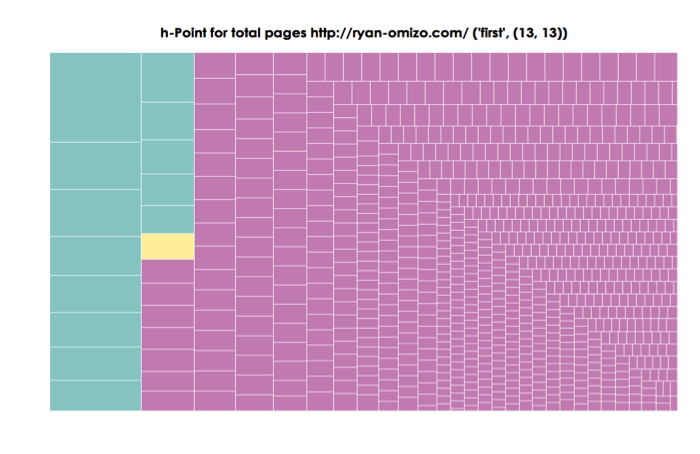
The RePort_Bot outputs an HTML page featuring treemap visualizations that  graph the h point distributions of word tokens for the entire portfolio and for individual pages[1]. The synsemantic, h point, and autosemantic terms are color coded so that users can discern the breakpoint between “fast” and “slow” terms in the treemap (see Figure 8). Hovering reveals a tooltip with term and rank-frequency information. Figures 9–11 display data culled from ryan-omizo.com.

Figure 8. Treemap Color Codes

Figure 8. Treemap Color Codes

h-Point for total pages http://ryan-omizo.com/ (‘first’, (13,13))
Figure 9. Treemap of All ePortfolio Pages, with 'first' as the h-point (13, 13) and 'author' with the highest rank-frequency (1, 78)

Figure 9. Treemap of All ePortfolio Pages

Taking ryan-omizo.com as a test case for the RePort_Bot, we can start reconciling results with rhetorical aims of the website/ePortfolio. The function of ryan-omizo.com is to establish my web presence in the field of academia—specifically, rhetoric and composition, professional writing, and digital humanities. The primary means of grounding my professional academic presence is through the use descriptions of myself, descriptions of page content, and blog posts that present examples of computational work, of which, a lengthy portion is occupied by material supplementing a off-site publication (see Omizo and Hart-Davidson 2016 for further context). All of this would be considered the why and what of this professional/academe-anchored ePortfolio. The RePort_Bot findings focus on how I am implementing this strategy and crafting an ethos.

The first treemap visualization (Figure 9) accounts for the total term frequencies and ranks in the entire ePortfolio. The h point (‘first’, 13, 13) seems rather innocuous as a separator of synsemantic and autosematic terms in the ePortfolio’s vocabulary. Terms such as (“writer”, 14) and (“rhetoric”, 17) that fall in the “fast” synsemantic category parallel the avowed ethos of rhetoric and composition academic. However, also occupying the “fast” synsemantic region of the rank-frequency distribution are more idiosyncratic. Terms such as (“author”, 1, 78) and (“sentence”, 2, 41) seem to relate to the discipline of rhetoric and composition, but their high rank-frequency suggest that something more is occurring. Indeed, the reason these terms appear with such high rank-frequency is because they are part of an extended blog post that contains a supplement to a print article. Of course, determining the provenance of a term’s rank-frequency does not convey higher order rhetorical information—especially to the writer of the ePortfolio under inspection. The information in this treemap does suggest that primary content of ryan-omizo.com (defined by length and vocabulary richness) is skewed toward a single blog post in the Experiments section. The insight here implicates the arrangement of the ePortfolio as opposed to the topics considered.

ryan-omizo.com |
h-point (u’writing’, (2,2))
Figure 10. Treemap visualization of landing page, with 'writing' as the h-point (2,2) and 'rhetoric' and 'university' as the top rank-frequency (1,3)

Figure 10. Treemap visualization of landing page

Research
h-point (u’graph’,(2,2))
Figure 11. Treemap visualization of Research page, with 'graph' as the h-point (2,2) and 'human,' 'computational,' 'how,' and 'research' as the top rank-frequency (1,3)

Figure 11. Treemap visualization of Research page

The second (Figure 10) and third treemaps (Figure 11) also seem to return the expected results. The brevity of both pages translates into scant distinctions between synsemantic and autosemantic terms. Moreover, the landing page features “fast” terms such as “rhetoric,” “composition,” “writing,” and “university”—all of which reiterate institutional affiliation and academic training. However, it is the fourth treemap that visualizes Teaching (Figure 12) that, upon personal reflection, returns surprising results. The highest ranked term in that page is “must,” suggesting that the content on that page emphasizes prescription—the “oughts” of what teachers and students should do to make learning happen or a univocal stance toward pedagogy. As a point of personal reflection, this is not the pedagogical stance that I wish to communicate in my ePortfolio, so this result is a surprise to this author.

Teaching
h-point (u’writer’,(3,3))
Figure 12. Treemap visualization of Teaching page, with 'writer' as the h-point (3,3) and 'must' as the top rank-frequency (1,5)

Figure 12. Treemap visualization of Teaching page

In all, the rhetorical velocity information, framed as the reuse of terms above and below the in-page h point of ryan-omizo.com, has suggested the following: (1) the content linguistic content of the ePortfolio is dominated by a single post in the Experiments blog, which functions an online resource for readers of the Journal of Writing Research; (2) the landing, Research, and CV pages return results that are typical of genre in that the circulation of terms on the page are disciplinary-specific and seem to enunciate my positionality within the field of rhetoric and composition; (3) the Teaching page suggests the use of a prescriptive vocabulary that runs counter to my actual teaching philosophy.

Use Cases/Conclusions

In this section, I offer four use cases for the RePort_Bot and make an extended point about how the use of the RePort_Bot can inform pedagogy and classroom practices. To make this latter point, I include a possible ePortfolio assignment that leverages the theoretical preoccupations of the RePort_Bot.

The first use case builds upon the Output/Analysis section above and poses the RePort_Bot as an instrument that fosters self-reflection/self-regulation. This use case is based on the assumption that writers do not always have a global perspective on their own writing (hence the need for peer and instructor feedback). Though blunt, the RePort_Bot provides an alternative perspective on the ePortfolio. This perspective does not offer definitive answers, but obliges ePortfolio writers to revisit their writing and attempt to integrate the results with their composing strategies. This act represents what Graves (1992) describes as a “nudge.” This nudge can encourage the writer to re-read his/her writing and learn to make individual course corrections.

The second use case for using the RePort_Bot involves making the ePortfolio a site for increased functional literacy (Selber 2004). The steps required to update the RePort_Bot files to make it viable for an individual’s ePortfolio can serve as a brief introduction to Python. More germane to an ePortfolio course, however, is the reconceptualization of the ePortfolio that is required before processing. Editing the RePort_Bot obliges the user to think of his/her ePortfolio not simply as a holistic showcase of exemplary work, curation, and reflection but as live web assets, accessible by human and non-human agents. Students would learn that their digital artifacts operate within an ecosystem of web crawlers and bots that are reading their ePortfolios and already repurposing their content. The RePort_Bot’s Python configuration can illuminate what this process involves. In this way, the RePort_Bot is similar in purpose to Ridolfo’s (2006) (C)omprehensive (O)nline (D)ocument (E)valuation heuristic. The CODE guide asks students to evaluate online sources in the context of the sources’ digital fingerprint (e.g., domain name, IP address, ISP, geographic location, and version history), much of which is neglected when undergraduates select materials for research. Revising the RePort_Bot for the needs of a class or individual user can perform the same type of unpacking, making students aware of their own digital fingerprint.

The third use case involves using the RePort_Bot as a research tool for a competitive review of like-minded ePortfolio writers. In a competitive review session, a writer can use the RePort_Bot to compare his/her site with a peer’s ePortfolio in order to determine how his/her ePortfolio aligns with others in his/her field according to the use of “fast” and “slow” terms. A student who is majoring in public relations and is designing a professional ePortfolio may look to the sites of industry experts and see how those experts are managing their rhetoric with the use of stabilizing and recurrent synsemantic terms and stickier, more idiosyncratic autosemantic terms. Put another way, this application of the RePort_Bot can be instructive in teaching practitioners how to mine ePortfolio for genre cues at the level of situation and syntax (Campbell and Jamieson 1978, 19; Jamieson and Campbell 1982, 146). Designers of ePortfolios can use the RePort_Bot to discover the linguistic elements that recur within known disciplinary examples in order to determine the types of elements that are characteristic of their fields.

The fourth use case for the RePort_Bot construes the RePort_Bot as a research tool for a broader genre analysis of ePortfolios. This genre research coheres with Miller’s (1984) definition of genre as goal-driven action that renders communication socially intelligible. Miller (1984) makes it clear that genre exceeds style and formal rules, indicating an “acting together” without necessary closure. While the RePort_Bot operates as a function of the presence or absence of terms in an ePortfolio, the heuristical nature of its output does engage in the type of open inquiry for which Miller advocates. The conventions and taxonomies read from the treemap visualizations are meant to complement human judgment. Moreover, the treemaps oblige a bottom-up interpretation—beginning with the frequency of word units that lay the foundation for higher-order rhetorical analysis. The empirical results of the RePort_Bot can lead to the establishment of more general rules and tendencies, but these rules and tendencies are generated by the constitution of textual inputs as opposed to imposing macro-classification schemes onto texts. In the arena of computation, the results generated by the RePort_Bot might be considered unsupervised—meaning that human coding of content has not been used to “teach” the algorithm how to label data. Consequently, a sub-use case could be made for using the processing and labeling (“fast” vs. “slow”) as a means to annotate data for other computational tasks like supervised machine learning or classification tasks.

These four use cases are presented as starting points for future elaborations. That said, communicating rhetorical concepts such as rhetorical velocity and bibliometric concepts such as the h point to students might still present challenges for instructors. To help students use the RePort_Bot in their cycles of composing, reflecting and revising, I am including a worksheet predicated on reconciling the rhetorical goals of student users and the RePort_Bot results. The tasks, as you will, see are meant to position students within a feedback loop between their drafts, their RePort_Bot results, and their goals and expectations for their ePortfolio projects. Students are obliged to first isolate data from the ePortfolio as a whole and from individual pages. They then frame the entire ePortfolio and each page in terms of their motivations. After scraping and analyzing their ePorfolio content with the RePort_Bot script, they are asked to recursively compare the measurements of the RePort_Bot with their own perceptions and then explain areas of coherence or disjunction.

Notes

[1] The treemap visualization used is an adaptation of Bostock’s treemap example: https://bl.ocks.org/mbostock/4063582. The RePort_Bot’s visualization is greatly indebted to this published code sample.

RePort_Bot Student Worksheet

Name: __________

Date: ___________

Using this sheet, you will record the goals for your ePortfolio as a whole and for each page or content area. Additionally, you will describe the tone you wish to convey through the written content of the ePortfolio. You will list at least 3 key words that communicate the primary topics of your ePortfolio as a whole and 3 key words for each page or content area.

Once you have completed the sheet, run the RePort_Bot script on your ePortfolio and compare your reading of the results to your initial goals, tone descriptions, and key words.

ePortfolio URL: ____________________

Please describe the primary goals of your ePortfolio in the space below. Who is the audience of yourmy ePortfolio? What do you wish to communicate to this audience? How are you communicating with this audience?

Please describe the tone you wish to convey in your ePortfolio and how you believe you are establishing this tone in the space below.

Please list 3 key words that sum up the main topics of your ePortfolio:

1.
2.
3.

After running the RePort_Bot, please compare the interpretation of your results to the goals description above. Is the RePort_Bot classifying the terms you wish to emphasize as “fast” or “slow” in rhetorical velocity? Is the RePort_Bot confirming what you expected to see? Why or why not? What do you think is influencing the RePort_Bot’s analysis judgment?

ePortfolio page title: ______________

URL: ____________________

Please describe the primary goals of the listed ePortfolio page in the space below. What is the function of this page? How does the content of this page relate to the goals of the whole ePortfolio?

Please describe the tone you wish to convey in this ePortfolio page and how you believe you are establishing this tone in the space below.

Please list 3 key words that sum up the main topics of this ePortfolio page:

1.
2.
3.

After running the RePort_Bot, please compare the intepretation of your results to the goals description above. Is the RePort_Bot classifying the terms you wish to emphasize as “fast” or “slow” in rhetorical velocity? Is the RePort_Bot confirming what you expected to see? Why or why not? What do you think is influencing the RePort_Bot’s judgment?

Bibliography

Abrami, Philip, Anne Wade, Vanitha Pillay, Ofra Aslan, Eva Bures, and Caitlin Bentley. 2009.”Encouraging self-regulated learning through electronic portfolios.” Canadian Journal of Learning and Technology/La revue canadienne de l’apprentissage et de la technologie 34, no. 3. https://www.cjlt.ca/index.php/cjlt/article/view/26414/19596

Ball, Philip. “Index Aims for Fair Ranking of Scientists.” Nature 436, no. 7053 (2005): 900–900. doi:10.1038/436900a

Barrett, Helen. 2000 “Electronic Teaching Portfolios: Multimedia Skills+ Portfolio Development= Powerful Professional Development.” ERIC Database (IR020170). http://eric.ed.gov/?id=ED444514

Beveridge, Aaron. 2016. “Looking in the Dustbin Data Janitorial Work, Statistical Reasoning, and Information Rhetorics.” Computers and Composition Online Fall 2015–Spring 2016. http://cconlinejournal.org/fall15/beveridge/

Bourelle, Andrew, Tiffany Bourelle, and Natasha Jones. 2015. “Multimodality in the Technical Communication Classroom: Viewing Classical Rhetoric Through a 21st Century Lens.” Technical Communication Quarterly 24, no. 4: 306–327. http://dx.doi.org/10.1080/10572252.2015.1078847.

Campbell, Karlyn Kohrs, and Kathleen Hall Jamieson. 1978. “Form and Genre in Rhetorical Criticism: An Introduction.” Eds. Karlyn Korhs Campbell and Kathleen Hall Jamieson. in Form and genre: Shaping rhetorical action, edited by Karlyn Korhs Campbell and Kathleen Hall Jamieson, 9–32. Falls Church: Speech Communication Association.ERIC Database (CS502046). http://eric.ed.gov/?id=ED151893

Graves, Donald. 1992. “Help Students Learn to Read their Own Portfolios.” in Portfolio Portraits edited by Donald H. Graves and Bonnie S. Sunstein, 85–95. Portsmouth:Heinemann.

Hirsch, Jorge E. 2005. “An index to quantify an individual’s scientific research output.” Proceedings of the National academy of Sciences of the United States of America 102, no. 46: 16569–16572. doi: 10.1073/pnas.0507655102.

———. 2007. “Does the h index have predictive power?” Proceedings of the National Academy of Sciences 104, no. 49: 19193–19198. doi: 10.1073/pnas.0707962104

Jamieson, Kathleen Hall, and Karlyn Kohrs Campbell. 1982. “Rhetorical hybrids: Fusions of generic elements.” Quarterly Journal of Speech 68, no. 2: 146–157. http://dx.doi.org/10.1080/00335638209383600.

Jockers, Matthew L. 2013. Macroanalysis: Digita Methods and Literary History. Champaign: University of Illinois Press.

Kilbane, Clare R., and Natalie B. Milman. 2003. The Digital Teaching Portfolio Handbook: A how-to guide for educators. New York: Pearson College Division.

Kissane, Erin. 2011. The Elements of Content Strategy. New York: A Book Apart. eBook.

Klein, Lauren F. 2013. “The Social eportfolio: Integrating social media and models of learning in academic eportfolios.” in ePortfolio performance support systems: Constructing, presenting, and assessing portfolios, edited by Wills, Katherine V., and Richard Aaron Rice, 53–71. Fort Collins. http://wac.colostate.edu/books/eportfolios/willsrice.pdf

Kopple, William J. Vande. 1985. “Some Exploratory Discourse on Metadiscourse.” College composition and communication: 82–93. doi: 10.2307/357609

Meloni, Julia. 2009. “Getting Started with GoogleDocs in the Classroom.” Chronicle of Higher Education: ProfHacker, Accessed April 12, 2016. http://www.chronicle.com/blogs/profhacker/getting-started-with-google-docs-in-the-classroom/22641.

Miller, Carolyn R. “Genre as Social Action.” Quarterly Journal of Speech 70 (1984): 151–167.

Omizo, Ryan and Hart-Davidson, William. 2016. “Finding Genre Signals in Academic Writing.” Journal of Writing Research 7, no. 3: 485–509. doi: 10.17239/jowr-2016.07.03.08

Popescu, Ioan-Ioviț, and Gabriel Altmann. 2009. Word frequency studies. Berlin: Mouton de Gruyter.

Ramsay, Stephen. 2011 Reading machines: Toward an algorithmic criticism. Champaign: University of Illinois Press.

———. 2003. “Special section: Reconceiving text analysis toward an algorithmic criticism.” Literary and Linguistic Computing 18, no. 2: 167–174. doi: 10.1093/llc/18.2.167

Reynolds, Nedra, and Elizabeth Davis. 2013. Portfolio teaching: A guide for instructors. New York: Macmillan Higher Education.

Rice, Rich. 2013. “The Hypermediated Teaching Philosophy ePortfolio Performance Support System.” in. ePortfolio performance support systems: Constructing, presenting, and assessing portfolios, edited by Katherine Willis and Richard Aaron Rice, 37–51. Fort Collins: WAC Clearinghouse. http://wac.colostate.edu/books/eportfolios/willsrice.pdf

Ridolfo, Jim. 2006. “(C).omprehensive (O).nline (D).ocument (E).valuation.” Kairos: A Journal of Rhetoric, Technology, and Pedagogy 10, no. 2. http://kairos.technorhetoric.net/10.2/praxis/ridolfo/

Ridolfo, Jim, and Dànielle Nicole DeVoss. 2009. “Composing for Recomposition: Rhetorical Velocity and Delivery.” Kairos: A Journal of Rhetoric, Technology, and Pedagogy 13, no. 2. http://kairos.technorhetoric.net/13.2/topoi/ridolfo_devoss/

Ridolfo, Jim, and Martine Courant Rife. 2011. “Rhetorical Velocity and Copyright: A Case Study on Strategies of Rhetorical Delivery.” in  Copy(write), edited by Martine Courant Rife, Shaun Slattery, Danielle Nicole DeVoss, 223–243. Fort Collins: WAC Clearinghouse. eBook pdf.

Samuels, Lisa, and Jerome J. McGann. 1999. “Deformance and interpretation.” New Literary History 30, no. 1: 25–56. doi: 10.1353/nlh.1999.0010

“Scrapy | A Fast and Powerful Scraping and Web Crawling Framework.” Scrapy | A Fast and Powerful Scraping and Web Crawling Framework. Accessed April 12, 2016. http://scrapy.org/.

Selber, Stuart. 2004. Multiliteracies for a digital age. Carbondale: SIU Press.

Silver, Naomi. 2016. “Reflection in Digital Spaces Publication, Conversation, Collaboration.” in Rhetoric of Reflection, edited by Kathleen Blake Yancey, 166–200. Logan: Utah State University Press. http://www.jstor.org/stable/j.ctt1djmhfg

Yancey, Kathleen Blake. 2004. “Made not only in words: Composition in a new key.” College Composition and Communication 56, no. 2: 297–328.

———. 2013. “Postmodernism, Palimpsest, and Portfolios: Theoretical Issues in the Representation of Student Work.” in. ePortfolio performance support systems: Constructing, presenting, and assessing portfolios, edited by Katherine Willis and Richard Aaron Rice,15–36. Fort Collins: WAC Clearinghouse. http://wac.colostate.edu/books/eportfolios/willsrice.pdf

———. 2009. “Reflection and Electronic Portfolios.” in Electronic portfolios 2.0: Emergent research on implementation and impact, edited by Darren Cambridge, Barbara Cambridge, and Kathleen Blake Yancey, 5–15. Sterling: Stylus Publishing, LLC..

———. Reflection in the writing classroom. 1998. Logan: Utah State University Press.

Zipf, George Kingsley. 1949 Human behavior and the principle of least effort: An Introduction to Human Ecology. Cambridge: Addison-Wesley Press.

About the Author

Ryan Omizo is an Assistant Professor in the Department of Writing and Rhetoric at the University of Rhode Island. His research interests include computational rhetoric, Asian-American rhetoric, and the digital humanities. His work has appeared in The Journal of Writing Research and Enculturation: Journal of Rhetoric, Writing, and Culture. He is the co-editor of The Rhetoric of Participation: Interrogating Commonplace In and Beyond the Classroom, which is currently under review by Computers and Composition Digital Press.

0

Learning and Reflecting with ISUComm ePortfolios: Exploring Technological and Curricular Places

Abstract

EPortfolios are acknowledged as a high-impact practice in a student’s university experience (Kahn 2014; AAEEBL 2016). For our multimodal, place-based curriculum (Blakely and Pagnac 2012), we envision ePortfolios as an environment of discovery, exploration, and research, and a place to create connections. While David Hailey (2014) discusses problems with the place metaphor and how it makes it more difficult to evaluate websites as texts, we find the reverse is helpful. Seeking to better teach electronic communication in this context, we developed an ePortfolio platform using open-source software, a platform that promotes the place metaphor as it affords students the ability to guide audiences through its architectural features and its unique configuration of pages and links. Enhanced by our pedagogy, which teaches a scaffolded process of research, critical inquiry, composition, and reflection, students use our platform to define themselves as growing scholars and professionals in an online place.

Our approach to the implementation of an ePortfolio system in our foundational communication program is one where—as characterized by Michael Day (2009)—multiple perspectives and strengths are appreciated and utilized to accomplish important programmatic goals. In this article we describe 1) our ISUComm ePortfolios as an environment for student learning in our large Foundation Courses program, 2) the challenge of developing the technology and support structure needed to enhance our pedagogy, and 3) how we more fully integrated reflection throughout the semester and emphasized the crucial role it plays in student learning. As a result of this iterative process, we describe how pedagogy and technology can and should mediate each other in ePortfolio development and implementation. We then conclude by describing how we are scaling up to further develop our platform and its various subsystems.


Introduction

EPortfolios are widely acknowledged as a high-impact practice in a student’s university experience (Kahn 2014; AAEEBL 2016). In this article we theorize our ISUComm ePortfolios as part of an environment for student learning, within which students explore themselves as university students on a particular campus. Students are challenged to become reflective communicators who recognize the transfer potential of their communication learning, including the affordances of the web, through their multimodal work in our program. Indeed, the concept of place has emerged as integral to our thinking about the interaction between technology and pedagogy in our program: learning occurs in deliberately designed environments that encourage exploration, growth, and reflection on that growth. Blakely and Pagnac (2012) note that

[t]he transition to being a successful university student is seen as a movement toward more generative and adaptive ways of understanding and being in the world, a process that happens on many levels and through many means [ . . . ] The transition to and subsequent experience at the university is not just a time of limbo or a four-year layover on the road to the ‘real world.’ (17)

As this suggests, providing students an effective curriculum is important to student transition, identity formation, and a sense of responsibility as learners. Such a curriculum must allow students to explore questions most new college students are implicitly asking: “Who am I?” “Where am I?” and “What do I do?” (Thayer, 2003, qtd in Blakely and Pagnac 19).

In this article, we describe how our ISUComm Foundation Courses Program’s threshold practices and curriculum undergird our pedagogy and how substantive technological development and support work together to enhance our pedagogy. We demonstrate how pedagogy and technology can and should mediate each other in ePortfolio development and implementation. We offer this while recognizing that our own experience is still evolving; what began with a small group within ISUComm Foundation Courses will, in Spring 2017, involve the entire program. Through workshops, our growth is extending to the larger Department of English and potentially the university as a whole. So while some of our decisions are contingent and context-dependent, we believe that sharing important decisions from our journey in implementing an effective ePortfolio platform for our program can be beneficial to any institution working to develop or improve one at their own institution. We feel these insights further the discourse about how ePortfolios are integral to multimodal programs and student learning.

Our approach to the implemention of an ePortfolio system in our foundational communication program, as well as our approach to writing this piece, is one where—as characterized by Michael Day (2009)—multiple perspectives and strengths are appreciated and utilized to accomplish important programmatic goals.[1] Our project began with our program goals in our multimodal, WOVE pedagogy, which focuses on written, oral, visual, and electronic modes of communication; we wanted to develop a stronger electronic component as a means to better develop the E in WOVE. This goal challenged us to transcend technological and pedagogical boundaries. We found that our pedagogy drove technological innovations just as our developing technology drove our pedagogy, particularly with respect to reflection. Therefore, the work described here is the dialogic result of the interactive forces exerted by our technological development and our pedagogical decisions and implementations.

Over three years, the ePortfolio has become a vital component of our ISUComm Foundation Communication (ISUComm) courses program (http://www.engl.iastate.edu/isucomm/). Our Online Learning Team (OLT), comprised of graduate students, both supports the customized ISUComm ePortfolio sites our students create, and also administers our department’s own LMS (built with Moodle) and WordPress installations. In the process of bolstering the technological components of our multimodal curriculum, we were in turn motivated to develop new pedagogies to encourage students to take full advantage of the reflective thinking that can make any portfolio a deep learning experience (Jenson 2011). At the same time, the graduate students who developed the open-source website platform had to consider the technical, pedagogical, and, importantly, the security and maintenance needs of our administration. In all of these developments, our thinking about learning in place resonates with that of Anne Wysocki and Michael Day: “as educators, technorhetoricians can and should respond to or resist large-scale, commercial community-building by forming and maintaining smaller-scale intentional communities of practice that fit with local contexts of value and belief” (Day 2009, 143).

Through our multiple voices—a writing program administrator (WPA) and three PhD students who have all contributed to the ePortfolio system in Iowa State University’s ISUComm Foundation Courses—we show that incorporating ISUComm ePortfolios into our students’ learning has not been a linear, straightforward process, but rather a ground-up, collaborative, and iterative undertaking. Our writing challenge has been to accurately present a process where technology and pedagogy informed each other in an iterative process.

Theorized Curriculum: Place, Thresholds, and Liminality

The curriculum for our very large program (7,500 students/year), ISUComm Foundation Courses, is firmly based in the guidance of our primary professional organizations—the National Council of Teachers of English (NCTE) and the Council of Writing Program Administration (CWPA). As our detailed programmatic website elaborates (http://www.engl.iastate.edu/isucomm/), one goal of the program is to foster students’ development of rhetorical knowledge and practices in the context of a particular habit of mind, one the ePortfolio literature calls “folio thinking.” This process of learning allows students to “integrate discrete learning experiences, enhance their self-understanding, promote taking responsibility for their own learning, and support them in developing an intellectual identity” (Penny Light, Chen, and Ittelson 2011, 86). This habit of mind, we argue, is tightly coordinated with and complementary to the work we ask our students to undertake in our campus place-based curriculum. The curriculum used in the first of our two-course program centers on student discovery, exploration of, and research into the campus where they move and learn everyday. They are encouraged to see themselves within a process of transitioning, placing themselves within a trajectory, seeing or creating connections, and finding or developing identities as learners in a university campus (detailed in Blakely and Pagnac 2012).

Likewise, folio thinking is a process of exploring, establishing touchstones (artifacts, experiences), and extrapolating into one’s future based on past and present experiences. As Gourlay (2009) and others (Meyer and Land 2005; Adler-Kassner, Majewski, and Koshnick 2012; Robertson, Taczak, and Yancey 2012) assert, central to these transitional processes is liminality, an experience of being “betwixt spaces” (Palmer, O’Kane, and Owens 2009) and grappling with “troublesome knowledge” (Adler-Kassner et al, 2012). As students continue to navigate and learn from these liminal spaces, they experience a transition essential to the university experience.

The ISUComm Foundation Courses campus-as-place curriculum creates a “material-discursive where” (Mauk 2003, 379) from which work in ISUComm Foundation Communication classes connects students to their university experience deliberately and reflectively as a series of increasingly intensive opportunities to explore their present even as they imagine and prepare for their futures. (See Blakely and Pagnac, “Pausing in the Whirlwind,” 2012, for a full theoretical and curricular description.) ISUComm ePortfolios provide a significant complementary and parallel “material-discursive where” within which students have the opportunity to work in this “enabling ground” (Buell 22)—or what D.W. Winnicott (qtd in Ellsworth 2005) refers to as a “transition space”—a deliberately designed, interrelated learning place that fosters transformation.

As Gourlay (2009) asserts, “writing plays a role in student identity formation”; we agree that threshold concepts and practices can become the site of learning, sometimes as “troublesome points of struggle which may also lead the individual to a fuller sense of being a student and belonging at university” (181), and we argue that ePortfolios are thus an important threshold practice. By practicing folio thinking within the context of our place-based curriculum, students are able to productively transition to the university environment while also reflecting on their past experiences as communicators and learners. We have found that the ePortfolio (folio thinking and its metacognitive centerpiece, reflection) must therefore be introduced at the outset of students’ experience at the university—in our case, at the beginning of their first ISUComm Foundation Course. The ISUComm ePortfolio thus becomes the enveloping, shaping environment, the material-discursive where, the enabling ground, the transition space (e.g., Mauk 2003; Buell 2001; Ellsworth 2005), in which the student is encountering, working, exploring, and making connections among threshold concepts. They explore these concepts in tandem with the place-based work they are doing; both are environments in and through which they are readying themselves for future learning and accomplishing future goals.

Reflection as a Threshold Practice

These conclusions are the result of a threshold concept we learned as we navigated the liminal experience of incorporating ePortfolios into our program. ISUComm ePortfolios afforded better options for our students to display their multimodal work than the paper portfolios we had been asking them to produce. Indeed, when we began examining ISUComm ePortfolios for programmatic assessment, we were pleased with the multimodal products students showcased. Students incorporated photographs, videos, and screenshots as examples of their work in the course. They were doing a good job of collecting artifacts and displaying them in a digital environment, which is the first step to folio thinking. However, we found that many did not display the larger connections that indicate deep learning and reflective habits of mind (Yancey; Jensen). In fact, in response to a reflection prompt asking about their growth as communicators in an electronic medium, we found some students dutifully “reflecting” that their best example of electronic work during the semester was a PowerPoint presentation. They were in the process of creating an ISUComm ePortfolio whose very communicative mode was unacknowledged and seemingly invisible to them! Simply creating these spaces for students to work within was not enough to facilitate the habits of mind that ePortfolios have the potential to develop as a high-impact practice. As well, the way we were teaching reflection was not necessarily affording students the metacognitive experiences they needed in order to “see” the spaces they were filling with artifacts and better understand the affordances that environment gives them as the architects of those spaces.

We are now building a consistent programmatic pedagogy that more fully realizes the potential of the ISUComm ePortfolio, its attendant reflections, and (we hope, as a result) student learning. As we have scaled up ISUComm ePortfolios and encouraged more instructors to use the system, we have also spent considerable time contemplating and articulating how the print portfolio model need not simply be translated into the digital environment, but may need to be abandoned altogether in favor of a born-digital model. Critical reflection about how to encourage students’ reflective thinking made us realize that their reflection was in many instances constrained by the somewhat generic prompts we offered. As part of this effort, we developed an updated assignment sheet and rubric for the portfolio that asks students to think critically about what the electronic mode affords. The new assignment sheet calls for a web-centric approach that asks the students to conceptualize the ePortfolio in terms of web pages, menus, and digital content. We directly ask students to create an About Me page to introduce themselves and their ISUComm ePortfolios, which allows them a space to begin articulating their ethos and explore their identities as university students and communicators. In the LMS (Moodle) course template and lesson plans that we offer beginning instructors, we situate ISUComm ePortfolio construction near the beginning of the semester in order to encourage the creation of a living, dynamic document throughout the term.

But seeing electronic affordances was not the only metacognitive vision we found the students lacking. What was often absent in student reflections was evidence of deep learning and recognition that they are architects who make conscious choices about their own work. We have discovered, in alignment with what Peggy O’Neill (2002) suggests, that it is important to encourage instructors to pass over the liminal threshold and recognize how integral reflection ought to be throughout the composing process. In a large program like ours, change happens slowly. Previous versions of the place-based assignments consistent across all sections included reflection as a final step in the writing process. So, besides changing the Moodle course template for beginning instructors, we have begun providing departmental workshops that encourage instructors to work formal and informal reflective activities into their curriculum at various stages of projects rather than just at the end of major papers. As more instructors incorporate ISUComm ePortfolios we have an opportunity to stress this in their training. We also created better prompts for reflections throughout the semester and more specific and simple ways of evaluating them (based on research by Jenson 2011; Rickards, et al. 2008). For the final semester reflections associated with the ISUComm ePortfolio, we encourage teachers to treat the reflection as an important genre in itself rather than just something for students to check off the to-do list: to this end, we suggest that teachers devote class time to peer review for these final reflection pieces.

We also recognized the necessity of differentiating between reflection for assessment and reflective activities as opportunities to express weakness and growth. As most composition teachers know, students, knowing that reflections will be formally assessed, often write what they think will most impress their teachers. Our new emphasis on reflective activities throughout the composing process is designed to address this concern: some reflections or reflective activities are private spaces where expressing vulnerability does not impact grades; more formal reflections like those associated with the final ISUComm ePortfolio are public spaces. Our explicit attention to reflection as a process helps students develop reflective habits while also producing opportunities for teachers and students to interact in ways where vulnerabilities are not liabilities, but rather steps in the learning process. In fact, as Riedinger (2009) suggests, we ask students to “mine” the reflections they produce during the semester in order to more fully describe their learning (90). Thus students’ formal, final ISUComm ePortfolio reflections analyze their informal reflections as well as provide hyperlinks to notes, feedback, and drafts from other projects throughout the semester. At this point we hope that students recognize the similarities in the reflective process even as they recognize that their formal reflections are different from their informal ones.

This need for more fully integrated reflection throughout the semester has forced us to reconceptualize the role the ISUComm ePortfolio should play in the Foundation Courses as well. Since such a significant portion of the ISUComm ePortfolio assignment includes reflection, the student’s site thus provides a generative environment in which students can reflect on their work throughout the semester while using it as an interactive repository for their work. This may look like a blog in some classes, akin to a weekly journal. Other classes do reflective work in other ways, but they still begin ISUComm ePortfolios early in the semester by asking students to learn how to manipulate the platform and make informed rhetorical decisions as they set up their menus and pages. This is a distinct change from the paper portfolio process instructors used before, where the portfolio assignment was not introduced until the end of the semester. Regardless of what the actual end product looks like, as a result of our new pedagogical emphasis, we expect students to make conscious decisions as digital authors throughout the semester and, as a natural part of the process, reflect upon the affordances the digital environment offers.

We turn now to some of the growing pains we experienced as we developed our technical system. We hope these experiences will be enlightening, and we offer the pedagogical considerations highlighted above as a backdrop for considering how best to theorize such a system. There is a reciprocal relationship between technology and pedagogy. As exemplified above, we continue to restructure our pedagogy to reflect what we have learned as a result of our experience with the technology, and we continue to develop the technology to better match the pedagogy.

Developing the Platform as an Online Environment

Our fully functioning ePortfolio platform is a WordPress multisite installation called ISUComm Sites (hosted at sites.isucomm.iastate.edu). This means that a single installation was customized to create a network of ePortfolios that share the same themes and plugins and that can be managed by a small team of site administrators.

We chose WordPress because it is a well-supported, open-source platform that is easier for novices to learn. Using open-source tools like WordPress for ePortfolios is a practice endorsed by the National Council of Teachers of English (NCTE), because it affords us the ability to “contribute to the development of open-source software and standards that support e-portfolio implementation and maintenance.” The advantages of a multisite installation are numerous: first, site administrators have the sole ability to create new ISUComm ePortfolio sites on the network; second, the site admins can simultaneously upgrade all sites and their related themes and plugins; third, the site admins can access the dashboard of any ISUComm ePortfolio site, which means they can assist instructors and students within the context of their own ISUComm ePortfolio sites; fourth, the same network hosts both a support site for new users and an online repository of materials for instructors teaching with the ISUComm ePortfolio, thus interweaving our support structure within the very environment that our students are working in.

The permissions architecture is adapted to foster folio thinking as a habit of mind by foregrounding that students have control over their own sites, which they retain throughout their college career and for up to four years after graduation. This process begins when instructors request sites for their students as part of their enrollment in English 150 and 250. When ISUComm ePortfolios are generated, both the instructor and the students have administrative control over their sites (minus access to themes and plugins, or the ability to add new users). This is so the instructor can assist students as well as assess their work. Our platform works through ISU’s authentication system, which has already assigned each user a unique Net-ID. To foreground that the site belongs to individual students, as opposed to their instructor, students’ Net-IDs become part of the URLs for their respective ISUComm ePortfolios (http://sites.isucomm.iastate.edu/[Net-ID]). Assigning students primary ownership over their individual sites is not without its problems. For example, our URL protocol confounds group-authorship as an option for ISUComm ePortfolio sites. But the advantage is that students’ ISUComm ePortfolios are unique to them, and can be accessed and developed throughout their college careers and beyond.

Our goal is that students will be able to use the reflective habits they develop in our foundation courses to interrogate their learning as they progress throughout their educational experience and use their ISUComm ePortfolios for new purposes. Following these first semesters, a script will remove the original instructor from the administrative role since the instructor is no longer commissioned to assist or assess the student’s work. Subsequently, the student brings their ISUComm ePortfolios to other communication courses, which allows them to continue developing folio thinking. The student later retains their ISUComm ePortfolio to purpose and repurpose as they choose. Another instructor might be given administrative access at any time, but only if the instructor has the student during a subsequent course, or if the student wishes to grant access to a mentor of their choosing. Having a network of ISUComm ePortfolio sites that authenticates through Iowa State’s system means that only current Iowa State students and staff have access to ISUComm ePortfolios within the network. This does not mean that our ISUComm ePortfolios cannot be public: this just means they are secured until the site can be properly developed by students before they appear on the World Wide Web.

The platform outlined above was the product of a three-year, iterative process. An early account of this negotiation has been published with the Association of Computing Machinery as an Experience Report with the Special Interest Group on Design and Organizational Communication (see Lutz, et al.). For the purposes of this article, it is worthy to address how we negotiated the security and permissions of our system before discussing our pedagogy.

Our first meeting to develop our ISUComm ePortfolio platform ended in failure because we could not find agreement with our IT technicians on how our ePortfolio platform would work. We understand this disagreement as a set of “boundaries,” or “sociocultural difference leading to discontinuity in action or interaction” (Akkerman and Bakker 2011, 133). In the simplest terms, we wanted an easy-to-use platform that was as open as it could be in terms of access and use; however, the lead technician was not confident that a group of graduate students knew enough about server-side administration and development to successfully create and maintain a WordPress installation. The technician wanted to know: would the sites be available on the WWW? What security would be in place? Who would have administrative privileges on the server? Who would have access to the directories and to the database? How much storage would be needed? Who would have access to the back end of the WordPress network? And on the individual students’ sites? At this point, we did not understand the technician’s expectations and, apart from our imaginations, we were not quite sure of our own. But just as students learn and grow from “troublesome knowledge” (Adler-Kassner, et al 2012, 2) that does not fit easily with pre-existing understandings or projections, this ostensible “failure” became the enabling ground on which we were able to move forward with a new plan.

We built a heuristic framework to understand how we might reconcile expectations and transcend boundaries in order to build the best platform possible, as shown in Table 1.

Questions for Platform Development Our Solutions
Security?

What kind of server environment is needed?

Who can provide a Uniform Resource Identifier? What should it be?

Virtual Machines hosted by the university and managed by their staff. The platform is accessible through Shibboleth, ISU’s centralized authentication system. The WordPress technician has access to the directories. The graduate students have access to the code through GitHub.
Permissions?

Who has access to the directories?

Who has access to the back-end of each site?

Custom roles created in a WordPress multisite installation: super admin, instructor, and student. The WordPress technician and the OLT are super admins, who have sitewide control over sites, themes, and plugins; the instructors have administrative control over their own ePortfolio site and the sites of their students, but cannot access themes or plugins; the students have administrative control over their own ePortfolio site, again without access to themes or plugins.
Support?

Who are the primary contacts?

Virtual support, or support in person?

How many hours can be dedicated to support?

The email address [email protected] was set up through the university. The WordPress technician, the OLT, and the Director of Composition are included in this list. There is a dedicated staff of five graduate students with 10 hours per week devoted to Sites and other online platforms; 30 hours of available in-person support; 2 hours of invited co-working space each week.
Development? The Jetpack™ plugin manager that expands the affordances of the platform to include custom fonts, styles, embedded documents, embedding Prezi and Youtube, and custom CSS for individual sites. A Github repository is used for theme development.

Table 1. Heuristic framework for the platform’s beta.


It was not feasible to give students their own WordPress installations and access to both the server and its directories. To amend this, a WordPress multisite installation was created on ISU’s servers. Their support staff assisted our graduate students with the development of the server and the database, while the graduate students retained a super-admin role that gave them full access the dashboard of the multisite network. To create a server environment to these specifications, the OLT aligned themselves as “boundary brokers” within the department, or individuals with “boundary experiences” that informed how we could foster productive conversations about “real differences and common ground” (Wenger 2000, 233). Their involvement with ISU’s Information Technology Services resulted in the security architecture described in Table 1.

Table 1 also describes the affordances of the environment. Since the boundary brokers had full control of the platform, they worked with a WordPress technician to install themes and plugins that would foster folio thinking, as connected to class learning outcomes and larger learning outcomes. To support multimodality (written, oral, visual, and electronic communication), these plugins allowed students to embed images and video, as well as word documents, PowerPoint files, and Prezi presentations. The plugins also expanded options for changing fonts, colors, and styles to allow for creating visual hierarchies with increased usability in mind. Themes were also chosen as a means to encourage folio thinking by helping students theorize potential future applications during their time in college. For example, the boundary brokers chose themes that encouraged a clever visual layout that design majors could use for their professional development, while other themes were chosen to foreground embedded documents in ways useful to students majoring in business or engineering. This architecture enabled students to demonstrate the affordances of the four modes in Foundation Courses and reflect on how they can make informed choices about how to use them with audience and purpose in mind, now and in the future.

To complement these affordances, the boundary brokers worked with the ISUComm Foundation Courses Director to develop ISUComm ePortfolios as an environment of discovery, exploration, and research, a place to create connections and develop identity (Blakely and Pagnac 2012). The metaphor of place works well as a way to encourage students to view their ISUComm ePortfolios, like the museums and buildings they research, as a space to curate, showcase, and contextualize their work. By working through a scaffolded process of research, critical inquiry, and composition, students can define themselves as growing scholars and professionals in an online place that frames their presence on ISU’s campus. The artifacts they choose to demonstrate their best communication work are, by virtue of the place-based curriculum, artifacts that bring the physical spaces of the campus into their ISUComm ePortfolios and thus into their metacognitive processes. They use the various modes of our program—written, oral, visual, and electronic—to speak to the significance of place in shaping their learning. Here it is important to note that David Hailey (2014) discusses problems with the place metaphor and how it creates filters that make it more difficult for usability experts to evaluate websites as texts. We find the reverse of this situation is helpful in the context of Foundation Communication: as students have worked with documents all semester, the ISUComm ePortfolio platform promotes the place metaphor more strongly as it affords students the ability to guide audiences through their place—its architectural features and its unique configuration of pages and links.

Our working prototype reflected a collaborative effort, where expectations were envisioned, negotiated, and finally developed into software that met the shared vision of ISUComm. Now in 2016, we are scaling up. We now have a dedicated homepage (Figure 1) for our platform, which explains the vision of ISUComm and the purpose of the ISUComm ePortfolio. Our dedicated homepage is a way to solicit students’ consent for using their ISUComm ePortfolios as examples for other students or for the meetings we have with stakeholders across our campus. With this infrastructure in place, we have moved beyond the pilot stage and are actively working to integrate our ISUComm ePortfolio into the curriculum for ISUComm Foundation courses.

This image shows the homepage of ISUComm Sites. Tabs in the menu include “Home, News, About, Examples, Resources, Requests, and Support.” The Resources tab has been expanded in the image, displaying “Quick Start, WordPress, Video Training, Pedagogy, and Authorization and Release Form” as options.

Figure 1. ISUComm Sites homepage


Looking to the Future: Recursivity, Revision, Reiteration

We are scaling up to further develop our multisite installation and its various subsystems. The system is old enough now that we have students asking us questions similar to the situation mentioned above, including, “What should I do if my English 250 instructor isn’t using ISUComm ePortfolios, but I want to continue using the site I created in English 150?” (a problem that is lessening as we make ISUComm Sites the standard practice across both courses in the ISUComm Foundation Courses program), or “I want to make my website public so others can see it. How do I enable that?” Instructors are also coming to us with various needs that they have identified, such as wanting to use ISUComm Sites for group projects. Because sites.isucomm.iastate.edu is set up for individual students’ ISUComm ePortfolios associated with their individual Net-IDs as outlined above, the platform doesn’t translate well into group-based projects for team-based learning environments, such as those described by Michaelsen, Knight, and Fink (2002). During this upcoming year we will develop a new subdomain where we can host sites on which multiple students can collaborate to support these projects. To address the desire to make our ePortfolios public for outward-facing, employment-seeking websites, we will also develop a separate subdomain to allow students to create professional ePortfolios. Another incentive for developing this subdomain is to allow new graduate teaching assistants to develop their own teaching ePortfolios during our training proseminar. Instructors need to have experience with creating a site before they can direct students to create one. Additionally, if instructors use their own site to show students how to set up their ISUComm ePortfolios, one system alone is not enough to support these two needs: a site cannot be both a professional teaching ePortfolio and an example semester project for students at the same time. Thus, we have identified a real need for multiple subdomains on our system, each with its own permissions, plugins, themes, and user bases. While we’ve been at it, we have decided to make a name change to ISUComm Sites, largely due to the unfortunate grammatical construction of having a “Sites site.”

All told, Table 2 discusses the various systems that the OLT administers (or will soon administer).

System Name Purpose Audience
ISUComm Courses (Moodle) Learning Management System (LMS) for all Foundation Communication and other English department courses Instructors who prefer Moodle to Blackboard; students
ISUComm Sites Original ePortfolio platform for ISUComm ePortfolios (and beyond) Instructors; students; programmatic assessment
ISUComm ePortfolios ePortfolio platform for ISUComm ePortfolios (will eventually replace ISUComm Sites) Instructors; students; programmatic assessment
ISUComm Support Support site for all ISUComm platforms All ISUComm participants
DRAW (Digital Repository for Academic Writing) A repository of lesson plans and other pedagogical resources Instructors
ISUComm eProfiles Web portfolio platform for student employment-seeking websites Instructors (particularly TAs); students
ISUComm eProjects Team-based learning platform for group project websites Instructors; students

Table 2. Platforms managed by the Online Learning Team (OLT).


Going forward, our future goals also include implementing ISUComm ePortfolios more consistently in advanced writing classes as well as across the university. Our Associate Dean has, kairotically, become our advocate with others in the university. When we showed him what we developed, he immediately saw the vision of what ISUComm ePortfolios can do for other programs. He encouraged and facilitated our reaching out to other departments on campus (to our learning community partners, for instance, and to the Center for Excellence in Learning and Teaching) to see how the ePortfolios students develop in their ISUComm Foundation Courses can truly provide a foundation for the work they do in their majors. For example, ISUComm ePortfolios have the potential to add an important element to projects in the disciplines where students can share not only their projects but also the steps they take to produce the projects, enabling others to replicate and/or improve upon their steps. We expect to negotiate entirely new boundaries as we work with various departments across campus to tailor the spaces of ISUComm ePortfolios to their needs.

As a result of our journey with implementing ISUComm ePortfolios, we have undergone transitional experiences which, as threshold concept experiences, will never allow us to approach our ISUComm Foundation Courses in quite the same way again. One such change is a better understanding of security concerns with regard to requiring students to use this technology. Another threshold we crossed has opened up a space for us to see reflection with new eyes. We cannot expect deep learning and folio thinking without fostering those habits of mind with explicit attention and frequent practice. While students need to explore their university as a place and their identities as university students, they also need to critically explore their 21st-century composing processes and products. The space and capabilities ISUComm ePortfolios offer have great potential to enable deep learning for students in those exploratory, or liminal, learning opportunities. They encounter new knowledge in relation to the old, not in the way that Robertson, Taczak, and Yancey (2012) call assemblage, or “grafting of isolated bits of new knowledge onto a continuing schema of old knowledge” (6-7), but as remix, in which students revise and incorporate what they see as different from their former communication learning.

However, to inspire that learning, the design of both the pedagogy and the technology must be considered carefully and recursively. Similarly, professional development about pedagogical uses of technology for a diverse cadre of faculty (including GTAs, adjuncts, and tenured and tenure-eligible faculty) must continue to be appropriate, mindful of the ineffectiveness of one-size-fits-all approaches to what are complex individual needs and concerns among such a large and diverse faculty. Blakely (2015) notes that “[f]or all groups of faculty, we must continue to work to provide professional development that allows both for the growth and maintenance of successful and purposeful identities” (152). Our new attitude as boundary brokers with regard to technical roadblocks will continue to be crucial to achieving our goals. As we have described, both the challenge and the strength of our project has been its recursive and multi-voiced nature; the same has been true of writing this article. We acknowledge that every institution has different resources, administrative support, and other contextual realities, but we feel that the overarching concepts we have here described have broad application and potential for usefulness in any program.

Notes

[1] There is no lead author. Instead, the authors wrote from their respective areas of expertise, and collaborated to develop the article as a cohesive whole. Listed first is Bryan Lutz ABD, who was one of the senior developers of the Alpha and Beta platforms and who has substantially contributed to the pedagogy and support materials for the technology component of the project. Listed second is Dr. Barbara Blakely, whose vision as director of ISUComm Foundation Courses, whose development of the campus place-based curriculum, extensive research into pedagogical uses of technology in foundation courses, and whose influence within the university established the context that made the project and its continued growth possible. Listed third is Kathy Rose ABD, assistant to Dr. Blakely who bravely piloted the Alpha and Beta versions in her courses and whose expertise in pedagogy, particularly writing as a reflective act, was pivotal for revising course materials to encourage more folio thinking and deep learning. Listed fourth is Tom Ballard, senior member of the OLT, who has substantially contributed to the pedagogy and support materials and whose leadership within the OLT has secured the continued growth of the project.

Bibliography

Adler-Kassner, Linda, John Majewski, and Damian Koshnick. 2012. “The Value of Troublesome Knowledge: Transfer and Threshold Concepts in Writing and History.” Composition Forum. 26: 1–17.

Akkerman, S. F., & Bakker, A. 2011. “Boundary Crossing and Boundary Objects.” Review of Educational Research. 81(2): 132–169.

Blakely, Barbara, and Susan B. Pagnac. 2012. “Pausing in the Whirlwind: A Campus Place-Based Curriculum in a Multimodal Foundation Communication Course.” Journal of Writing Program Administration. 35(2): 11–37.

Blakely, Barbara. 2015. “Pedagogical Technology Experiences of Successful Late-Career Faculty.” College Teaching. 63(4): 146–152,

Buell, Lawrence. 2001. Writing for an Endangered World: Literature, Culture, and Environment in the U.S. and Beyond. Cambridge, MA: Harvard UP.

CCCC Taskforce on Best Practices in Electronic Portfolios. 2015. “Principles and Practices in Electronic Portfolios.” Conference on College Composition and Communication. http://www.ncte.org/cccc/resources/positions/electronicportfolios.

Day, Michael. 2009. “The Administrator as Technorhetorician: Sustainable Technological Ecologies in Writing Programs.” In Technological Ecologies and Sustainability, edited by Dànielle DeVoss, Heidi McKee, and Richard Selfe (Logan, UT: Computers and Composition Digital Press/Utah State University Press), 128–148.

Ellsworth, Elizabeth. 2005. Places of Learning: Media, Architecture, Pedagogy. New York: Routledge.

Gourlay, Lesley. 2009. “Threshold Practices: Becoming a Student Through Academic Literacies.” London Review of Education. 7(2): 181–192.

Hailey, David. 2014. ReaderCentric Writing for Digital Media: Theory and Practice. Amityville, NY: Baywood Publishing Company.

Jenson, Jill D. 2011. “Promoting Self-regulation and Critical Reflection Through Writing Students’ Use of Electronic Portfolio.” International Journal of ePortfolio. 1(1): 49–60.

Kahn, Susan. 2014. “E-Portfolios:
A Look at Where We’ve Been, Where We Are Now, and Where We’re (Possibly) Going.” Peer Review. 16(1): 4–7.

Lutz, Bryan, Rebecca O’Connell, and Eric York. 2014. “Brokering ISUComm Sites: Toward the Creation of a Large Scale ePortfolio Platform for Multimodal Composition.” In Proceedings of the 32nd ACM International Conference on The Design of Communication CD-ROM, p. 12. ACM. http://dl.acm.org/citation.cfm?id=2666227.

Mauk, Jonhathan. 2003. “Location, Location, Location: The ‘Real’ (E)states of Being, Writing, and Thinking in Composition.” College English. 65(4): 368–388.

Meyer, Jan H. F., and Ray Land. 2005. “Threshold Concepts and Troublesome Knowledge (2): Epistemological Considerations and a Conceptual Framework for Teaching and Learning.” Higher Education. 49: 373–388.

Michaelsen, Larry K., Arletta Bauman Knight, and L. Dee Fink, eds. 2002. Team-Based Learning: A Transformative Use of Small Groups. Westport: Greenwood Publishing Group.

O’Neill, Peggy. 2002. “Reflection and Self-Assessment: Resisting Ritualistic Discourse.” The Writing Instructor 2. http://www.writinginstructor.org/oneill-2002-04.

Palmer, Mark, Paula O’Kane, and Martin Owens. 2009. “Betwixt Spaces: Students’ Accounts of Turning Experiences in the First-Year Transition.” Studies in Higher Education. 34(1): 37-54.

Penney Light, Tracy, Helen L. Chen, and John C. Ittelson. 2011. Documenting Learning With ePortfolios: A Guide for College Instructors. San Francisco, CA: Jossey-Bass.

Riedinger, Bonnie. 2006. “Mining for Meaning: Teaching Students How to Reflect.” In Handbook of Research on ePortfolios, edited by Ali Jafari and Catherine Kaufman (Hershey, PA: Idea Group Reference), 90–101.

Rickards, William H., Mary E. Diez, Linda Ehley, Lauralee F. Guilbault, Georgine Loacker, Judith Reisetter Hart, and Paul C. Smith. 2008. “Learning, Reflection, and Electronic Portfolios: Stepping Toward an Assessment Practice.” The Journal of General Education. 57(1): 31–50.

Robertson, Liane, Kara Taczak, and Kathleen Blake Yancey. 2012. “Notes Toward a Theory of Prior Knowledge and Its Role in College Composers’ Transfer of Knowledge and Practice.” Composition Forum. 26: 1–21.

Star, Susan Leigh. 2010. “This is Not a Boundary Object.” Science Technology and Human Values. 35(5): 601–617.

Thayer, Robert L. 2003. LifePlace: Bioregional Thought and Practice. Berkeley: Univ of California Press.

Yancey, Kathleen Blake. 1998. Reflection in the Writing Classroom. Logan, UT: Utah State University Press.

Wenger, Etienne. 2000. “Communities of Practice and Social Learning Systems.” Organization. 7(2): 225–246.

Acknowledgements

The authors would like to thank Dr. Eric York as a pioneer and senior developer of the Alpha and Beta platforms; Dr. Erin Zimmerman, who piloted the Alpha and Beta versions in her courses; Mr. Brent Moore, for his insight and support of the platform; Mr. Kevin Wickham, who is our WordPress technician and whose total contributions are impossible to cover in a short article; Dr. Arne Hallam, Associate Dean of the College of Liberal Arts and Sciences, for his enthusiastic and ongoing support of the platform; Dr. Ann Marie VanDerZanden, for helping us promote the platform beyond the English department; Dr. Kathie Gossett, whose insights and support were essential to developing the platform; Ms. Rebecca O’Connell, for her expertise and support in the pilot stage of the project; Mr. Joe Geluso and Dr. Hyejin Yang for their development of ISUComm Support; and Mr. Hiro Iino, for his leadership and support as the manager of the Online Learning Team.

About the Authors

Bryan Lutz is a PhD candidate in Rhetoric and Professional Communication at Iowa State University. His dissertation examines how Millennials use multimodal composition to resist myths placed upon them by older generations in professional and academic contexts. His research examines how activist organizations develop and use technology to construct an identity, compose, and advocate for a non-violent, ethical solution to a problem—and ways to both maximize that potential and to teach it in composition. Bryan’s published scholarship appears in Computers and Composition Online and SIGDOC. [email protected].

Dr. Barbara Blakely, faculty in the Iowa State University Department of English Rhetoric and Professional Communication Program, has been the writing program administrator of Iowa State University’s Foundation Communication program for ten years. Her scholarship, spanning sixteen years, appears in the Journal of Writing Program Administration, Computers and Composition, College Teaching, and Pedagogy, among other journals. She teaches courses in composition theory, pedagogy, and research and co-teaches a writing program administration course. [email protected].

Kathy Rose is a PhD candidate in Rhetoric and Professional Communication and co-assistant WPA at Iowa State University. With an emphasis in writing pedagogy, her research has included studies of online peer response, writing center tutor interactions, ePortfolio reflections, and transfer. Her dissertation work explores the experiences of students who take Advanced Placement or dual credit English classes in high school and how their training transfers to their writing experiences in the university. She has a forthcoming chapter in Next Steps, a multi-voiced book of discussions about Writing About Writing (WAW) pedagogy. [email protected].

Tom Ballard is a PhD student in Rhetoric and Professional Communication at Iowa State University. His research involves digital media, technical communication, and rhetoric. Specifically, he seeks to better understand and define how digital media genres influence communication experiences. His dissertation project will investigate Internet memes as such a genre and how it can help multimodal writing students transfer between modes and ingratiate themselves into discourse communities. He has an article in The Rocky Mountain Review and shorter pieces in Intercom and Technical Communication. [email protected].

Images are for demo purposes only and are properties of their respective owners. ROMA by ThunderThemes.net

Skip to toolbar
